Service Manual-CA60 34 Scrub System DISC(CA60 20D/20TD) 54
Removal and Installation
Brush Motor Amperage Check
Warning! This procedure must be performed by qualified personnel only.
1.
Drain the recovery tank.
2.
Remove the brush.
3.
Make sure that the machine cannot move independently.
4.
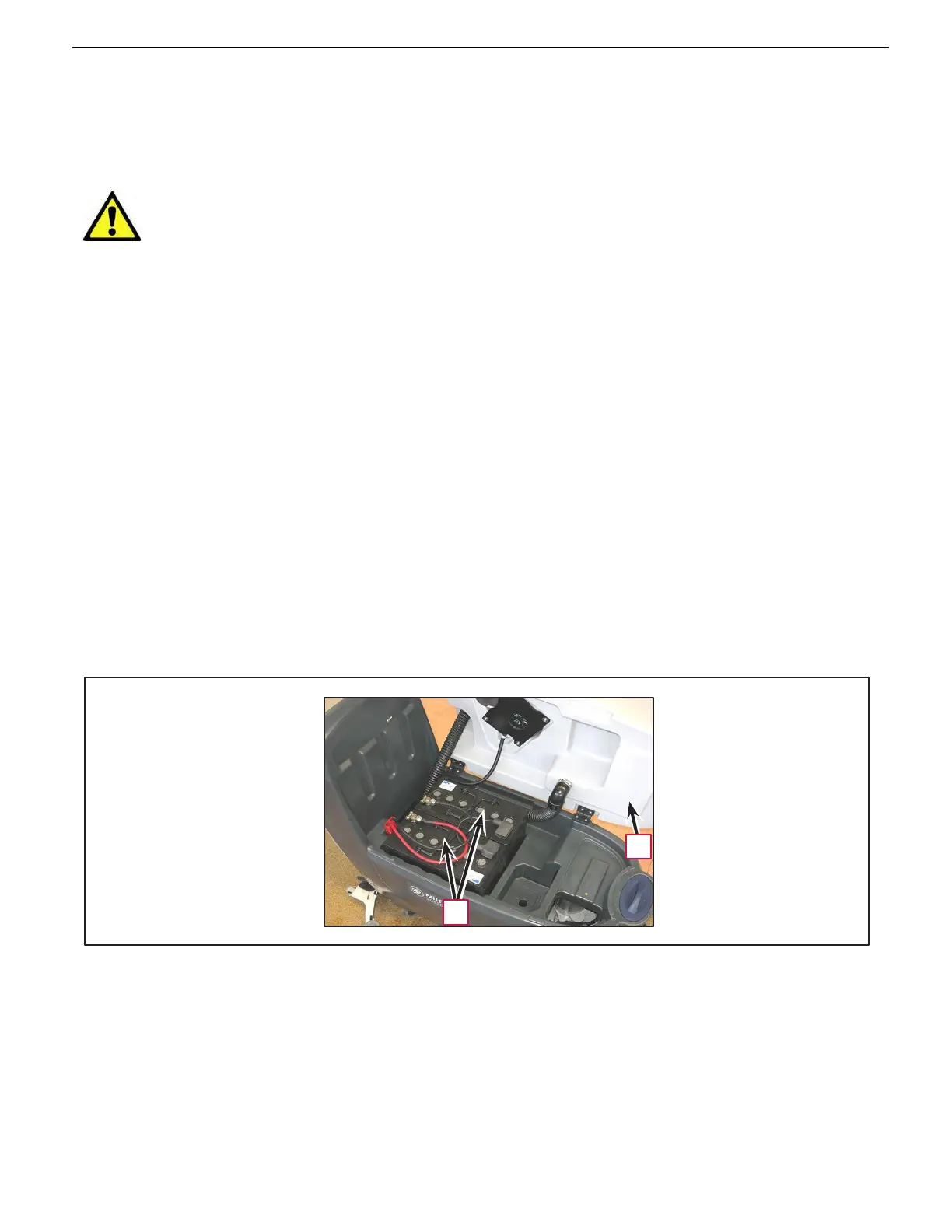
Turn the recovery tank (A) sideways.
5.
Apply the amp clamp on the cable from the positive pole of the batteries (B).
6.
Turn on the machine with the ignition key.
7.
Start brush rotation and check that the motor power draw is around 3 A at 24V.
• Stop brush rotation.
•
Turn the ignition key to “0”.
•
Remove the amp clamp.
If the amperage is higher, perform the following procedures to detect and correct the abnormal amperage:
•
Check that the relevant fuse (F2) (F3) is properly fastened.
•
Check that there is no dirt, debris or entangled cords on the brush hub.
•
If necessary, disassemble the motor (see procedure in the relevant paragraph), and check the condi-
tion of all its components.
If the above-mentioned procedures do not lead to a correct amperage, the motor must be replaced (see the
procedure in the relevant paragraph).
Reassembly
8.
Perform steps 2 and 4 in reverse order.
A
B



 To Next Page