EasyManua.ls Logo

ClearView Hawk Series - Connection Sam Ple

ClearView Hawk Series
147 pages
Print Icon
To Next Page IconTo Next Page
To Previous Page IconTo Previous Page
Loading...
8
Figure
2-3
Please refer to the following sheet for detailed information.
SN
Name
SN
Name
SN
Name
1
Video input
2
Video output
3
Audio output
4
Audio input
5
Video VGA output
6
HDMI port
7
USB port
8
Network port
9
RS-485 input port
10
Power socket
11
On/off button
12
GND port
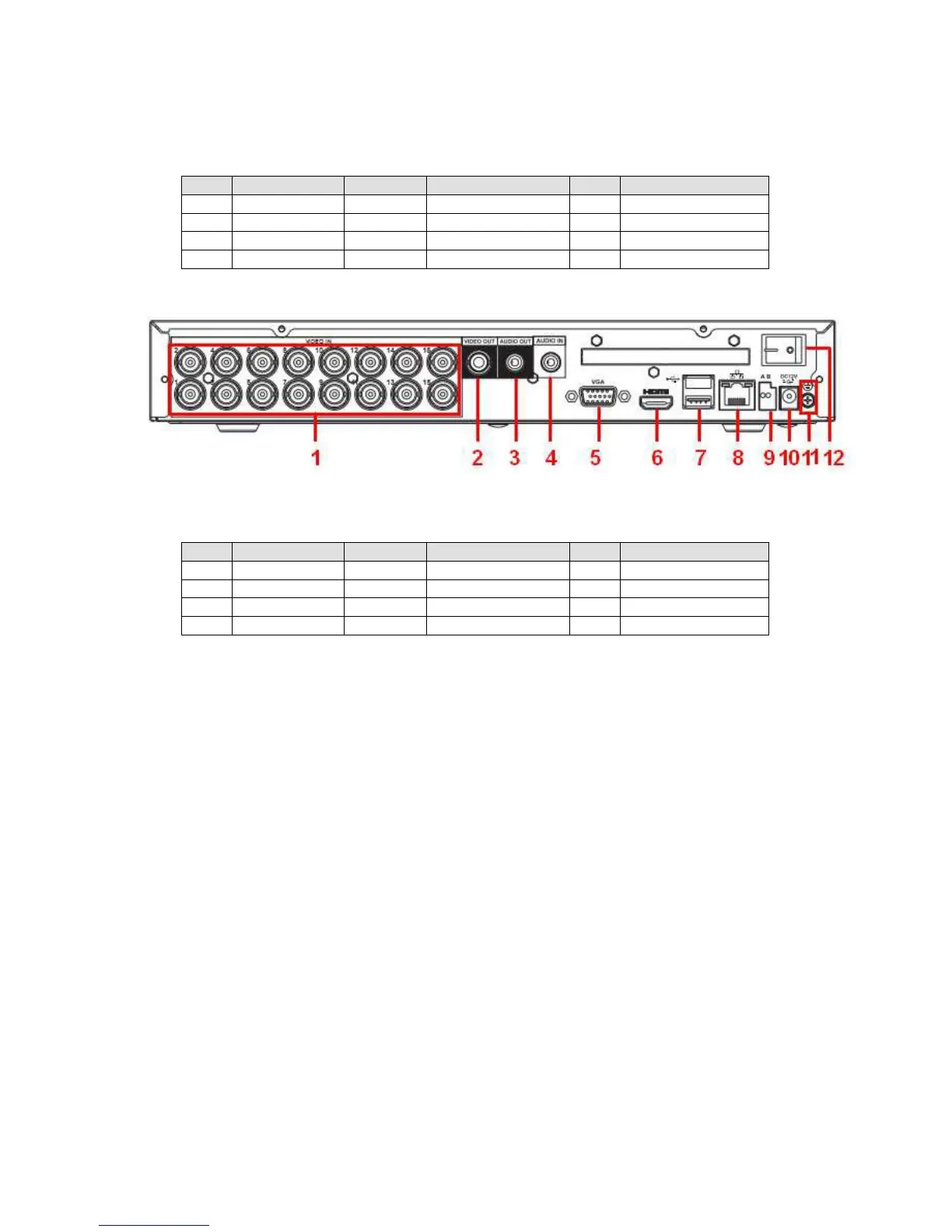
The 16-channel series product rear panel is shown as in Figure 2-4.
Figure
2-4
Please refer to the following sheet for detailed information.
SN
Name
SN
Name
SN
Name
1
Video input
2
Video output
3
Audio output
4
Audio input
5
Video VGA output
6
HDMI port
7
USB port
8
Network port
9
RS-485 input port
10
Power socket
11
GND port
12
On/off button
When connect the Ethernet port, please use crossover cable to connect the PC and use the
straight cable to connect to the switcher or router.
2
.
3
C
o
nn
e
c
ti
o
n
S
a
m p
l
e
The connection sample is shown as below. See Figure 2-5.
The following figure is based on the 4-channel series product.

Table of Contents

Related product manuals