EasyManua.ls Logo

ClearView Hawk Series - Preset;Patrol; Pattern;Border Function

ClearView Hawk Series
147 pages
Print Icon
To Next Page IconTo Next Page
To Previous Page IconTo Previous Page
Loading...
73
Here is a sheet for you reference.
Figure 6-4
Name
Function
key
function
Shortcut
key
Function
key
function
Shortcut
key
Zoom
Near
Far
Focus
Near
Far
Iris
close
11
Open
11
6
.
2
P
r
e
s
e
t
/
Pa
tr
o
l
/
Pattern
/
B
o
r
d
e
r
F
un
c
ti
o
n
In
X402H402H
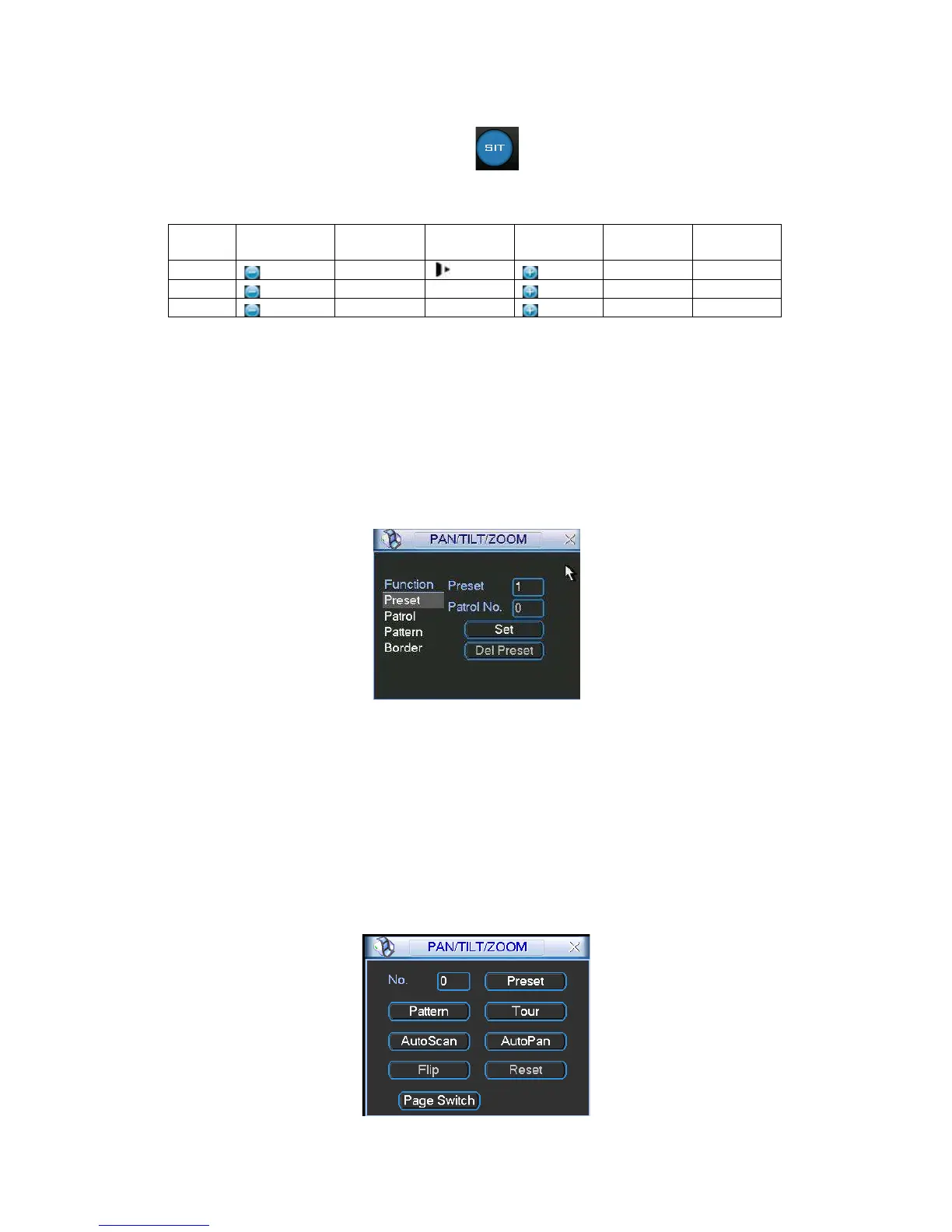
402HFigure 6-2X click the set button. The interface is shown as below:
Here you can set the following items:
Preset
Patrol
Pattern
Border
Figure
6-5
In
X403H403H
403HFigure 6-2X, click page switch button, you can see an interface as in X404H404H404HFigure 6-6X.
Here you can activate the following functions:
Preset
Tour(Patrol)
Pattern
Auto scan
Auto pan
Flip
Page Switch
Figure
6-6

Table of Contents

Related product manuals