2
1
3
4
6 5
11
7 10
8
12 9
Figure
4-11
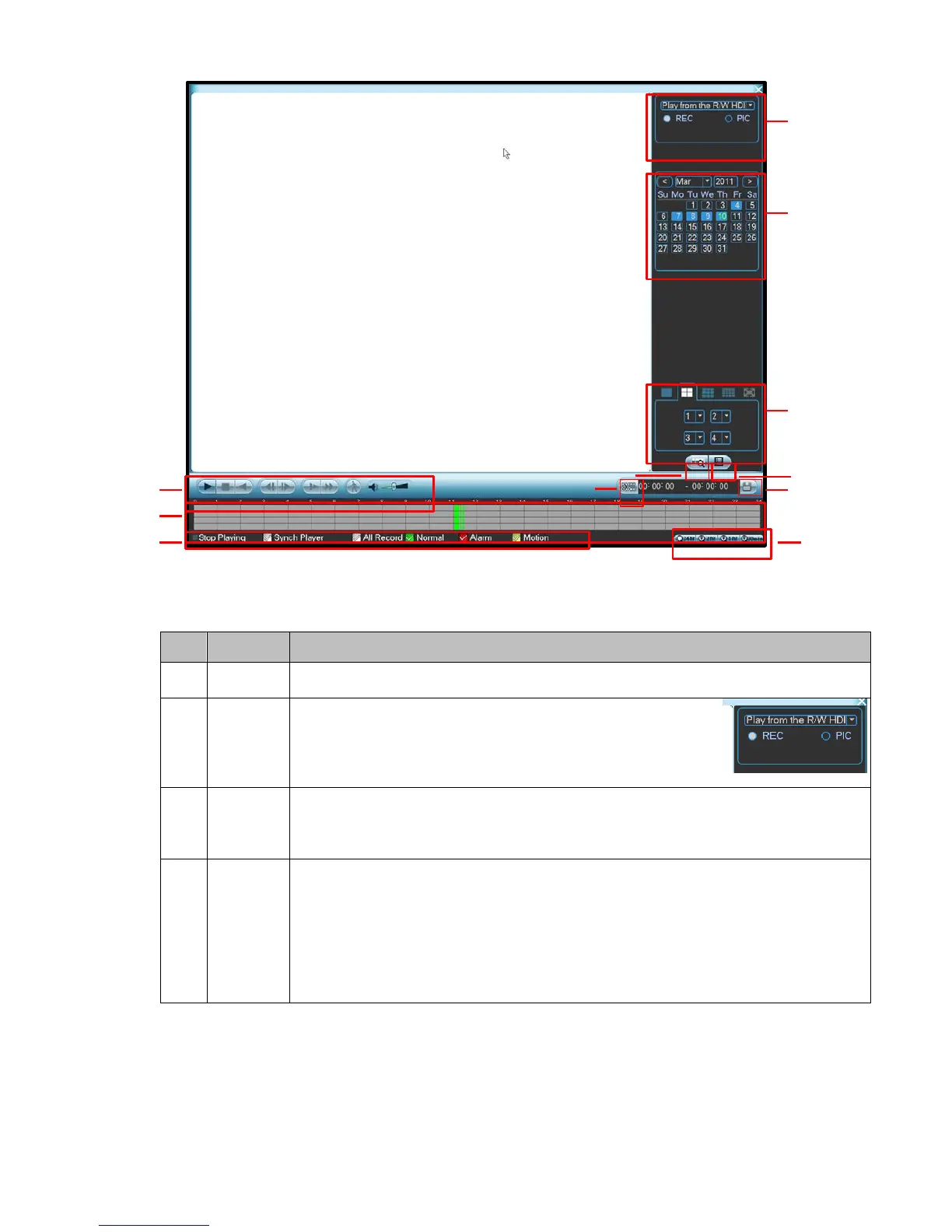
Please refer to the following sheet for more information.
•
Here is to display the searched picture or file.
•
Support 1/4/9/16-window playback.
•
Here you can select to search the picture or the recorded
file.
•
When there is displayed picture on the left pane, you can
set the corresponding setup
•
The blue highlighted date means there is picture or file. Otherwise, there is no
picture or file.
•
In any play mode, click the date you want to see, you can see the corresponding
record file trace in the time bar.
Playback
mode
and
channel
selection
pane.
1/4/9/16. (It may vary due to different series.)
� In 1-window playback mode: you can select 1-16 channels.
� In 4-window playback mode: you can select 4 channels according to your
requirement.
� In 9-window playback mode, you can switch between 1-9 and 10-16 channels.
� In 16-window playback mode, you can switch between1-16 channels.
•
The time bar will change once you modify the playback mode or the channel


 To Next Page