67
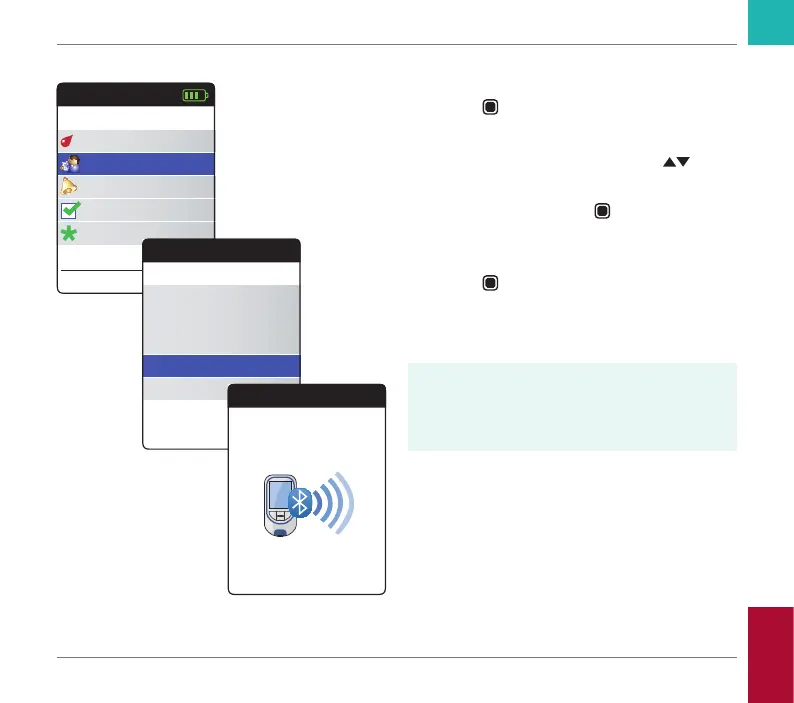
Data transfer via Bluetooth
1 Power the meter on by pressing the Enter
button
. Wait until the Main Menu is
displayed.
2 Use the up/down arrows button
to
select My Results.
3 Press the Enter button
to open the My
Results menu.
4 Select Transfer Data and press the Enter
button
to start the data transfer mode.
The meter now waits for a connection to the
paired device to be established.
Information about compatible software for
data transfer with the CoaguChek INRange
meter can be found at
www.coaguchek.com/INRange.
Main Menu
Test
17:03
Settings
Reminders
My Results
17 Sep 2018
Other
My Results
Review Results
Trend
Target
Transfer Data
Reports
Transfer Data
BT Smart
Activating Bluetooth
Reviewing and Handling Data
CoaguChek INRange User’s Manual



 To Next Page