80
New reminder
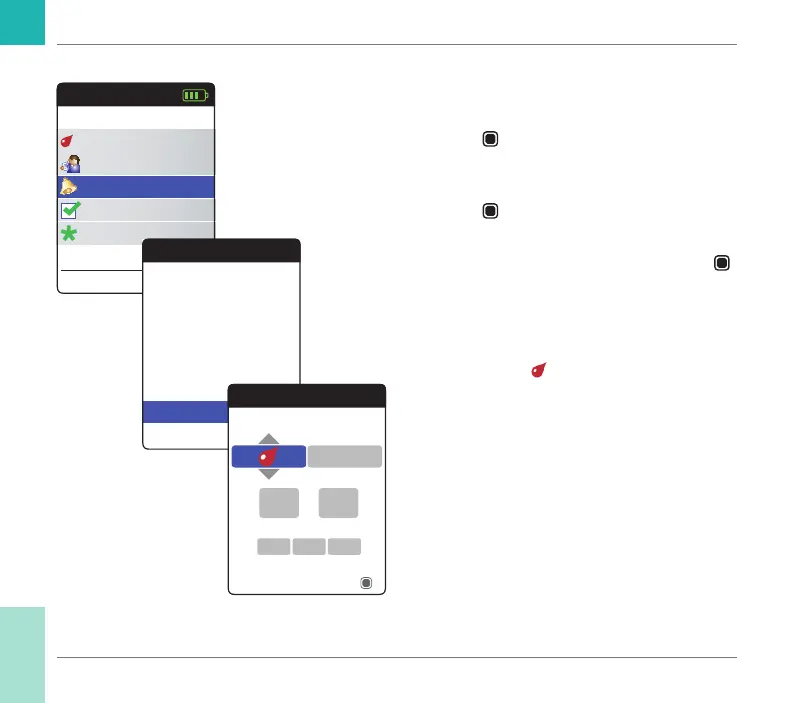
To set a new reminder:
1 Power the meter on by pressing the Enter
button
. Wait until the Main Menu is
displayed.
2 Select Reminders and press the Enter
button
to open the corresponding
menu.
3 Select New and press the Enter button
to set up a new reminder.
The Reminders screen opens and displays
the options you can set:
• Type (default:
(Test))
• Interval (default: once)
• Time and date (default: current time on the
next day)
Main Menu
Test
17:03
Settings
Reminders
My Results
17 Sep 2018
Other
Reminders
Current Reminders
New
Reminders
Select reminder type
13
17Sep
Next
45:
2018
Once
Reminders and Meter Settings
CoaguChek INRange User’s Manual



 To Next Page