Page 10 INSTALLATION & USER'S MANUAL CLITE2
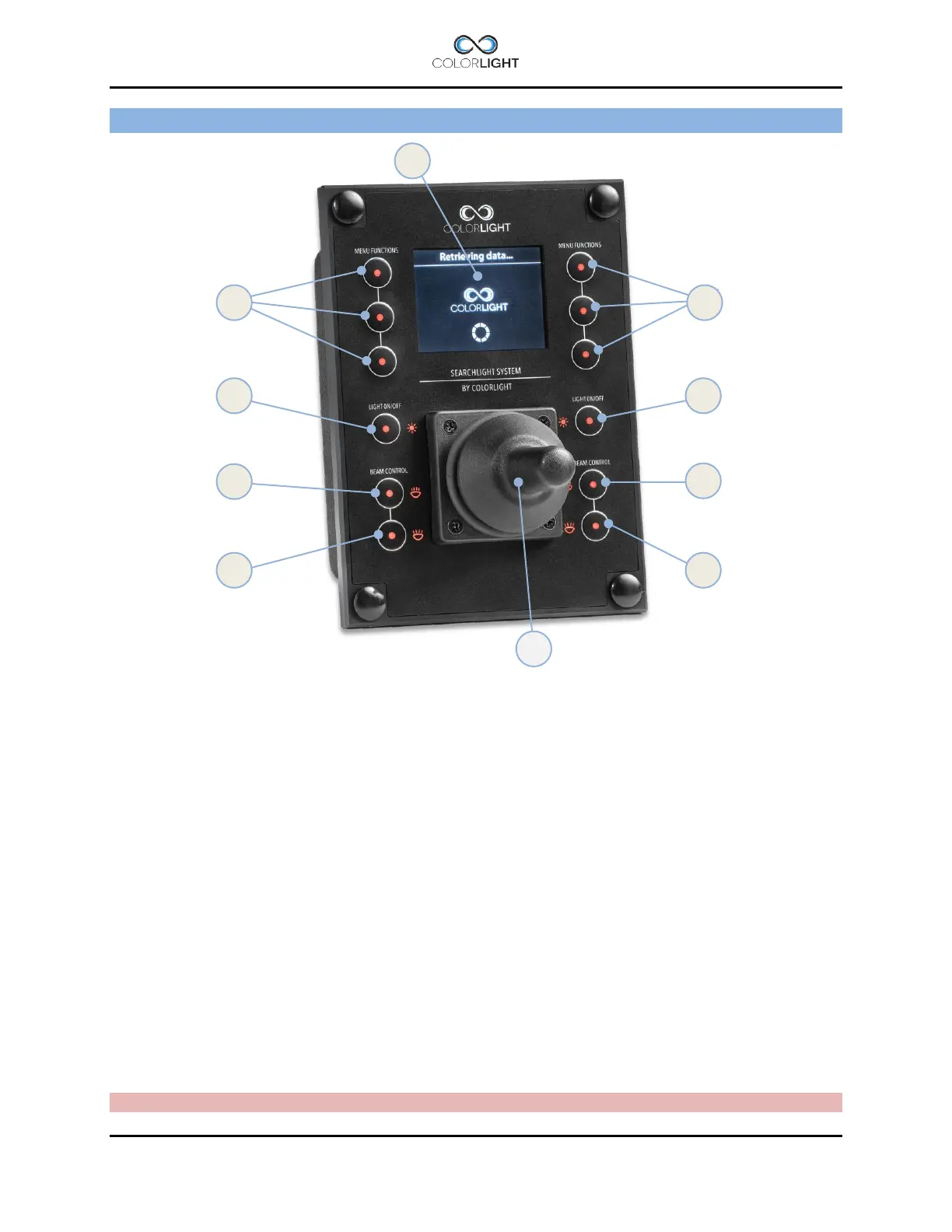
OPERATOR PANEL, OVERVIEW 5.
1. "Soft button": the function appears in the display window next to the button.
2. Left lamp on/off, (if “Single lamp mode” = On *
1
).
3. Left light increase intensity (Dim up in steps *
2
).
4. Left light decrease intensity (Dim down in steps *
2
).
5. Right lamp on/off, (if “Single lamp mode” = On *
1
).
6. Right light increase intensity (Dim up in steps *
2
).
7. Right light decrease intensity (Dim down is steps *
2
).
8. Joystick (”Hall effect” proportional).
9. Display (TFT 2,4”).
*
1
See 15.8.5.5 Single lamp mode .
*
2
LED dim levels are 25%, 50% 75% of max intensity. When light is lit the Intensity always starts at 100% (max)
regardless of previous dim level.
Note: Several sections of the manual refer to the above figures



 To Next Page