Bulletin 639536 • Revision L October 2014 16-1
Section 16
Changing the Beamwidth (Fan) on a Single
SmartBeam
TM
Antenna
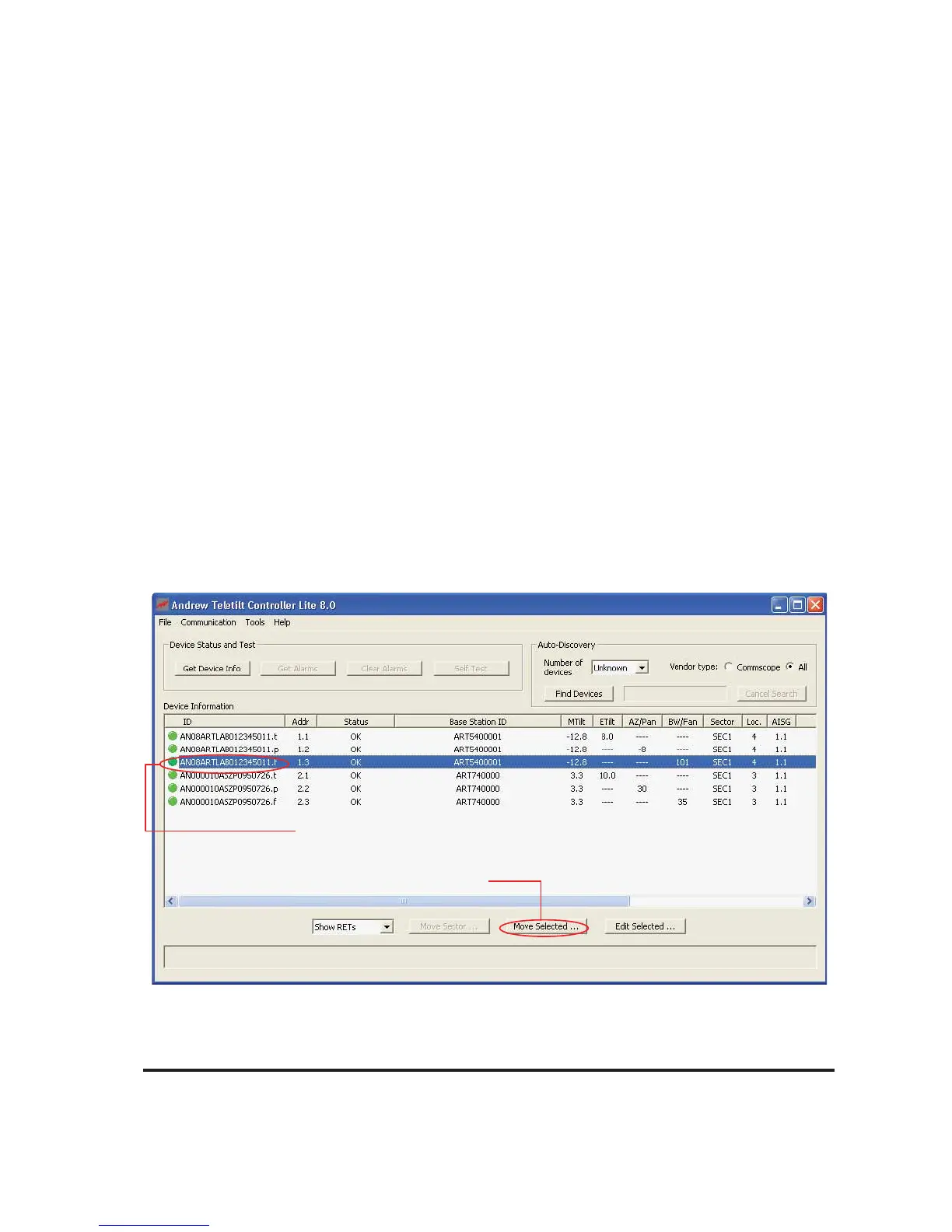
Figure 16-1. Selecting Device for Beamwidth (Fan) Adjustment.
1. Click on individual device to select for change in
Beamwidth (Fan)
2. Click Move Selected.
The Beamwidth (fan) may be adjusted on any device that is addressed, configured, and whose cur-
rent state does not prevent antenna movement. Examples where movement is prevented include
devices that are not responding to commands from the program, devices that are in the middle of a
move or configuration change, and devices that are experiencing a mechanical malfunction.
1. Switch to RET Device view by selecting ‘Show RETs’ from the drop down list below the
Device Information list.
2. From the Device Information list, click on the device ending in a ‘f’ to be moved (Figure 16-1).
3. Click Move Selected at the bottom of the screen (Figure 16-1).



 To Next Page