Bulletin 639536 • Revision L October 2014 1-1
Section 1
Program Installation
1.0 System Requirements/Recommendations
Required: • Windows
®
2000 or XP operating systems, or newer
• Available working USB port (USB1.1 or USB2.0)
Recommended: • Screen resolution of 1024 x 768, or higher
1.1 Program Download and Installation
If you are upgrading the ATC Lite software from an earlier installed version, it is recommended that
the earlier version is uninstalled before the new version is installed. Download the ATC Lite software
zip file.
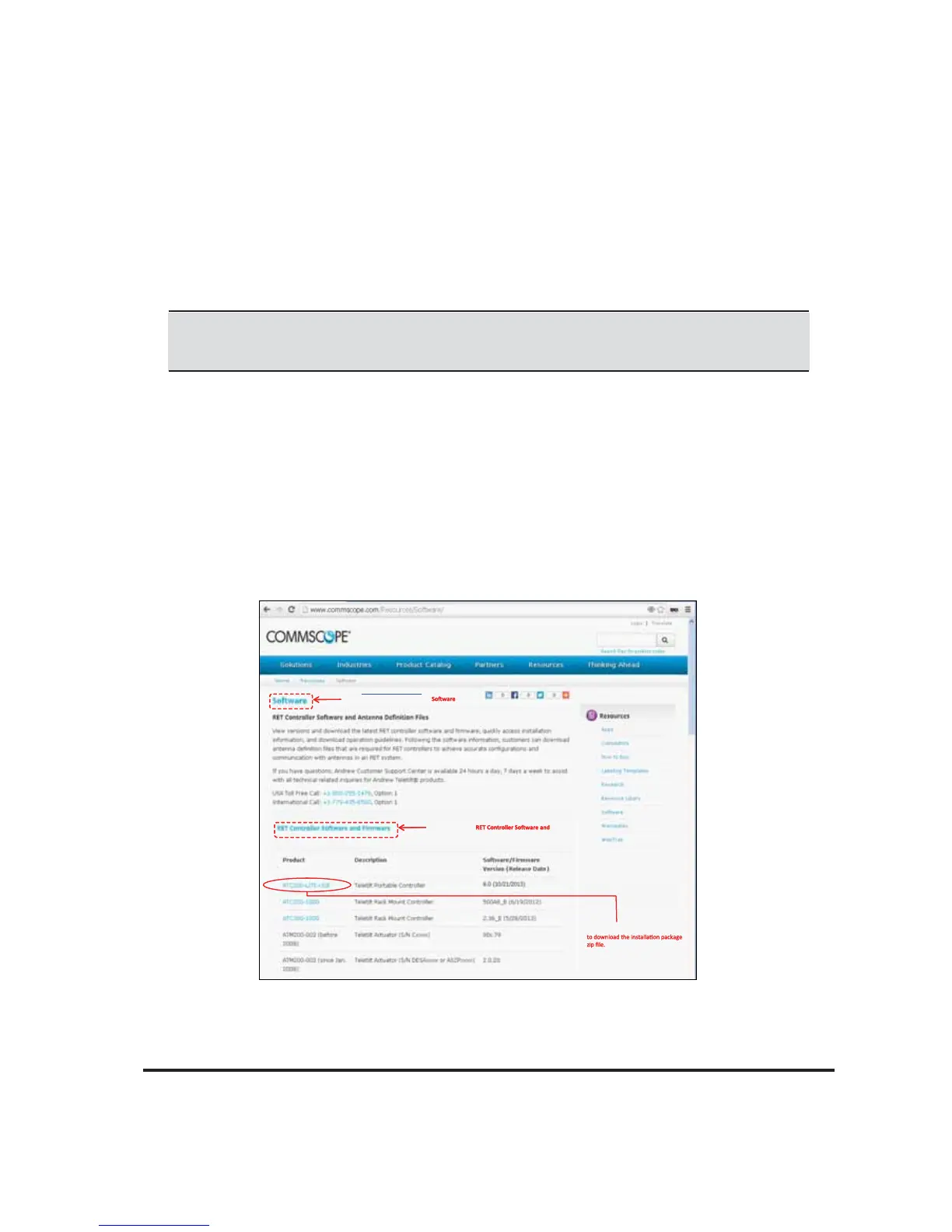
Figure 1-1. Downloading ATC Lite Software.
The controller MUST remain disconnected from the computer and its power
supply during the ATC Lite software installation process.
Microsoft, Encarta, MSN, and Windows are either registered trademarks or trademarks of Microsoft Corporation in the United States
and/or other countries.
From www.commscope.com click on Resources
Resourc e Library, then click on ‘
’ link on
the right side pane ‘Resources’ to view this page.
Click on this link ‘
Firmware’ to view the list of downloads as shown
here.
Click on this link ‘ATC200-LITE-USB’
From www.commscope.com click on Resources
Resourc e Library, then click on ‘
’ link on
the right side pane ‘Resources’ to view this page.
Click on this link ‘
Firmware’ to view the list of downloads as shown
here.
Click on this link ‘ATC200-LITE-USB’



 To Next Page