Section 9
Switching Operating Modes for Multiple
Integrated Actuators
Andrew specific Multiple Integrated Actuators named Andrew Integrated Tilt Master (AITM) can be
in one of two operating modes – Multiple Single-RET mode or Multi-RET mode. The ATC Lite pro-
gram provides the capability to switch AITMs between these modes. See Section 19.1 for instruc-
tions on determining the Product Number of a device.
In Multiple Single-RET mode, an AITM will behave as multiple single actuator devices, with one bus
address assigned to each tilt. The 19-character ID of each tilt will end with “t1”, “t2”, etc., and the
bus address of each tilt will be a whole number.
In Multi-RET mode, an AITM is assigned one bus address, and each tilt of the device is a subunit of
the master actuator. The ID of each tilt will have a suffix such as “.t1”, “.t2”, etc., and the bus ad-
dress will be x.y where x is the master bus address and y is the subunit number of the tilt.
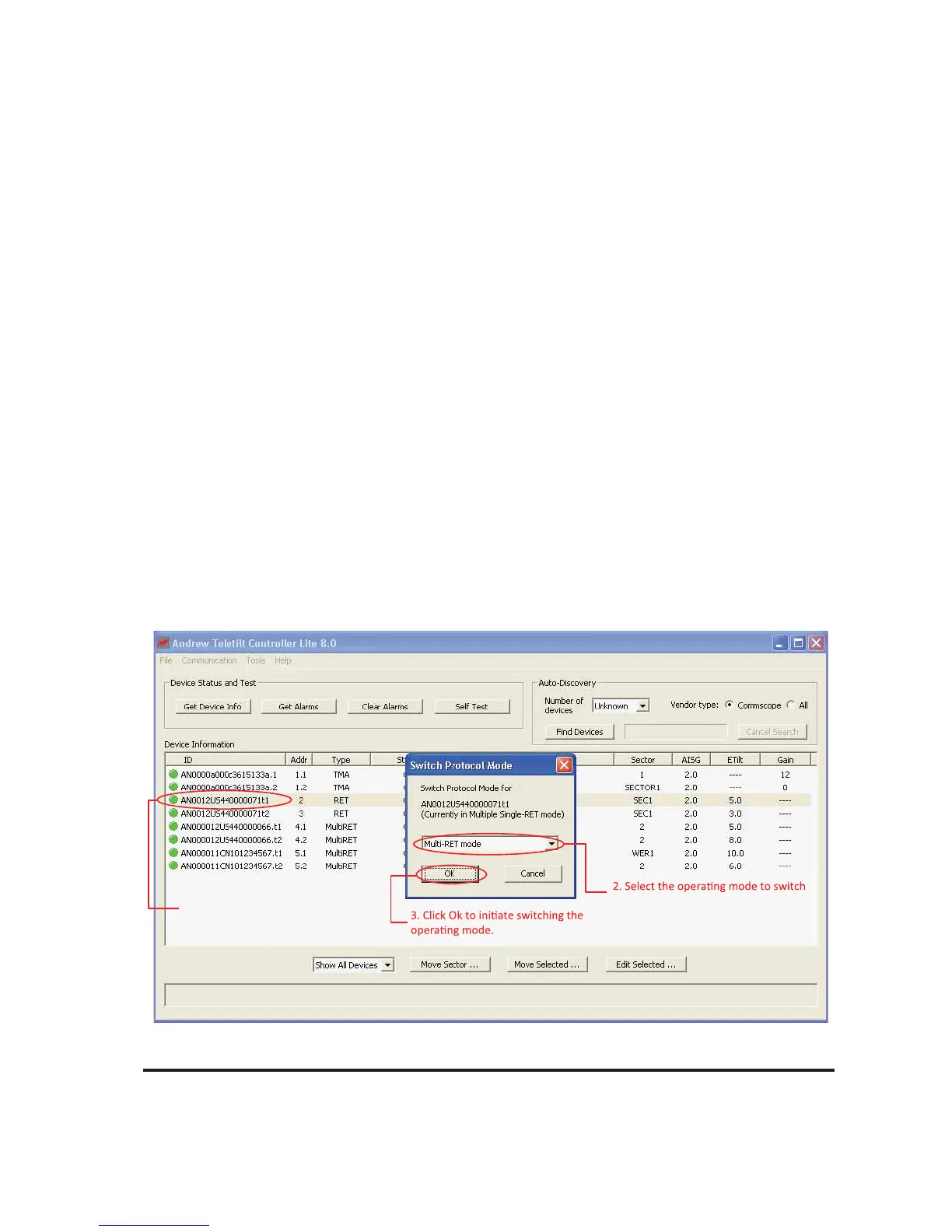
To switch the operating mode of an AITM, select the AITM from the device list. Click on
Tools→Switch Protocol Mode→AITM…, and then select the new operating mode. Click Ok to
perform the switch. All tilts of the AITM in the list will lose communication. To verify the AITM is oper-
ating in the new mode, select “Find Devices” again.
Figure 9-1. Switch Operating mode for AITM actuators.
9-1 October 2014 Bulletin 939536 • Revision L
v
1. Select the AITM device and Click on
ToolsSwitch Protocol ModeAITM.
to from the list.
v
v



 To Next Page