58 Ruckus ICX 7450 Switch Hardware Installation Guide
Part Number: 53-1003899-09
Ruckus ICX 7450 Operation
Ruckus ICX 7450 front-panel LEDs
• Ten stack ID (stack identifier) monocolor indicator LEDs (green)
• 48 1 GbE port bicolor status LEDs (green for 1 GbE and amber for 10/100 Mbps Ethernet) which indicate 1 GbE or 10/100
Mbps Ethernet mode of operation
• 48 PoE+ port monocolor status LEDs (green for providing power to attached device)
1G SFP module LEDs:
• Four 1 GbE SFP port bicolor status LEDs (green for 1 GbE and amber for 10/100 Mbps Ethernet) which indicate 1 GbE or
10/100 Mbps Ethernet mode of operation
10G SFP+ module LEDs:
• Four 1/10 GbE SFP+ port bicolor status LEDs (green for 10 GbE and amber for 1 GbE) which indicate 1 GbE or 10 GbE mode
of operation
40G QSFP+ module LEDs:
• One 40 GbE QSFP+ port bicolor status LED (green for 1x40 GbE and amber for 4x10 GbE) which indicates 1x40 GbE mode
of operation
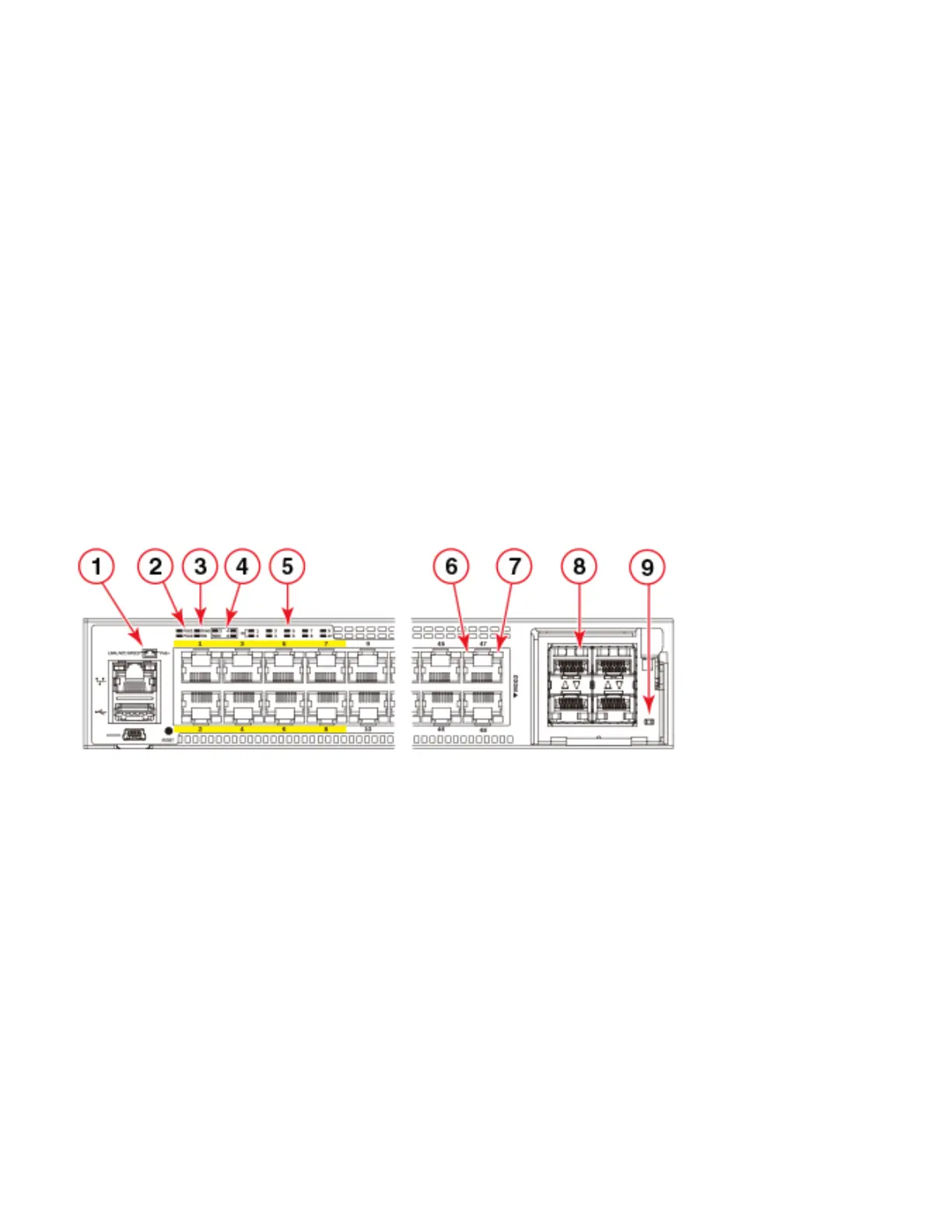
Figure 46 shows the LEDs on the Ruckus ICX 7450-48P front panel. The up-arrow port status LEDs for the 1 GbE ports correspond to
the upper, odd-numbered ports; the down-arrow port status LEDs correspond to the lower, even-numbered ports.
FIGURE 46 Ruckus ICX 7450-48P front-panel LEDs
PoE/PoE+ power is available to ports 1-48. High PoE/PoH is limited to ports 1-8.
1 Management port speed and link/activity LEDs 6 Ports 1-48 speed and link/activity LEDs
2 PSU1 and PSU2 status LEDs
PSU1 corresponds to the right power supply slot
on the rear panel and PSU2 to the left power
supply slot, as viewed from the rear.
7 PoE power LEDs. The PoE indicator is on if a port is
providing power to the connected device, and off if it
is not supplying power.
3 DIAG (diagnostic) status LED and MS (stacking
configuration) status LED
8 MOD2 1/10 GbE module speed andlink/activity
LEDs
4 MOD (media expansion module) LEDs. Module 2
is located on the right side of the front panel.
Module 3 and 4 are the right and left stacking
modules on the rear panel, as viewed from the rear.
9 MOD2 1/10 GbE power LED
5 Stack ID LEDs
Indicates stack unit identifier (1-12).



 To Next Page
 Loading...