6.3 Notes on operation
6.3.1 Function of the LED's in info mode
Theinfomodeisactivatedbypressingthedrain/infokeyforanextendedperiodoftime(>3seconds).
Afteractivatingtheinfomode:
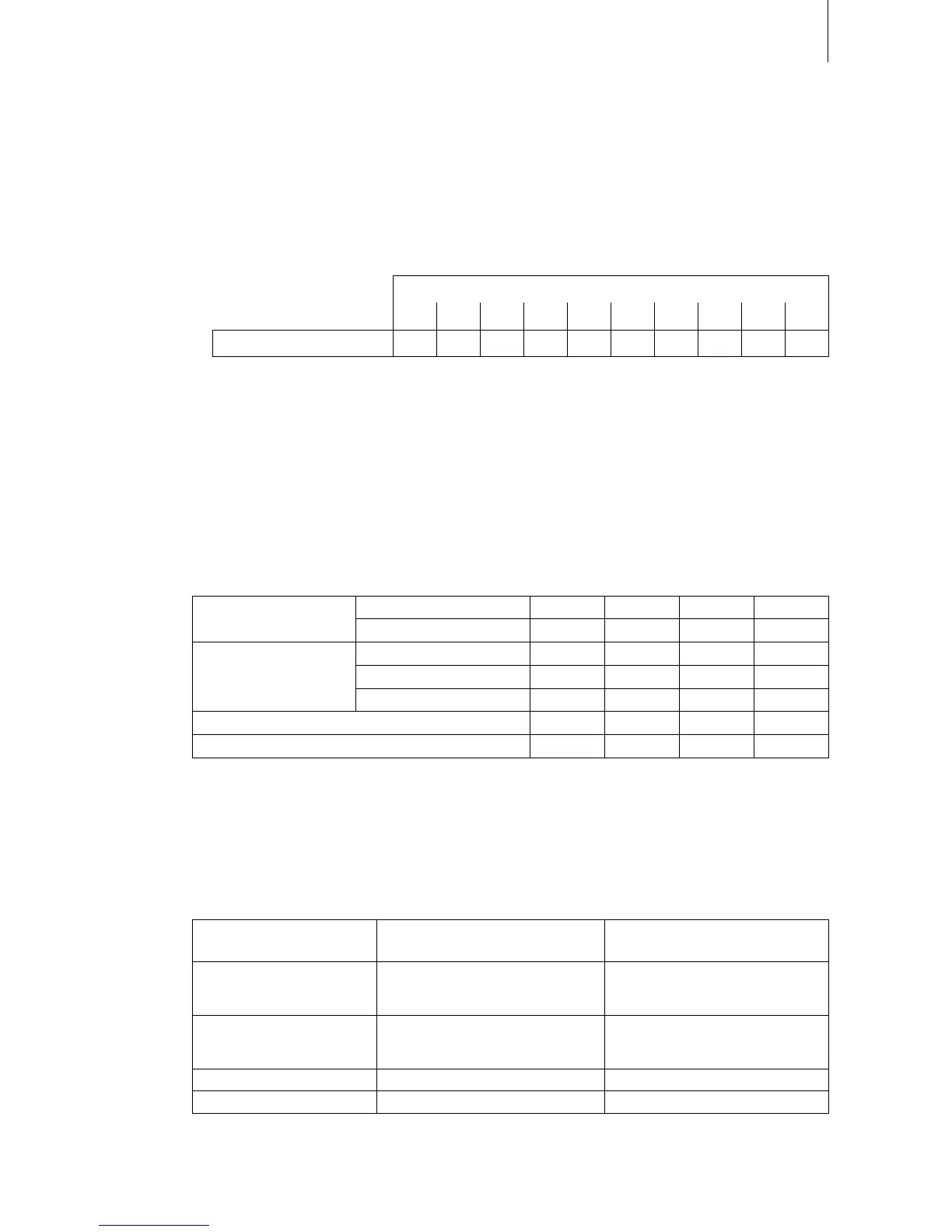
– rst,thegreenLEDashes.Thenumberofashesindicatesthecurrentsteamoutputin%ofthe
maximum steam capacity.
GreenLEDashing...
1x 2x 3x 4x 5x 6x 7x 8x 9x 10x
Steamoutputin% 10 20 30 40 50 60 70 80 90 100
Note:ifnosteamproductionisinprogresswhentheinfomodeisactivatedthegreenLEDlights
for3seconds,thenitturnsoffagain.
– then,ifamalfunctionispresent(warningorerror)theredandtheyellowLEDashsuccessively.
ThenumberofashesoftheredLEDindicatestheleftdigitoftheerrorcodewhilethenumber
ofashesoftheyellowLEDindicatestherightdigitoftheerrorcode.
Note:IftheredLEDlightswhentheinfomodeisactivatedthemalfunctionindicatedisanerror
(E..)otherwise
awarning(W..).
Thisindicationprocedureisrepeateduntiltheinfomodeisexitedautomaticallyafter5minutesor
theinfomodeisexitedbypressingthedrain/Infokeyagain.
Examples:
Indication in normal
operating mode
greenLEDlights no yes yes no
redLEDlights no no no yes
Indicationininfomode
greenLEDashes.. –– 5x 5x ––
redLEDashes.. –– –– 3x 2x
yellowLEDashes.. –– –– 6x 1x
Steam output 0 % 50 % 50% 0 %
Error code –– –– W36 E21
6.3.2 Remote operating and fault indication
Ifyourunitisequippedwiththeoptionaloperatingandfaultindication“RFI”thefollowingoperating
statusareshownremotely:
Activated remote
indication relay
When? Display on unit
“Error” Amalfunctionispresent,further
operation is not possible, the heating
voltage is interrupted
RedLEDlights
“Service” Steam cylinder maintenance is due.
Theunitremainsoperationalfora
certain time
YellowLEDlights
“Steamdemand” Steam demand/Steam production GreenLEDlights
“Uniton” Unit switched on Unit switch lights












 To Next Page