Parameter
structure
Keypad and
display
Parameter x.00
Parameter
description format
Advanced parameter
descriptions
Serial comms
protocol
Electronic
nameplate
Performance
Menu 11
Digitax ST Advanced User Guide 151
Issue Number: 1 www.controltechniques.com
Effects of variable maximums if ratings or options are different
It should be noted that if ratings of the source and destination drives are different, or the Solutions Modules installed to the source and destination
drives are different, it is possible that some parameters with variable maximums may be limited and not have the same values as on the card. For
example the user current maximum scaling (Pr 4.24) is rating dependent and could be set to its default value when it is transferred between drives of
different ratings, but this could also affect the torque reference (Pr 4.08) as this uses Pr 4.24 as its maximum. Also different position feedback
Solutions Modules can apply different limits on the speed references, therefore these can be affected when parameters are transferred between
drives with different position feedback Solutions Modules installed where the Solutions Module is being used for the drive position feedback.
Product identifier
When a SMARTCARD is used with Digitax ST it must have the correct product identifier in the card header to give full functionality with the drive. The
product identifier is written to the card. When the whole card is erased for Digitax ST the product identifier is set to 2.
If the identifier does not match the drive product and the card contains any data blocks a C.Prod trip is produced. Also if the following functions are
initiated a C.Acc trip is produced and the card or drive data is not affected: erase file, transfer data block from card to drive, or transfer data block from
drive to card. It is still possible to use Pr 11.37 to browse information about the whole card (i.e. Pr 11.37 = 1000 to 1003), but it is not possible to see
the data block information (i.e. Pr 11.37 < 1000). It is also possible to change the card header information (i.e. read-only flag and warning suppression
flag). This feature allows the read-only flag to be cleared so that a card can be erased to be used with the product that performs the card erase.
If the card does not contain any data blocks (i.e. an erased card) and the identifier does not match that of the drive then the drive will automatically
change the identifier on the card to match when it is first inserted.
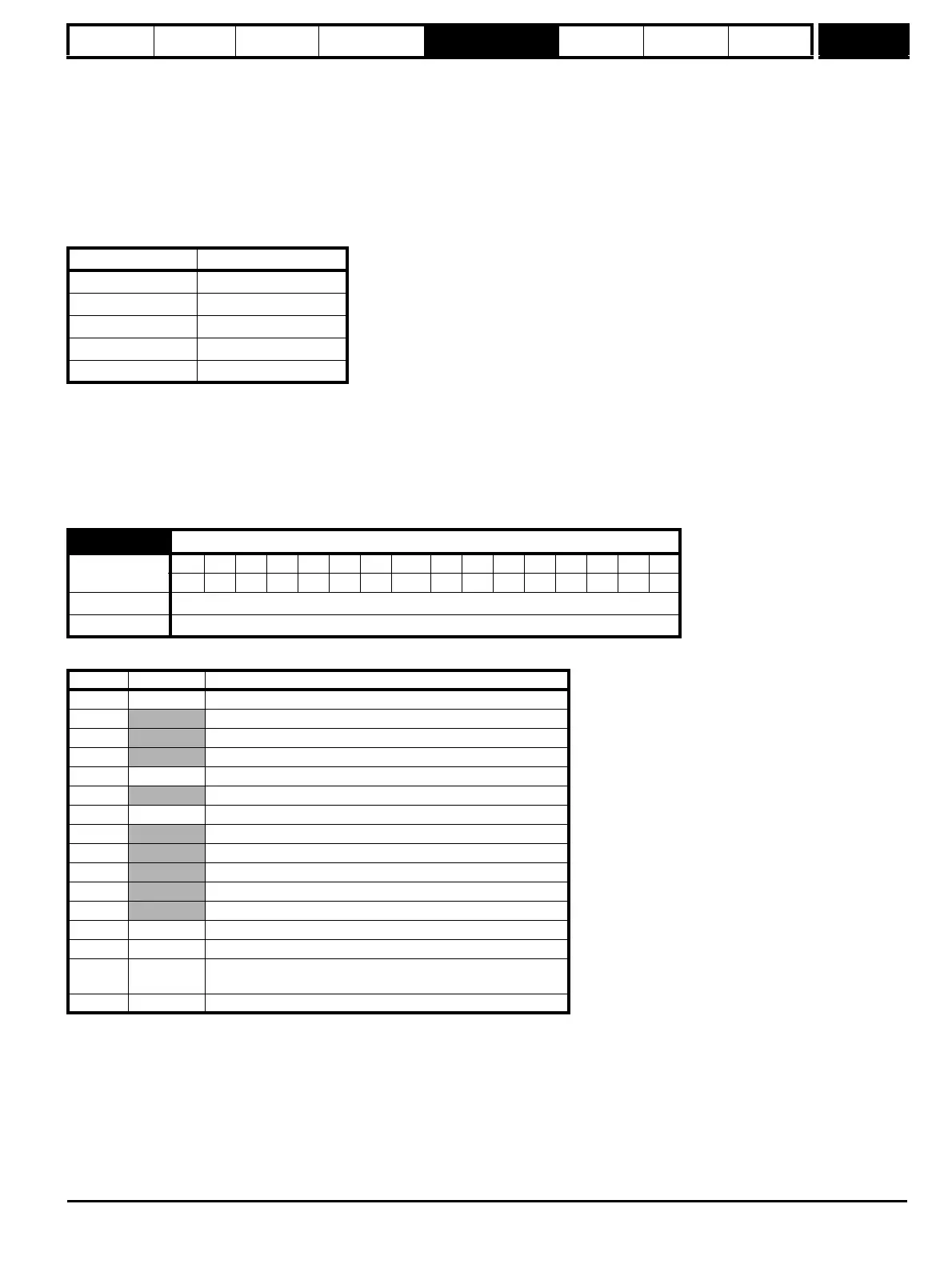
Gives the type/mode of the data block selected with Pr 11.37 as shown below.
Product Product identifier
Unidrive SP 255
Commander GP20 1
Digitax ST 2
Affinity 3
Mentor MP 4
11.38 SMARTCARD data type/mode
Coding
Bit SP FI DE Txt VM DP ND RA NC NV PT US RW BU PS
11111
Range 0 to 18
Update rate Background write
Pr 11.38 String Type/mode
0 FrEE Value when Pr 11.37 = 0
1
Reserved
2
Reserved
3
Reserved
4 3SErVO Servo mode parameter file
5
Reserved
6-8 3Un Unused
9
Reserved
10
Reserved
11
Reserved
12
Reserved
13
Reserved
14-16 4Un Unused
17 LAddEr Onboard Application Lite user program file
18 Option
A file containing user defined data (normally created by an SM-
Applications Solutions Module)
19 Opt.Prg Applications module user program


 To Next Page