Menu 11
Parameter
structure
Keypad and
display
Parameter x.00
Parameter
description format
Advanced parameter
descriptions
Serial comms
protocol
Electronic
nameplate
Performance
152 Digitax ST Advanced User Guide
www.controltechniques.com Issue Number: 1
Gives the version number of the data block. This is intended to be used when data blocks are used as drive macros. If a version number is to be
stored with a data block this parameter should be set to the required version number before the data is transferred. Each time Pr 11.37 is changed by
the user the drive puts the version number of the currently viewed data block in this parameter.
Gives the checksum of the data block, space left on the card, the total space on the card for the card flags see Pr 11.37 for details.
Sets the timeout for the drive display to revert to status mode from edit mode following no key presses. Although this parameter can be set to less
than 2s, the minimum timeout is 2s.
* Modes 1 and 2 are not US (i.e. not saved when drive parameters are saved), mode 3 and 4 are US.
Therefore this parameter can only be saved to EEPROM if it has a value of 0, 3 or 4.
Reading (1)
Setting Pr 11.42 to 1 and resetting the drive will transfer the data from the card into the drive parameters and then the drive EEPROM, provided data
block 1 exists and is a parameter file for the current drive mode. All SMARTCARD trips apply. When the action is complete this parameter is
automatically reset to zero.
Programming (2)
Setting Pr 11.42 to 2 and resetting the drive will save the parameters to a card, i.e. equivalent to writing 3001 to Pr x.00. If the data block already
exists it is automatically over-written. When the action is complete this parameter is automatically reset to zero.
Auto (3)
Changing Pr 11.42 to 3 and resetting the drive will save the complete parameter set from the drive parameters to the card, i.e. equivalent to writing
3001 to Pr x.00. If the data block already exists it is automatically overwritten. If the card is removed when Pr 11.42 is set to 3, Pr 11.42 will be set to
0. The action of setting Pr 11.42 to 0 when a card is removed forces the user to change Pr 11.42 back to 3 if auto mode is still required. The user will
need to set Pr 11.42 to 3 and reset the drive to write the complete parameter set to the new card.
When a parameter in menu zero is changed via the keypad and a card is installed the parameter is saved both to the drive EEPROM and the card.
Only the new value of the modified parameter is written to the EEPROM and the card. If Pr 11.42 was not cleared automatically when a card is
removed, then when a new card is inserted that contains data block 1 the modified parameter would be written to the existing data block 1 on the new
card and the rest of the parameters in this data block may not be the same as those in the drive.
When Pr 11.42 is equal to 3 and the parameters in the drive are saved, the card is also updated, therefore the card becomes a copy of the drive
parameters. At power up, if Pr 11.42 is set to 3, the drive will save the complete parameter set to the card. This is done to ensure that if a card is
inserted while the drive is powered down the new card will have the correct data after the drive is powered up again.
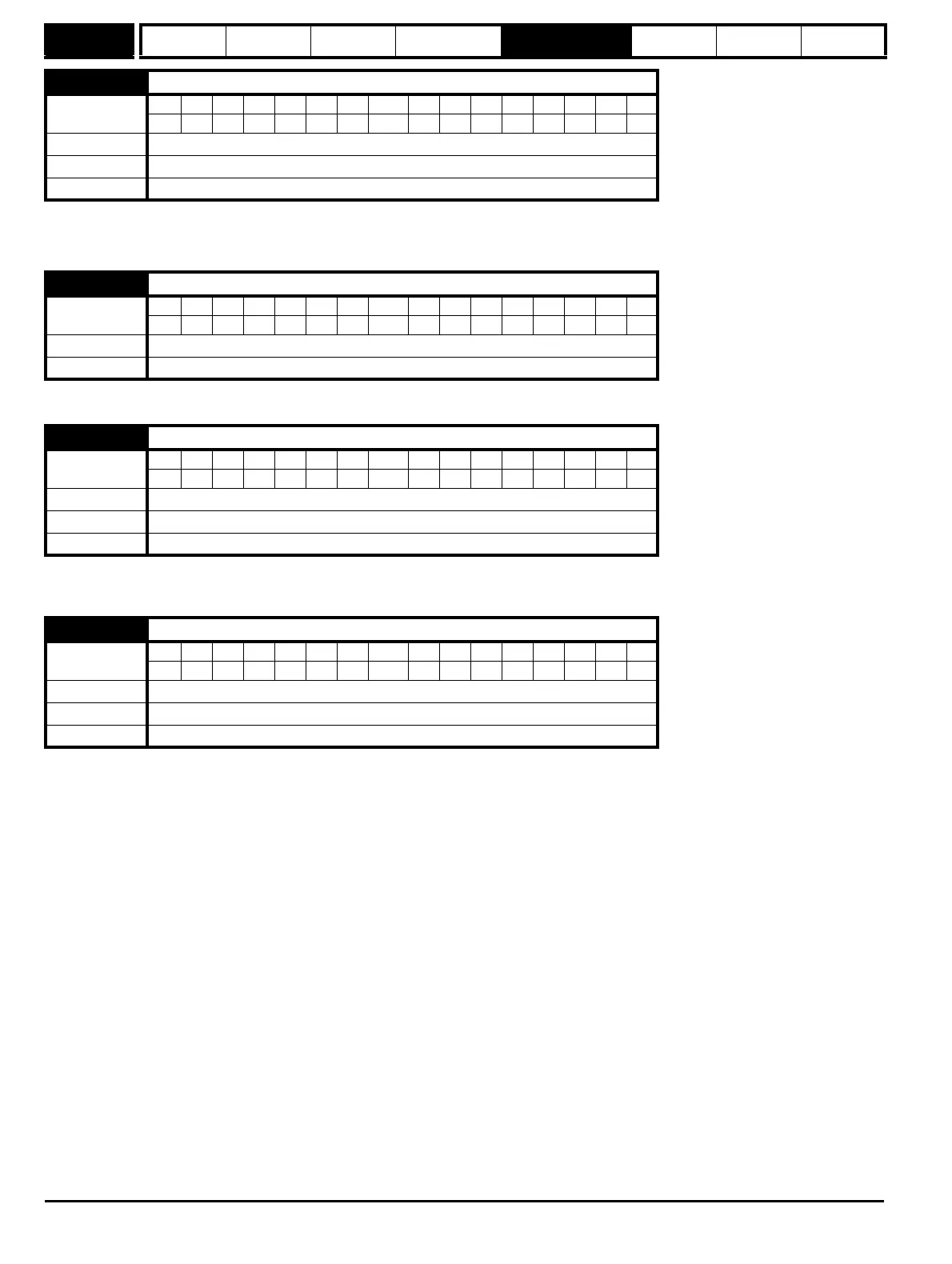
11.39 SMARTCARD data version
Coding
Bit SP FI DE Txt VM DP ND RA NC NV PT US RW BU PS
111
Range 0 to 9,999
Default 0
Update rate Background read/write
11.40 SMARTCARD data checksum
Coding
Bit SP FI DE Txt VM DP ND RA NC NV PT US RW BU PS
111 1
Range 0 to 65,335
Update rate Background write
11.41 Status mode time-out
Coding
Bit SP FI DE Txt VM DP ND RA NC NV PT US RW BU PS
111
Range 0 to 250 s
Default 240
Update rate Background read
11.42 Parameter copying
Coding
Bit SP FI DE Txt VM DP ND RA NC NV PT US RW BU PS
11*11
Range 0 to 4
Default 0
Update rate Background read


 To Next Page