Parameter
structure
Keypad and
display
Parameter x.00
Parameter
description format
Advanced parameter
descriptions
Serial comms
protocol
Electronic
nameplate
Performance
Menu 11
Digitax ST Advanced User Guide 153
Issue Number: 1 www.controltechniques.com
Boot (4)
When Pr 11.42 is set to 4 the drive operates in the same way as with Pr 11.42 set to 3 and automatically creates a copy of its parameters on a
SMARTCARD. Pr 11.42 has the NC (not clonable) attribute, and so it does not have a value stored on a SMARTCARD in the normal way. However,
when data is transferred to a card from the source drive the value of this parameter is held in the header of parameter or difference from default file
type data blocks so that the destination drive can detect when boot transfer is required on power-up (i.e. the source drive had this parameter set to 4).
If a card is present at power up, and it has Pr 11.42 stored as 4 in the header of a parameter file or difference from default file as data block 1 then the
following actions are taken.
1. The parameters from data block 1 are transferred to the drive and then saved in drive EEPROM.
2. If data block 2 exists and it is an onboard user program (i.e type 17 LAddEr) the user program from this data block is transferred to the drive.
3. If the card contains application module user program data block (i.e. type 19 Opt.Prg) number 3 and an application module is present in slot 1 the
drive will then attempt to initiate a transfer to the module. The same system is then applied to applications module data block with number 4 and
5 for the Solutions Modules in slots 2 and 3 respectively. If any of the transfers to the Solutions Modules fail no further Solutions Module transfers
will be initiated and the drive will produce a C.SLx trip to indicate the failure.
4. Parameter Pr 11.42 is set to zero after the data transfer is complete.
It is possible to create a difference from default bootable file by setting parameter Pr x.00 to 2001 and resetting the drive. This type of file causes the
drive to behave in the same way at power-up as a file created with boot mode set up with Pr 11.42. The difference from default file has the added
advantage of including menu 20 parameters. A bootable difference from default file can only be created in one operation and parameters cannot be
added as they are saved via menu zero.
When the drive is powered up it detects which Solutions Modules are installed before loading parameters from a SMARTCARD which has been set
up for boot mode. If a new Solutions Module has been installed since the last time the drive was powered up, the drive produces a SLx.dF trip and
then proceeds to transfer the parameters from the SMARTCARD. If the parameter data in the card includes the parameters for the newly installed
Solutions Module then these are also transferred to the drive. Once the transfer is complete the drive parameters are automatically saved to the drive
EEPROM. The SLx.dF trip can be reset either by resting the drive or powering down and then powering up again. Because the parameters are
transferred to the drive after detecting the Solutions Modules it is possible to fit the required Solutions Modules to a drive (corresponding to the
modules installed when the SMARTCARD data was stored) and transfer the parameters to the drive including those for the Solutions Modules.
Setting this parameter to a non-zero value and resetting the drive loads defaults as follows. This parameter is automatically reset to zero when the
action is complete.
This parameter controls access via the keypad as follows:
The keypad can adjust this parameter even when user security is set.
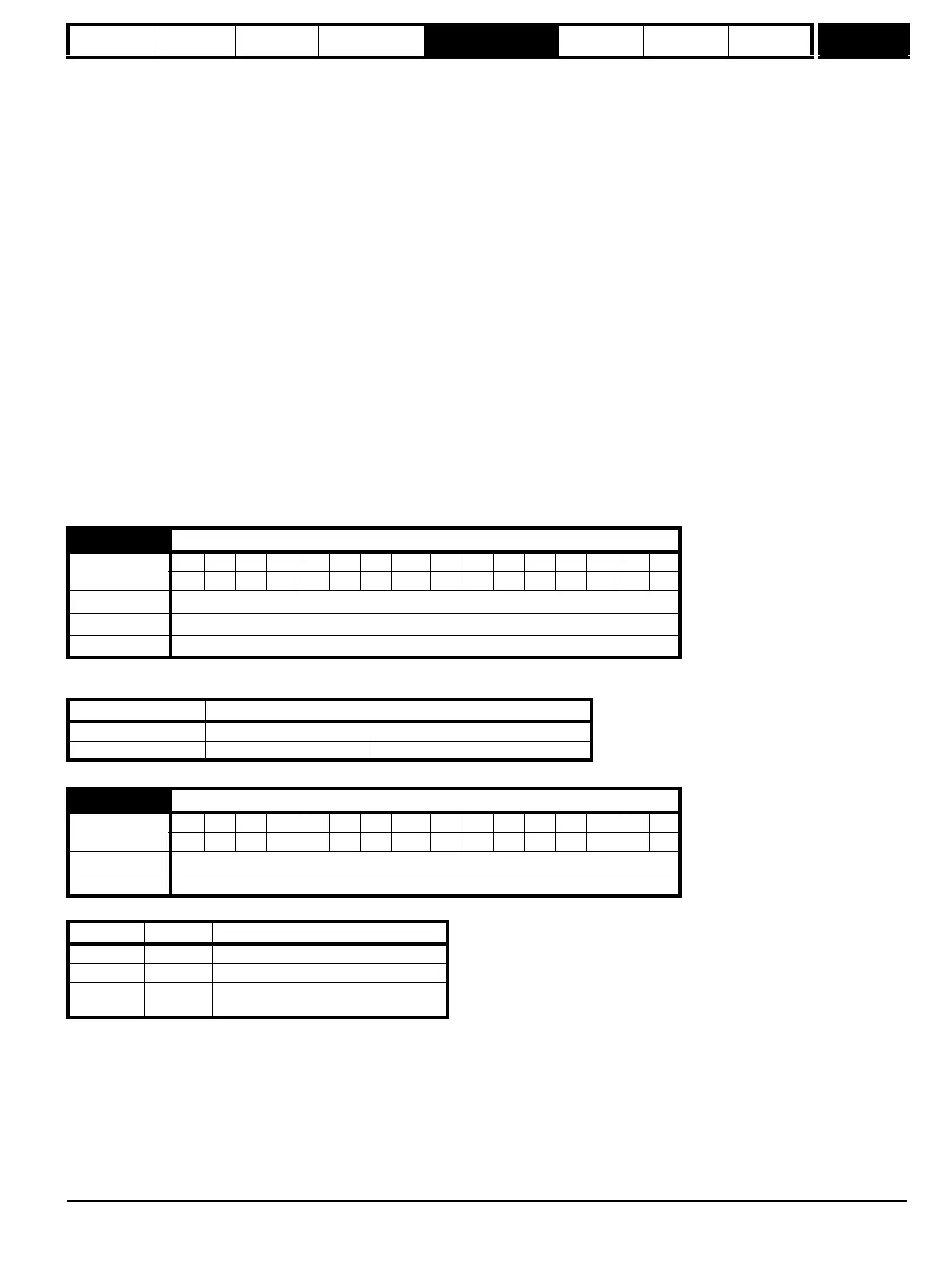
11.43 Load defaults
Coding
Bit SP FI DE Txt VM DP ND RA NC NV PT US RW BU PS
1111
Range 0 to 2
Default 0
Update rate Background read
Parameter value Equivalent Pr x.00 value Defaults loaded
1 (Eur) 1233 Normal defaults
2 (USA) 1244 US defaults
11.44 Security status
Coding
Bit SP FI DE Txt VM DP ND RA NC NV PT US RW BU PS
1 1 1111
Range 0 to 2
Update rate Background read
Value String Action
0 L1 Only menu 0 can be accessed
1 L2 All menus can be accessed
2 Loc
Lock user security when drive is reset.
(This parameter is set to L1 after reset.)


 To Next Page