Menu 17
Parameter
structure
Keypad and
display
Parameter x.00
Parameter
description format
Advanced parameter
descriptions
Serial comms
protocol
Electronic
nameplate
Performance
196 Digitax ST Advanced User Guide
www.controltechniques.com Issue Number: 1
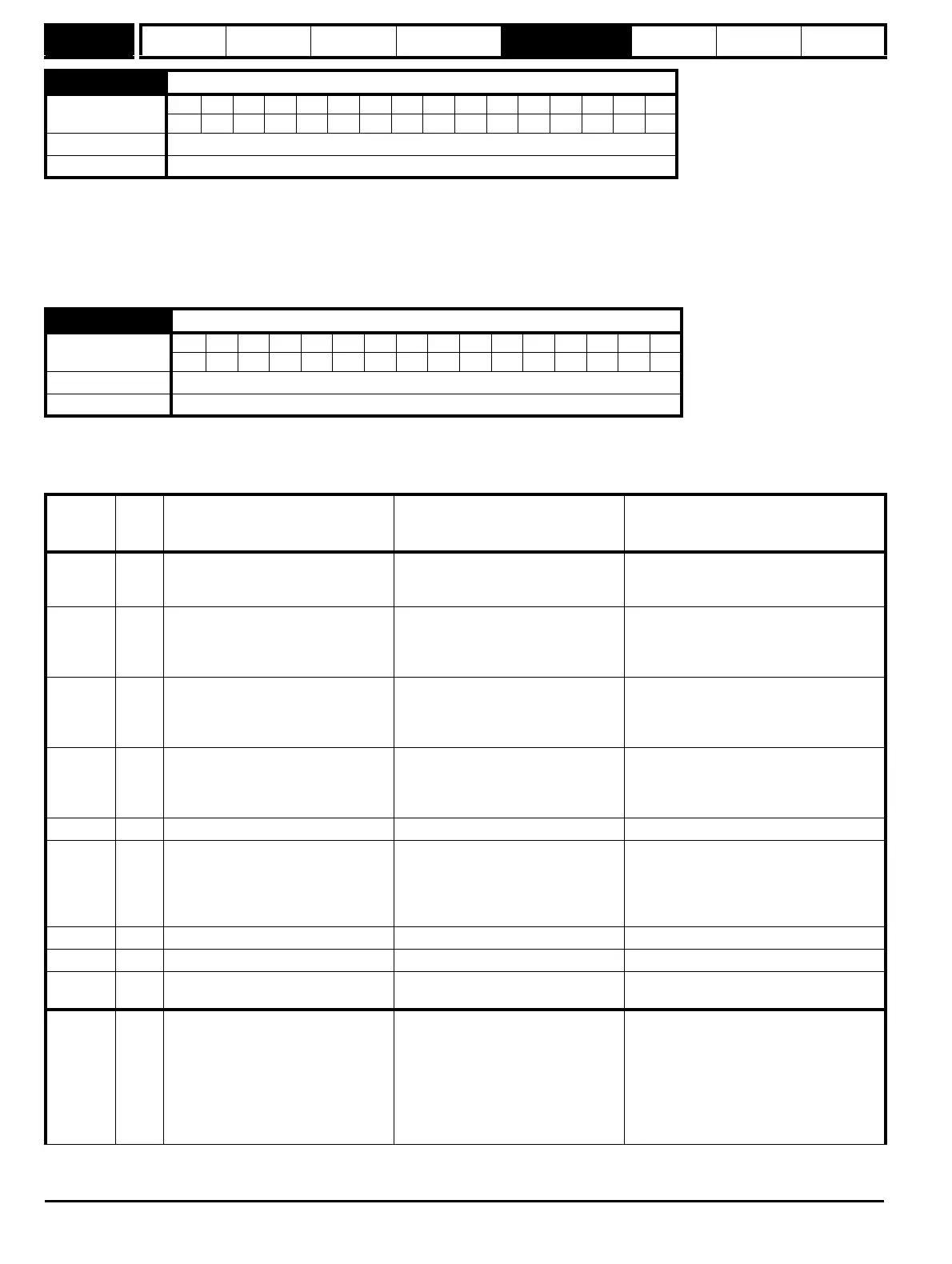
If an error occurs the reason for the error is written to this parameter and the drive may produce a SL3.Er trip. A value of zero indicates that the Motion
Processor has not detected an error, a non-zero value indicates that an error has been detected. (See Table 5-14 on page 196 for the meaning of the
values in this parameter.) When the drive is reset this parameter is cleared.
The Motion Processor includes a temperature monitoring circuit. If the PCB temperature exceeds 90°C the drive fan is forced to operate at full speed
(for a minimum of 10s). If the temperature falls below 90°C the fan can operate normally again. If the PCB temperature exceeds 100°C the drive is
tripped and the error status is set to 74.
The software version is displayed in these parameters in the form Pr 17.02 = xx.yy and Pr 17.50 = zz. Where xx specifies a change that affects
hardware compatibility, yy specifies a change that affects product documentation, and zz specifies a change that does not affect the product
documentation.
Table 5-14 Error status values for the Motion Processor
17.50 Motion Processor error status
Coding
Bit SP FI DE Txt VM DP ND RA NC NV PT US RW BU PS
111 1
Range 0 to 255
Update rate Background write
17.51 Motion Processor software sub-version
Coding
Bit SP FI DE Txt VM DP ND RA NC NV PT US RW BU PS
111 1
Range 0 to 99
Update rate Write on power-up
Error
Code
(Pr 17.50)
Cause
Trip?
Error Possible Reason Possible Solution
41 Y
Digitax ST Parameter Access Error -
Parameter Doesn't Exist
The Digitax ST Menu Parameter that
you are trying to read from or write to
does not exist.
Please double check the parameter number
42 Y
Digitax ST Parameter Access Error -
Parameter is Read Only
The Digitax ST Menu Parameter that
you are trying to write to is a Read Only
parameter
Avoid writing to Read Only parameters. Use
Drive Menu Watch view in PowerTools Pro,
or Digitax ST User Guide to verify parameter
accessibility
43 Y
Digitax ST Parameter Access Error -
Parameter is Write Only
The Digitax ST Menu Parameter that
you are trying to read from is Write
Only
Avoid reading from Write Only parameters.
Use Drive Menu Watch view in PowerTools
Pro, or Digitax ST User Guide to verify
parameter accessibility
44 Y
Digitax ST Parameter Access Error -
Written Value Out of Range
The value you are trying to write to the
Digitax ST Menu Parameter is out of
range.
Modify value that you are trying to write so
that it is within valid range of the parameter.
Use the Digitax ST User Guide to verify the
range of the parameter and try again
73 Y Digitax ST Database Setup Error
74 Y Module Overheat Error
Motion Processor module temperature
has exceeded 83 degrees Fahrenheit
Select lower switching frequency in
PowerTools Pro configuration, or reduce
motion performance (i.e. lower accel/decel,
lengthen dwells). If problem persists, please
contact factory
101 Y Invalid Configuration Error
102 Y NVM Invalid Error
103 Y Power Up Test Failure Error Motion Processor Power Up Test failed
Cycle power to the system. If problem
persists, please contact factory
104 Y Following Error
Amount of following error exceeded
following error limit set in PowerTools
Pro software.
Increase Following Error Limit in PowerTools
Pro configuration. Increase Velocity Loop
Bandwidth and/or Position Loop Bandwidth
in PowerTools Pro configuration. Lower
Acceleration/Deceleration ramp values.
Make sure that programmed velocity is
within maximum operating speed of the
given motor.


 To Next Page