Kit Installation
2-18 February 2016 | 256574-ENG R01
2.3.2.6 Installing the Unifloor
The floor has multiple profiles, which
collectively configure it as a single piece
called a ‘cassette’. The rear of the
cassette has an opening that allows
conditioned air to be distributed evenly up
through the floor and into the chamber.
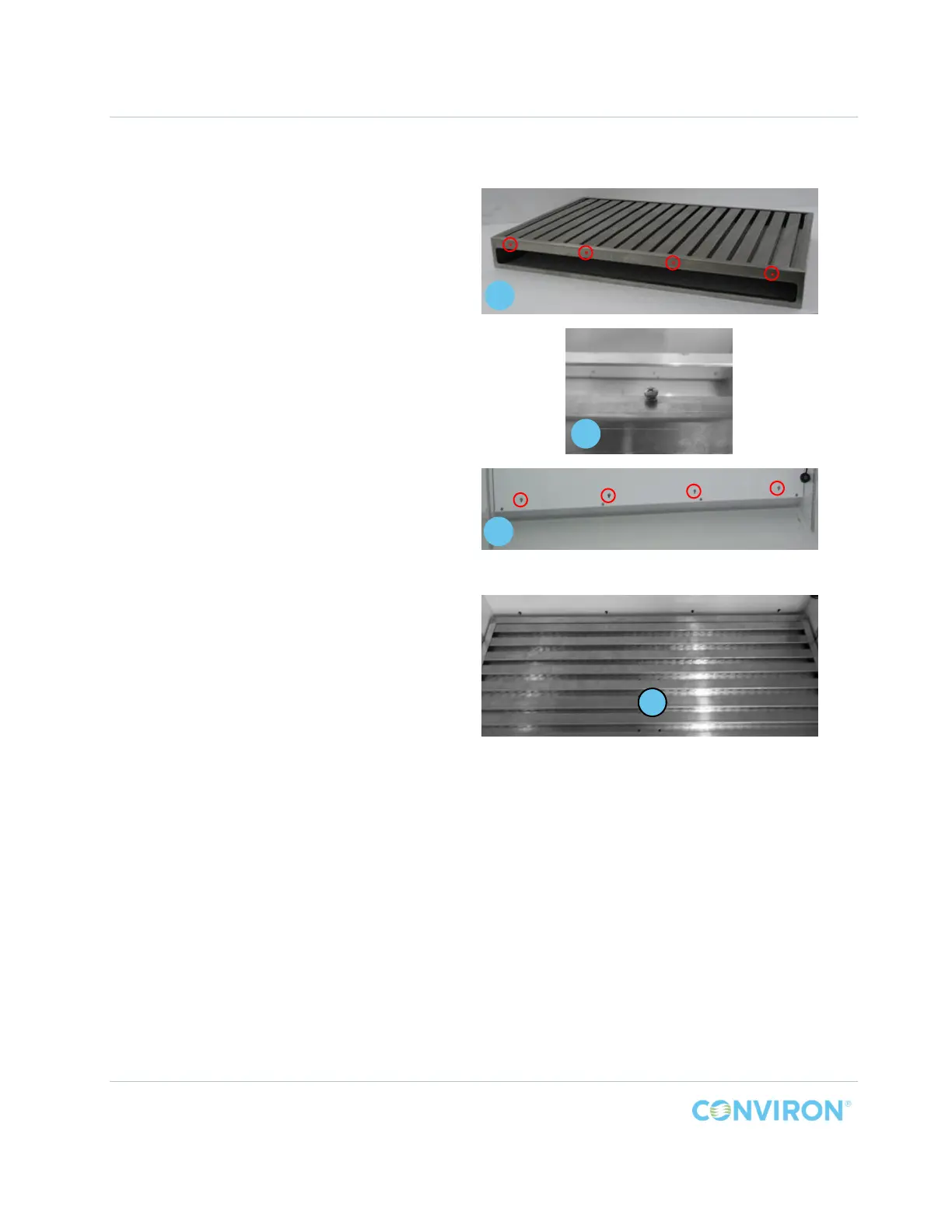
To install the Unifloor® cassette:
1. Partially install four (4) screws, Item
C, into the upper edge above the
opening of the cassette, Item L,
before placing it into the chamber
(Panel A, Figure 2-20). Leave a gap
between the screw head and the
cassette (Panel B, Figure 2-20) of
approximately 1/8” (3mm) so the
cassette can lock into the key holes
(Panel C, Figure 2-20) in the back wall
plenum.
2. Carefully slide the Unifloor cassette,
Item L, into the chamber with the
opening facing the back wall plenum.
3. Lift the back edge slightly and push
the cassette into contact with the back
wall plenum to engage the screws.
Figure 2-20 PG Unifloor Screw Installation
Figure 2-21 PG Unifloor Installation
L
C
B
A



 To Next Page