4 Operation
Operator manual: Postmix tower
Ribbon
25
Cornelius Deutschland GmbH
Document no. TD0000000
Version: 19/10/2017, Index 3
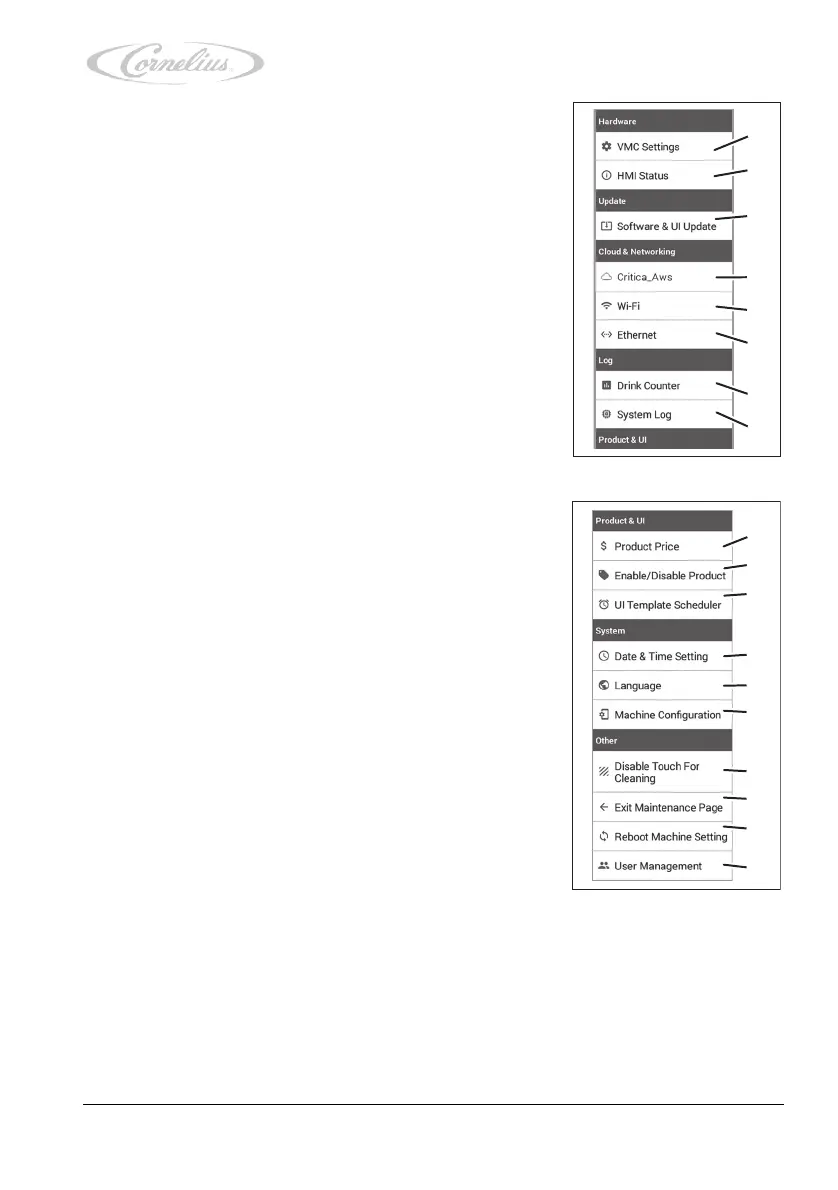
The service menu allows access to the following menu items:
1. “VMC Settings” (virtual machine control settings), see
chapter 4.3.2, page 26.
2. “HMI Status” (user interface status), see chapter 4.3.3,
page 28.
3. “Software & UI Update”
(software & user interface update) see chapter 4.3.4,
page 29.
4. “Critica_Aws”, see the document “Tower installation and
service manual”, document no. TD0000100.
5. “Wi-Fi”, see the document “Tower installation and service
manual”, document no. TD0000100.
6. “Ethernet”, see the document “Tower installation and ser-
vice manual”, document no. TD0000100.
7. “Drink Counter”, see chapter 4.3.5, page 30.
8. “System Log”, see the document “Tower installation and
service manual”, document no. TD0000100.
9. “Product Price”, see chapter 4.3.6, page 30.
10. “Enable/Disable Product”, see chapter 4.3.7, page 31.
11. “UI Template Scheduler”, see the document “Tower
installation and service manual”, document no.
TD0000100.
12. “Date & Time Setting”, see chapter 4.3.8, page 32.
13. “Language”, see chapter 4.3.9, page 33.
14. “Machine Configuration”, see the document “Tower
installation and service manual”, document no.
TD0000100.
15. “Disable Touch for Cleaning”, see chapter 4.3.10, page
34.
16. “Exit Maintenance Page”, see step 3, page 24.
17. “Reboot Machine Setting”, see the document “Tower
installation and service manual”, document no.
TD0000100.
18. “User Management”, see the document “Tower installa-
tion and service manual”, document no. TD0000100.













 To Next Page