Configuring and adjusting
Cornelius Deutschland GmbH
Document no. TD2005100
Version 15/03/2019, Index 0
Installation and service manual Dispensing valve
SFV1
23
7.1.2 “Top-up times” configuration mode
The module stores two fill times with a timed pause that is configured for each beverage size. During configuration, the “PGM”
indicator flashes. The last two configured fill times are stored when exiting configuration mode.
NOTICE!
Use the actual beverage sizes and amounts of ice for the configuration.
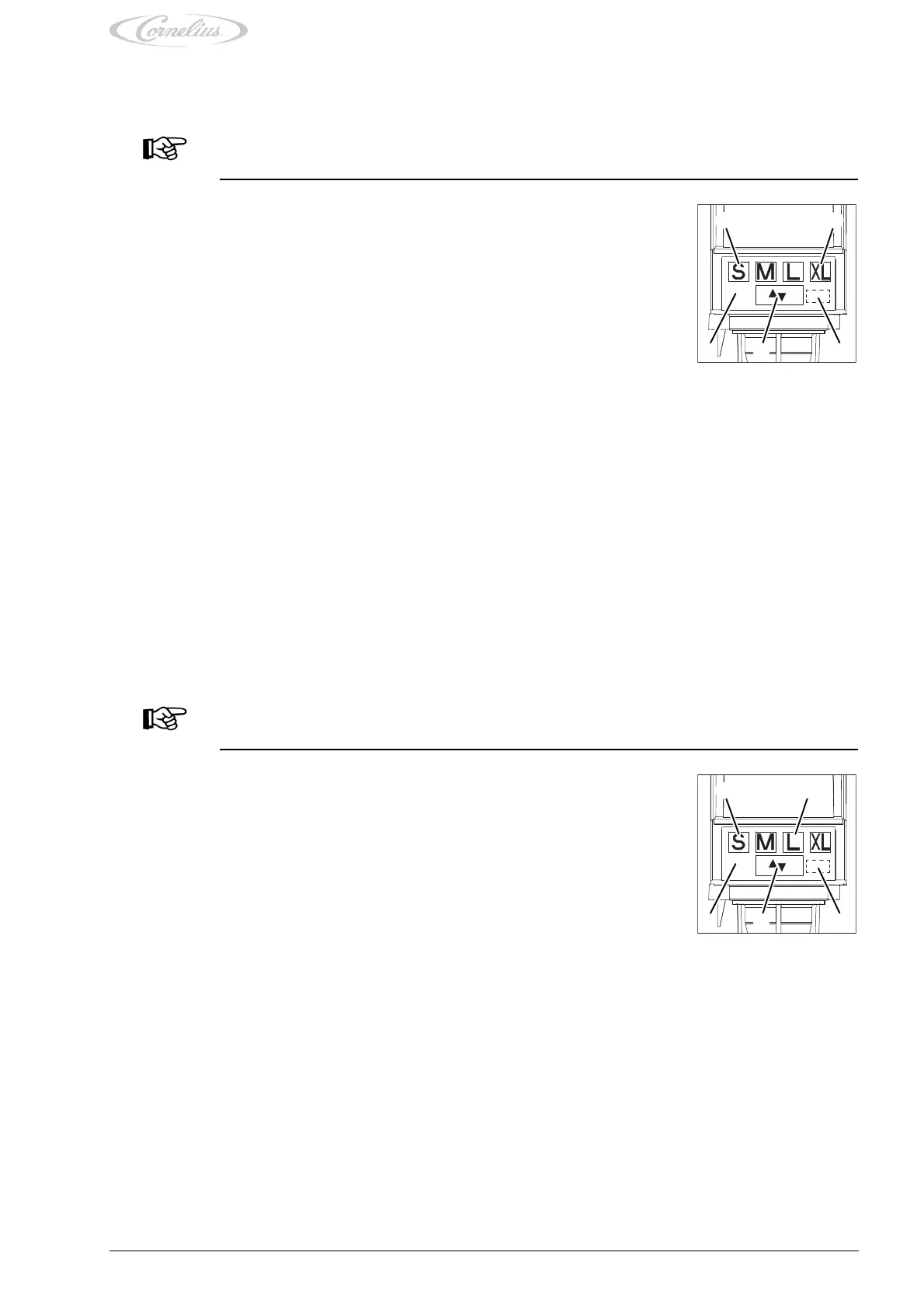
4. Wait until the foam has settled in the cup and press the button (Fig. 39/1) for the beverage size again until the fill level in the
cup is reached.
The fill time, pause and top-up time are stored in the module when you exit configuration mode.
5. Repeat the process for all beverage sizes.
6. Exit configuration mode by pressing the program button (Fig. 39/3) or the “Start & Stop” button (Fig. 39/4) for 5 seconds.
The “PGM” indicator (Fig. 39/5) goes out.
The last fill time, pause and top-up time set for each beverage size is stored.
7.1.3 “Incremental” configuration mode
The module stores the sums of all successive fill times of one single beverage size as one single fill time without any pauses.
During configuration, the “PGM” indicator flashes. The last successive fill times are stored as a beverage size when exiting con-
figuration mode.
If a new beverage size needs to be configured, it can be configured after another beverage size has been set, or by exiting con-
figuration mode and calling it up again.
NOTICE!
Use the actual cup sizes and amounts of ice for the configuration.
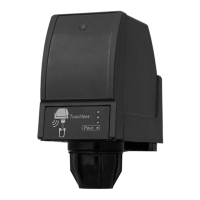
4. Wait until the foam has settled in the cup and press the button (Fig. 40/1) for the beverage size again until the fill level in the
cup is reached.
5. Repeat this process until the fill level in the cup is reached.
The sum of all the successive fill times is stored in the module as one single fill time with no pauses when you exit configuration
mode.
6. Repeat the process for all beverage sizes.
7. Exit configuration mode by pressing the program button (Fig. 40/3) or the “Start & Stop” button (Fig. 40/4) for 5 seconds.
The “PGM” indicator (Fig. 40/5) goes out.
The last fill time set for each beverage size is stored.
1. Call up the “Top-up times” configuration mode by pressing the program button (Fig. 39/3) and
the “S” button (Fig. 39/1) or the “S” (Fig. 39/1) and “XL” buttons (Fig. 39/2) simultaneously for
5 seconds.
To prevent any unintentional dispensing, press the program button (Fig. 39/3) slightly earlier
than the “S” button (Fig. 39/1).
The “PGM” indicator (Fig. 39/5) flashes.
2. Place a cup on the drip tray of the base unit and under the dispensing nozzle of the dispensing
valve.
3. Press the button (Fig. 39/1) for the beverage size to be configured until the fill level in the cup
is reached.
The “PGM” indicator (Fig. 39/5) flashes.
Fig. 39
PGM
WAIT
345
1 2
1. Call up the “Incremental” configuration mode by pressing the program button (Fig. 40/3) and
the “L” button (Fig. 40/2) simultaneously for 5 seconds.
To prevent any unintentional dispensing, press the program button (Fig. 40/3) slightly earlier
than the “L” button (Fig. 40/2).
The “PGM” indicator (Fig. 40/5) lights up.
2. Place a cup on the drip tray of the base unit and under the dispensing nozzle of the dispensing
valve.
3. Press the button (Fig. 40/1) for the beverage size to be configured until the fill level in the cup
is reached.
The “PGM” indicator (Fig. 40/5) flashes.
Fig. 40
PGM
WAIT
345
1 2





 To Next Page