Viper Low overrun Service Manual
Publication Number: 621360241LOEWSE - 50 - © 2016, Cornelius Inc.
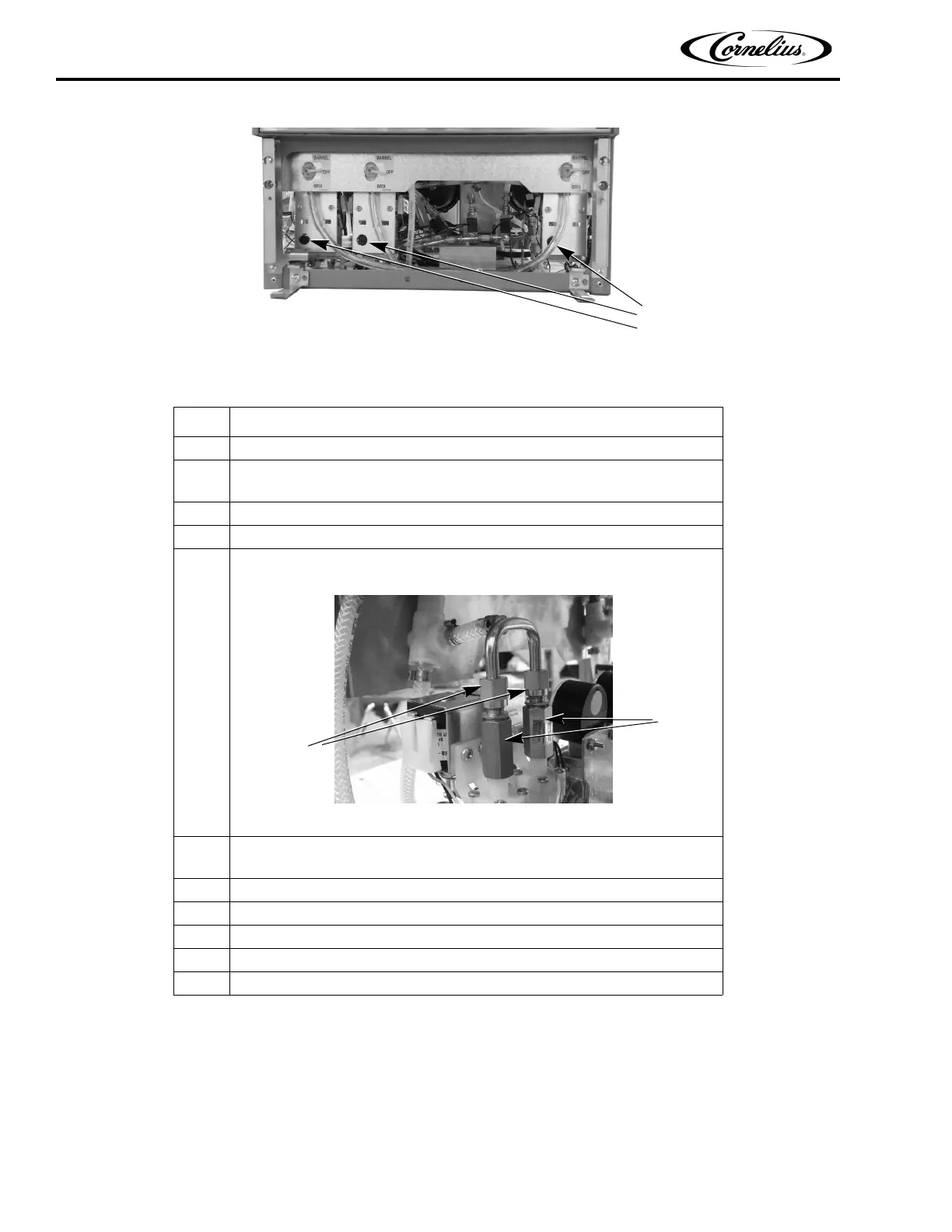
Figure 42. View of Shutoff Solenoids w/ Access Panel Removed
CONDENSER FAN MOTOR REPLACEMENT
The fan motor is located on the top of the unit, as shown in Figure 44. If the motor needs replacement, perform the
procedure in Table 53 to remove and reinstall a motor.
Table 52.
Step Procedure
1 Disconnect power from the unit.
2
Disconnect and bleed the water and syrup lines to remove pressure from the
system.
3 Remove the rear cover and side panels.
4 Remove the water and syrup lines from the input to the valves.
5
Remove the Wye tube from the output (top) of the valves by loosening the nuts
between the Wye and the check valves.
Figure 43.
6
Remove the two (2) locknuts from the base of the assembly and remove it
from the unit.
7 Remove the check valve from the valve being replaced.
8 Install the check valve on the new valve and solenoid.
9 Remove the valve and solenoid from the mounting bracket and replace it.
10 Reverse the procedure to reinstall the bracket into the unit.
11 Reconnect power to the unit and test the system.
Syrup
Shutoff
Valves &
Solenoids
Wye
Nuts
Retaining
Check
Valves



 To Next Page