Instruction Manual | 9
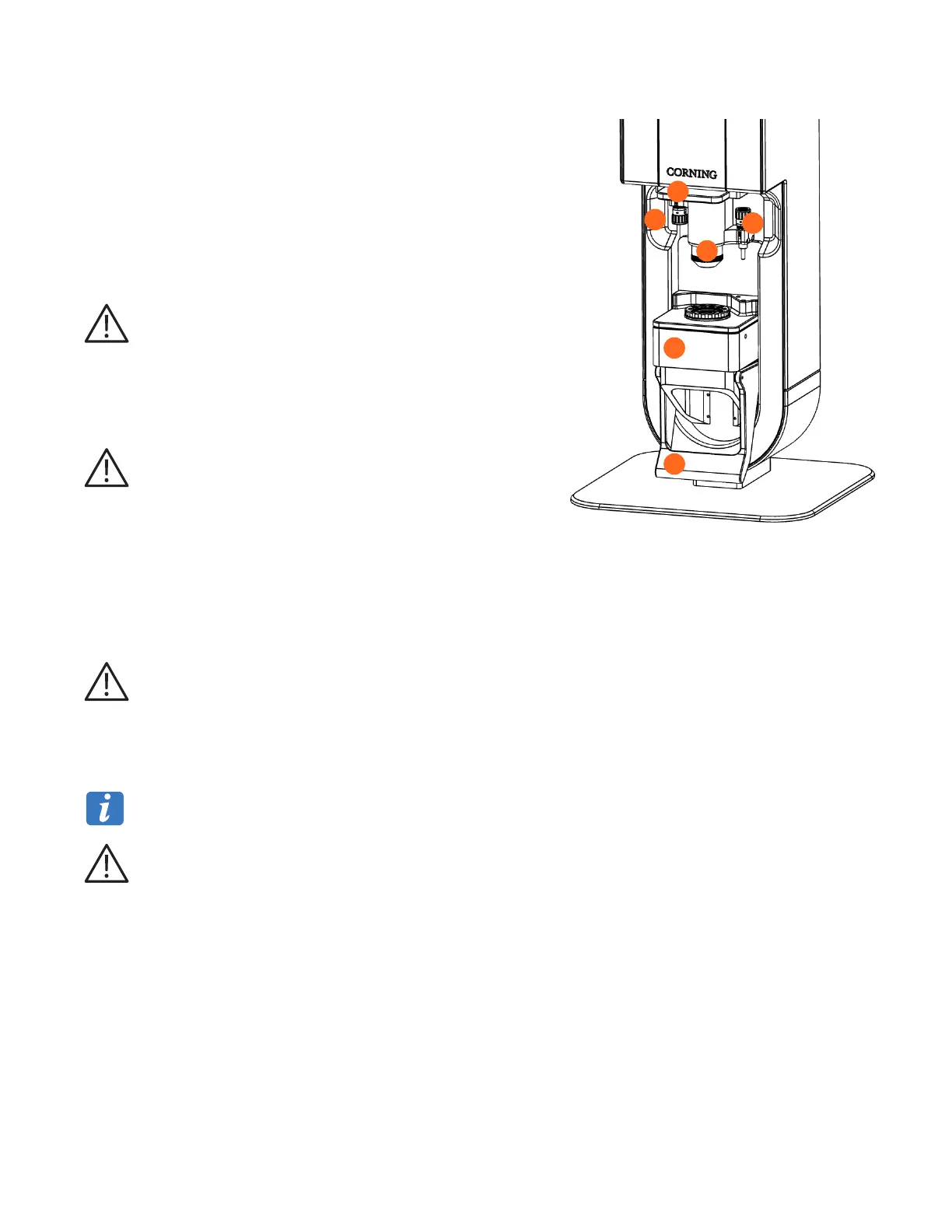
4.2 Front view
1. Sample platform
The sample holder is positioned on this platform that can be translated
vertically. In its lower position the sample holder can be placed or removed.
The upper position responds to the Measurement Position. The platform
contains the LED.
2. Handle
The handle allows the sample platform to be move up and down. In the
upper position, it locks the sample in its position for measurement.
Do not use the handle while the device is measuring.
Manipulate the handle with caution as not to pinch your hand.
3. Protective shield
The protective shield can be lowered or pulled up manually. It allows to
isolate the sample from the user during measurement.
Operate the protective shield (up or down) only when the sample
platform is in the lower position.
4. Lens
The lens is protected by a mechanical piece with a cover glass slide at the
bottom. When the sample platform is in the upper position, this glass slide
is in contact with the sample droplet.
1
2
4
6
5
3
5. Lens adjustment micrometer
This micrometer is used to adjust the height of the optical system in relation to the sample.
This adjustment is initially performed during installation by Corning authorized personnel. It must not be modified by
the end user.
6. Sample platform adjustment micrometer
This micrometer sets the upper height of the sample platform, at which the sample is positioned under the optical system.
This adjustment ensures that the sample drop remains in contact with the upper glass cover.
This adjustment is initially performed during installation by Corning-authorized personnel. It must not be modified by
the end user.



 To Next Page