10 | CORNING VIDEODROP
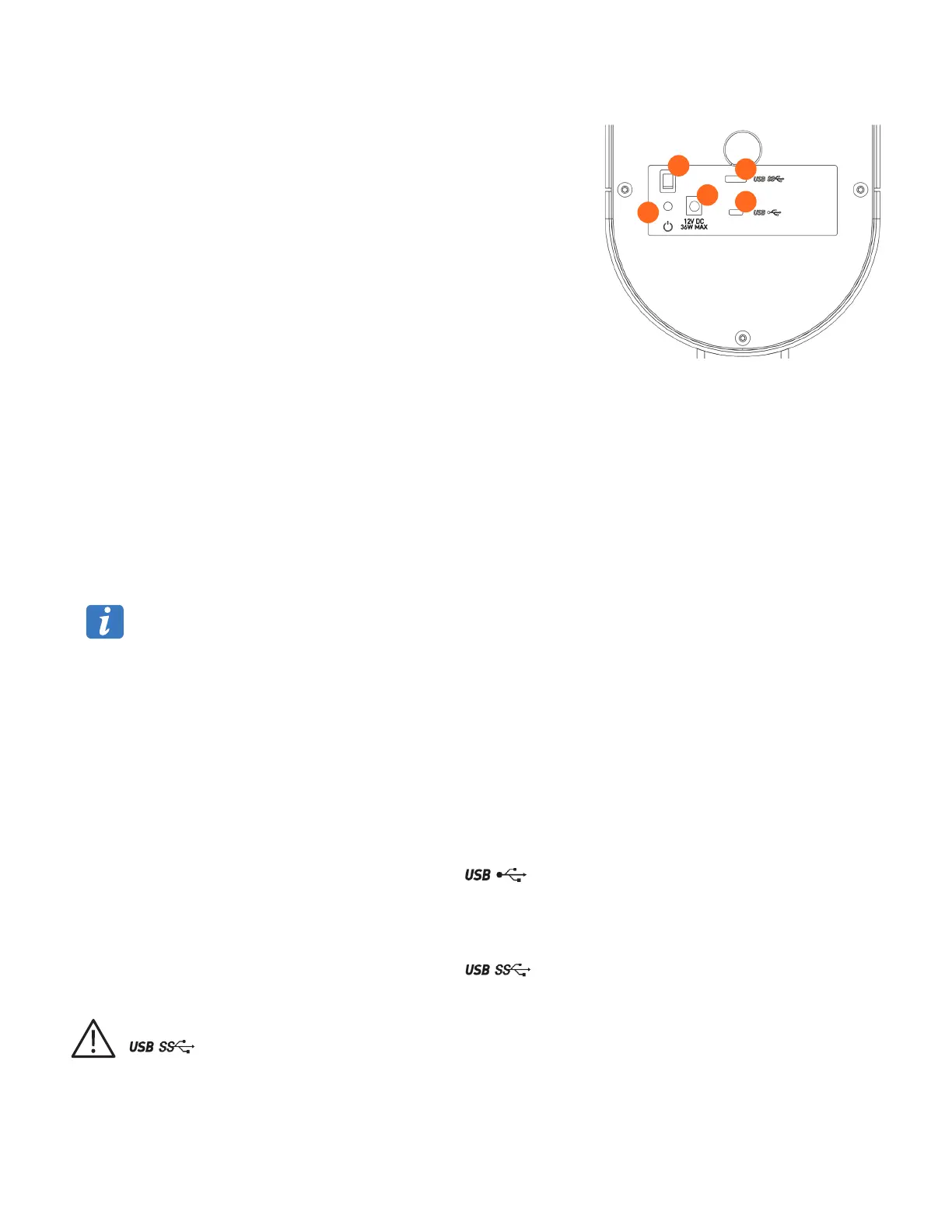
4.3 Rear view
1. Primary switch
This switch has two positions:
Position 0: No voltage is present, and the device connected to the
transformer is not powered. This is the zero (0) state position when the
device is no longer in use.
Position I: The transformer is powering the device. This is the working
position of the device.
2. Power input
The power supply transformer connecting the device to the main electrical
network must be connected to this input. The device must be plugged in to a
120V or 230V mains socket, single-phase 50/60 Hz AC via the supplied power
supply.
3. USB micro B connector (device control)
The USB 2.0 micro B (59.1 in./1.5 m) cable must be connected to this output and be connected (A connector) to any USB port of the
desktop PC.
4. USB SuperSpeed (SS) micro B connector (Video output)
The USB 3.0 micro B (78.8 in./2 m) cable must be connected to this output and be connected (A connector) to a SS USB port of the
desktop PC (blue USB port).
5. Power indicator light
Green light indicates the device is powered (On).
No light indicates the device is not powered (Off).
Cables from the device are fragile elements and must be handled carefully.
5.0 Installation
5.1 Connection
Connections of the system are performed during the installation by Corning-authorized personnel.
5.1.1 Power supply
The Videodrop and the computer must be connected to a main socket using the power cords supplied.
5.1.2 Control interface
Connect the USB 2.0 (59.1 in./1.5 m) cable by connecting:
The male micro B port to the Videodrop rear female connector: .
The male A port to any A female port of the desktop PC.
5.1.3 Data interface (Video data)
Connect the USB 3.0 (78.8 in./2 m) cable by connecting:
The male micro B port to the Videodrop rear female connector: .
The male A port to a USB SS A female port of the desktop PC. These types of ports are blue.
If the video data wire is not connected to a USB SuperSpeed port (usually these ports are colored in blue) of the computer:
, the system won’t work properly as the data transfer speed won’t be sufficient.
1
2
3
4
5



 To Next Page