Instruction Manual | 19
Export file
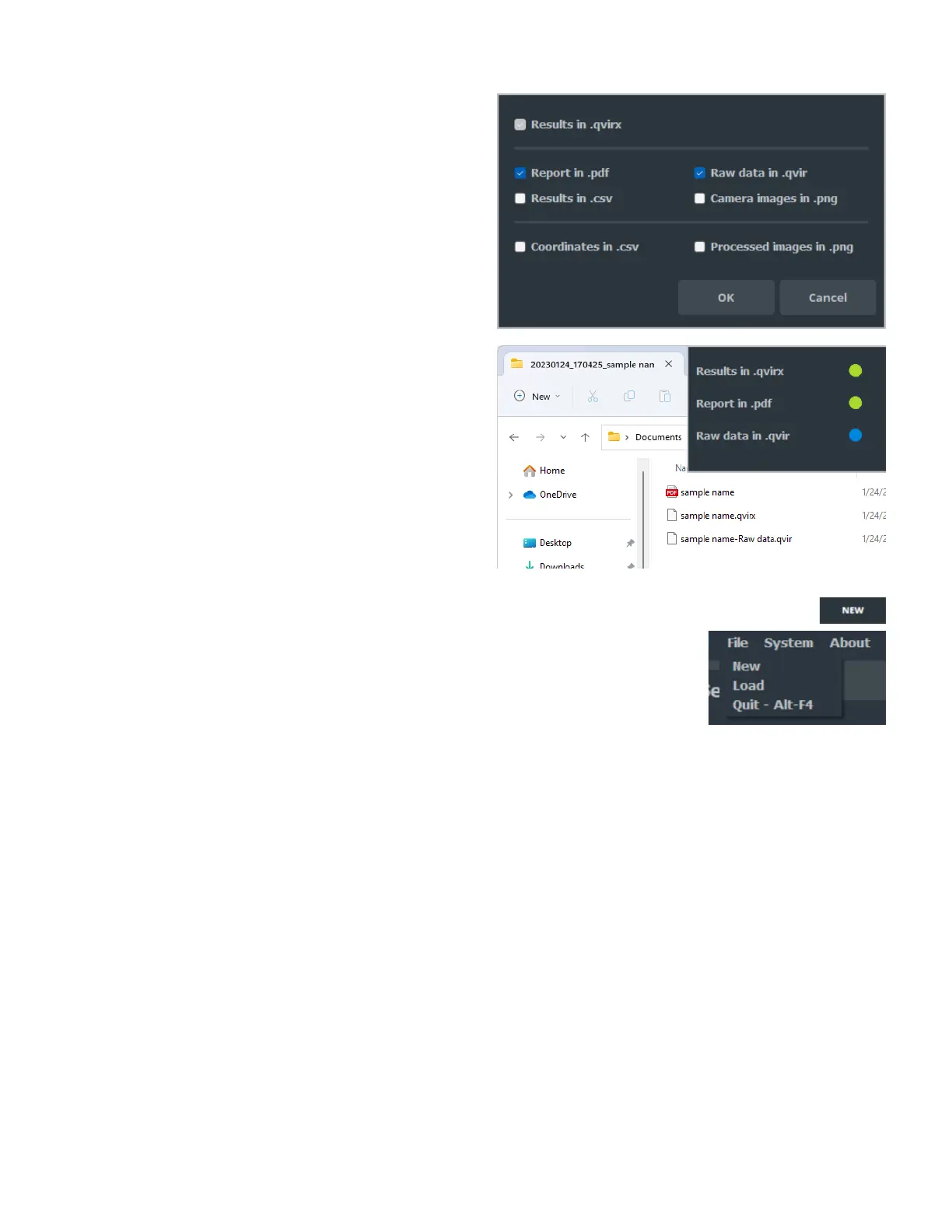
Select the formats you want to save by checking the
corresponding boxes and click OK.
Choose the folder location where the selected elements will
be saved.
The folder name is by default:
DATE(YYYYMMDD)_HOUR(HHMMSS)_SAMPLE NAME
It can be modified when confirming the folder name before
Saving.
The export progress indicates when the export is completed.
7.2.3 Create a new file
After exporting the results, the user can create a new sample by:
Clicking on the New button that has replaced the Record
button when the export is completed.
By clicking on File, New.
It will load the Welcome window (see Section 7.1).
7.2.4 Load sample
There are several ways to load a previously saved .qvir or .qvirx file.
From the Welcome window (see Section 7.1)
By clicking on File, Load.
By dragging and dropping the file from the load window into
qvirCLS
• On the Welcome window.
• On the main window.
Loading a file allows:
For .qvir file:
• To play the last video of a measurement.
• To export the results (PDF report, Excel file, etc.).
For .qvirx file:
• To visualize the last image of the measurement.
• To export the results (PDF report, Excel file, etc.).
Loading a file does not allow to modify the parameters or the
comments.



 To Next Page