2-13 Installation
2.7 SCA Input Connections
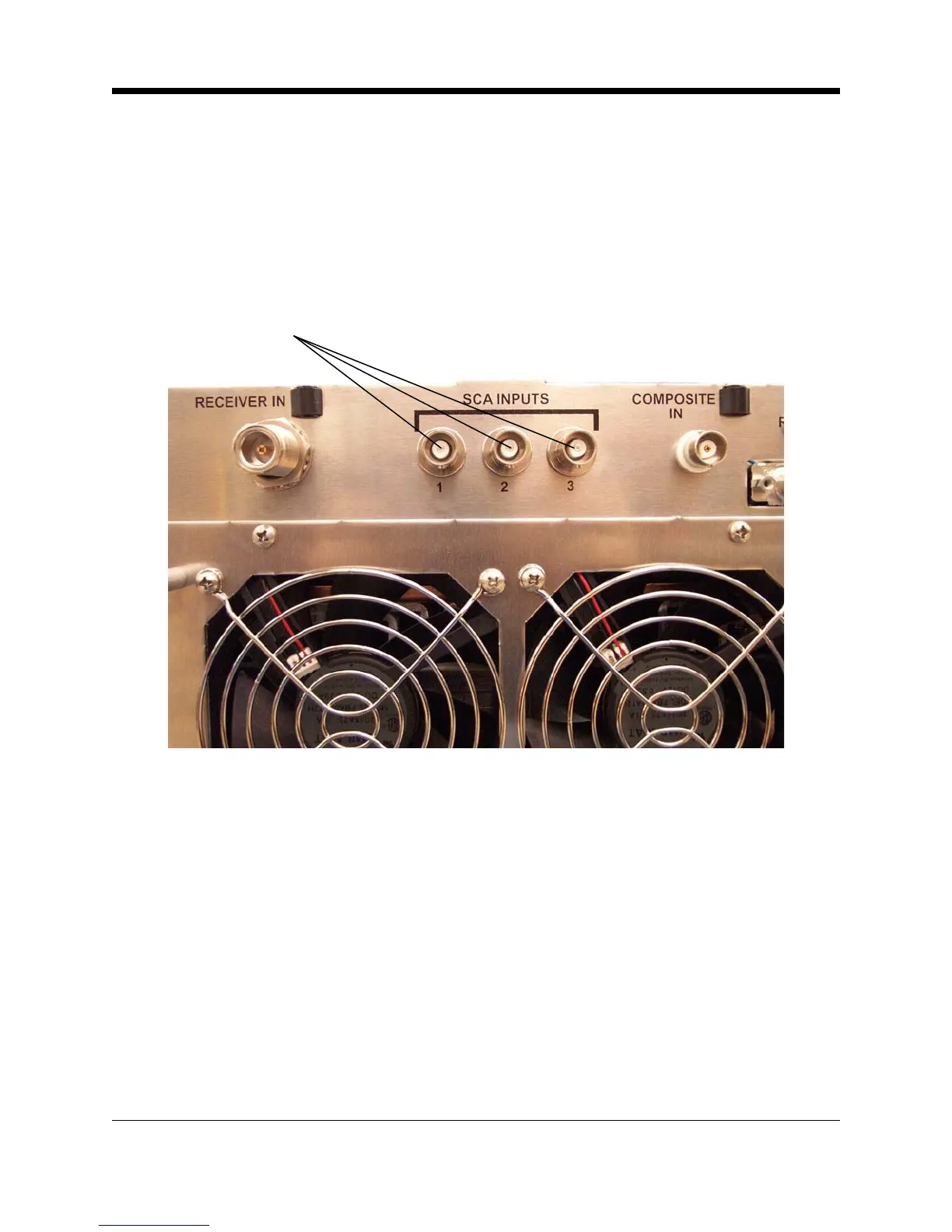
You can connect external SCA generators to the SCA In connectors (BNC-type) on the rear
panel. The inputs are intended for the 60 kHz to 99 kHz range, but a lower frequency may be
used if the transmitter is operated in Mono mode. (The 23 to 53 kHz band is used for stereo
transmission.) For 7.5 kHz deviation (10% modulation), input of approximately 3.5–volts (peak
-to-peak) is required.
SCA Inputs
Illustration 2–15 SCA Input Connectors
2.8 Composite Input Connection
You may feed composite stereo (or mono audio) directly to the RF exciter bypassing the inter-
nal audio processor and stereo generator. To use the Crown transmitter as an RF Exciter only
("E" version or when using the "T" version with composite input), it is necessary to use the
Composite Input section of the transmitter. This will feed composite stereo (or mono audio)
directly to the RF exciter. In the "T" version, this will bypass the internal audio processor and
stereo generator.
Input sensitivity is approximately 3.5–volt P-P for 75 kHz deviation.
1. Enable the Composite Input by grounding pin 14 of the Remote I/O connector
(see Illustration 2–18).
2. Connect the composite signal using the Composite In BNC connector.



 To Next Page