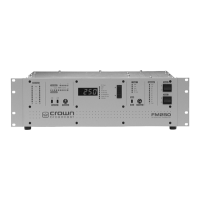
3.3 Front Panel Bar-Dot Displays
Bar-dot LEDs show audio input levels, wideband and highband audio gain control, and modu-
lation percentage. Resolution for the gain control and modulation displays is increased over a
conventional bar-graph display using dither enhancement which modulates the brightness of
the LED to give the effect of a fade from dot to dot. (See section 4.7.)
3.3.1 Audio Processor Input
Two vertical, moving-dot displays for the left and right channels indicate the relative audio lev-
els, in 3 dB steps, at the input of the audio processor. Under normal operating conditions, the
left and right Audio Processor indicators will be active, indicating the relative audio input level
after the Input Gain switches. During program pauses, the red Low LED will light.
The translator configuration shows relative audio levels from the included receiver.
3.3.2 Highband and Wideband Display
During audio processing, the moving-dot displays indicate the amount of gain control for broad-
band (Wide) and pre-emphasized (High) audio.
As long as program material causes activity of the Wideband green indicators, determined by
the program source level and Input Gain switches, the transmitter will be fully modulated. (See
section 3.4.)
The Wideband indicator shows short-term “syllabic-rate” expansion and gain reduction around
a long-term (several seconds) average gain set. In the translator configuration, the Wideband
indicator also shows relative RF signal strength.
Program material and the setting of the Processing control determine the magnitude of the
short-term expansion and compression (the rapid left and right movement of the green light).
High-frequency program content affects the activity of the Highband indicator. With 75–µsec
pre-emphasis, Highband processing begins at about 2 kHz and increases as the audio fre-
quency increases. Some programs, especially speech, may show no activity while some mu-
sic programs may show a great deal of activity.
3.3.3 Modulation Display
A 10–segment, vertical peak-and-hold, bar graph displays the peak modulation percentage. A
reading of “100” coincides with 75 kHz deviation. The display holds briefly (about 0.1 seconds)
after the peak. The “Pilot” indicator illuminates when the transmitter is in the stereo mode.
To verify the actual (or more precise) modulation percentage, connect a certified modulation
monitor to the RF monitor jack on the rear panel.
3-5 Operation



 To Next Page