Operating modes
station has been found, “FM” is displayed be-
hind the name of the st
ation. If the corr
e-
sponding DAB station becomes available
again, it returns to DAB mode after a while
and the “FM” identification is concealed.
●
Switch to a similar station: This allows
service providers to indicate alternative sta-
tions with similar content. In this way, if the
radio loses coverage of a DAB station and
does not find an alternative FM or DAB fre-
quency, it is possible to tune to a station with
similar content.
Radio text
Some stations transmit additional text infor-
mation, the so-called radio text.
Radio text is displayed in the upper half of
the screen above the memory buttons
›››
Fig. 145 or on the Station Information or
Radio text screens of the Display menu
›››
page 173.
The radio text display can be deactivated in
the DAB Settings
›››
page 177.
Slideshow
Some stations transmit additional visual in-
formation in the form of images.
These images are displayed as a slideshow
on the Stations
or Slidesho
w
screens of the
Screen menu
›
›
›
page 173.
The slideshow can be displayed in full screen
by pressing on the current image.
Screen Menu
The function buttons refer to the menu that
is displayed when the View
button is pressed
›
›
›
Fig. 145.
Function button: function
Preset list
: Viewing the preset buttons
›››
Fig. 145.
Station List
: Simultaneous display of radio text and sli-
deshows instead of memory keys
›››
Fig. 146.
Radio text
: The radio text is displayed instead of the
memory buttons.
Slideshow
: Slideshows are shown in full screen mode.
Note
Not all DAB stations broadcast radio text
and slideshows.
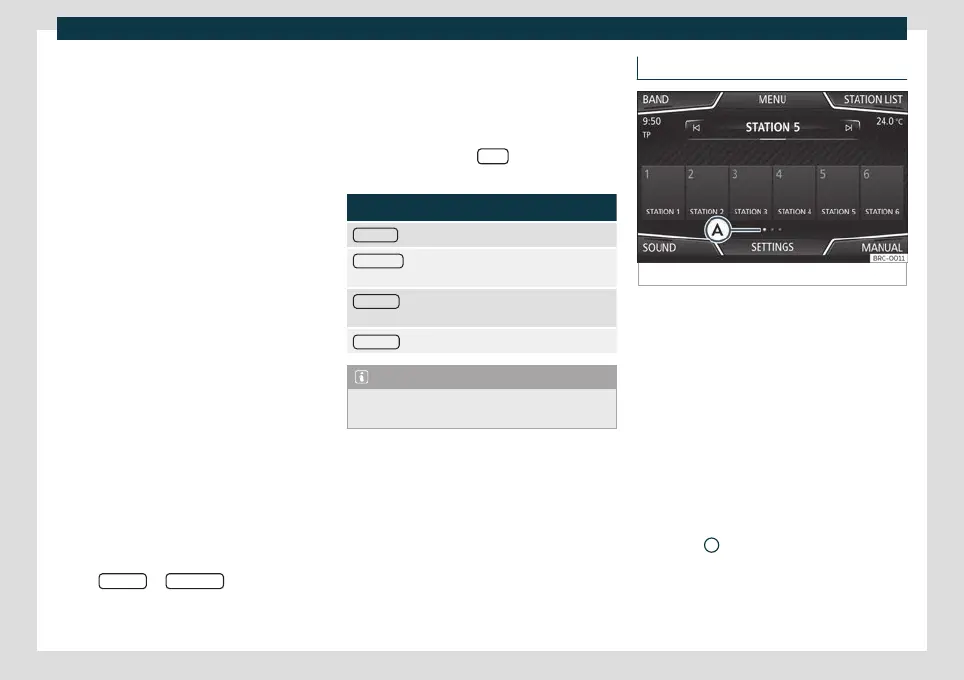
Memory buttons
Fig. 147
RADIO main menu.
In the R
adio main menu, you can store sta-
tions fr
om all available frequency wave-
lengths on the numbered function buttons.
These function buttons are called “memory
buttons”.
Storing the station on the memory buttons
See: Preset stations
›››
page 175.
Change the memory bank (screens)
●
Move your finger over the screen from left
to right or vice-versa.
●
OR: Press one of the function buttons
›››
Fig. 147
A
»
173



 To Next Page