39D-Link DAP-2680 User Manual
Web User Interface
Schedule
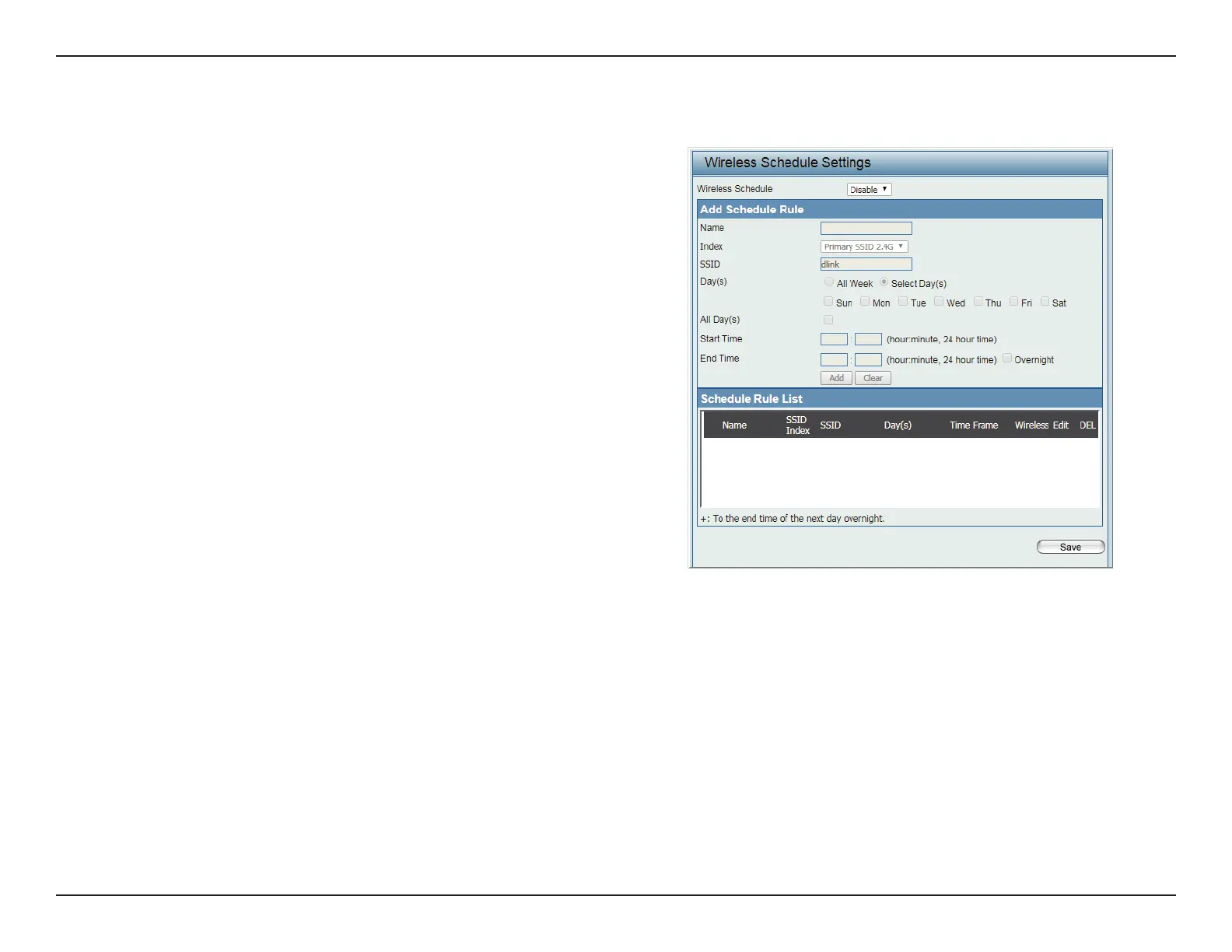
The Wireless Schedule Settings window is used to add and modify schedule rules on the device. Click Save for the changes to take eect.
Wireless Schedule Click the drop-down menu to enable the
device’s schedule feature.
Name Enter a name for the new schedule rule in the
eld provided.
Index Click the drop-down menu to select the desired
SSID.
SSID Displays the current SSID.
To create a new SSID, go to the Wireless Settings
window (Basic Settings > Wireless).
Day(s) Click the radio button to select All Week and
Select Day(s). If Select Day(s) is selected,
check the specic days you want the rule to be
eective on.
All Day(s) Check this box to have your settings apply 24
hours a day.
Start Time Enter the beginning hour and minute, using a
24-hour clock.
End Time Enter the ending hour and minute, using a 24-
hour clock.
Save Click to save the updated conguration.
To make the updates permanent, click
Conguration > Save and Activate.



 To Next Page
 Loading...