83D-Link DAP-2680 User Manual
Web User Interface
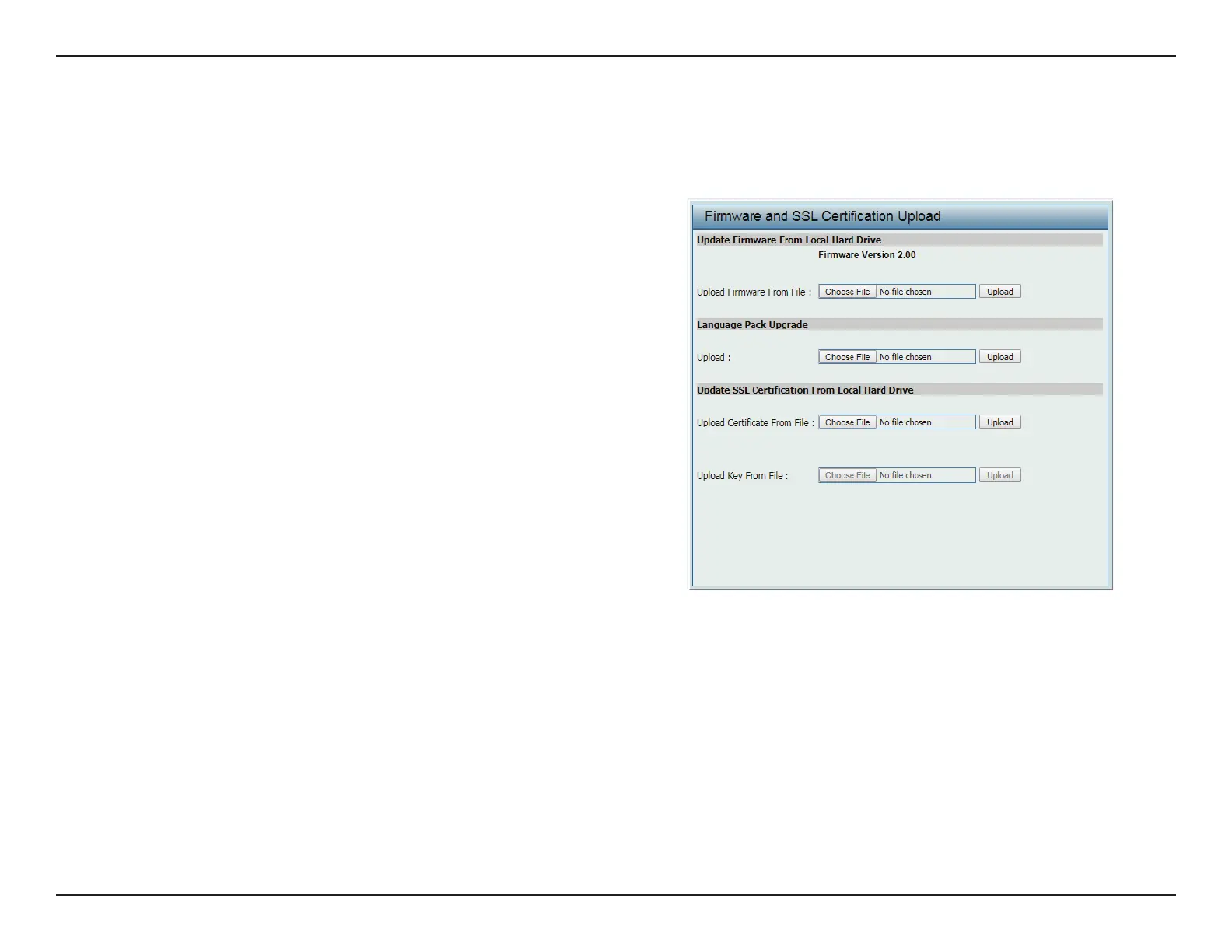
Firmware and SSL Certication Upload
The page allows users to perform a rmware upgrade. A Firmware upgrade is a function that upgrades the low-level access point software.. This is
a useful feature that prevents future bugs and allows for new features to be added to this product. Please go to your local D-Link website to see if
there is a new rmware version available.
Update Firmware From
Local Hard Drive
The current rmware version is displayed above
the le location eld. After the latest rmware
is downloaded, click Choose File to locate
the new rmware. Once the le is selected,
click Open and Upload to begin updating the
rmware. Please don’t turn the power o while
upgrading.
Language Pack Upgrade After you have downloaded a language pack
to your local drive, click Choose File. Select the
language pack and click Open and Upload to
complete the upgrade.
Update SSL Certication
From Local Hard Drive
After you have downloaded a SSL certication
to your local drive, click Choose File. Select
the certication and click Open and Upload to
complete the upgrade.



 To Next Page
 Loading...