●Disassembling Procedure
141
8
Disassembling Procedure
Disassembling
Procedure
Work Procedure Point
WARNING
Before disassembling work, be sure
to turn OFF all power supplies.
1
Remove the switch box cover in
accordance with “Procedure for
Removing Outside Panel Block
(P.133)”.
1
Remove the control panel mounting
plate in accordance with “Procedure
for Removing Switch Box (P.136)”.
Procedure for Removing Inverter
Board (AKZ56A, 90A-500)
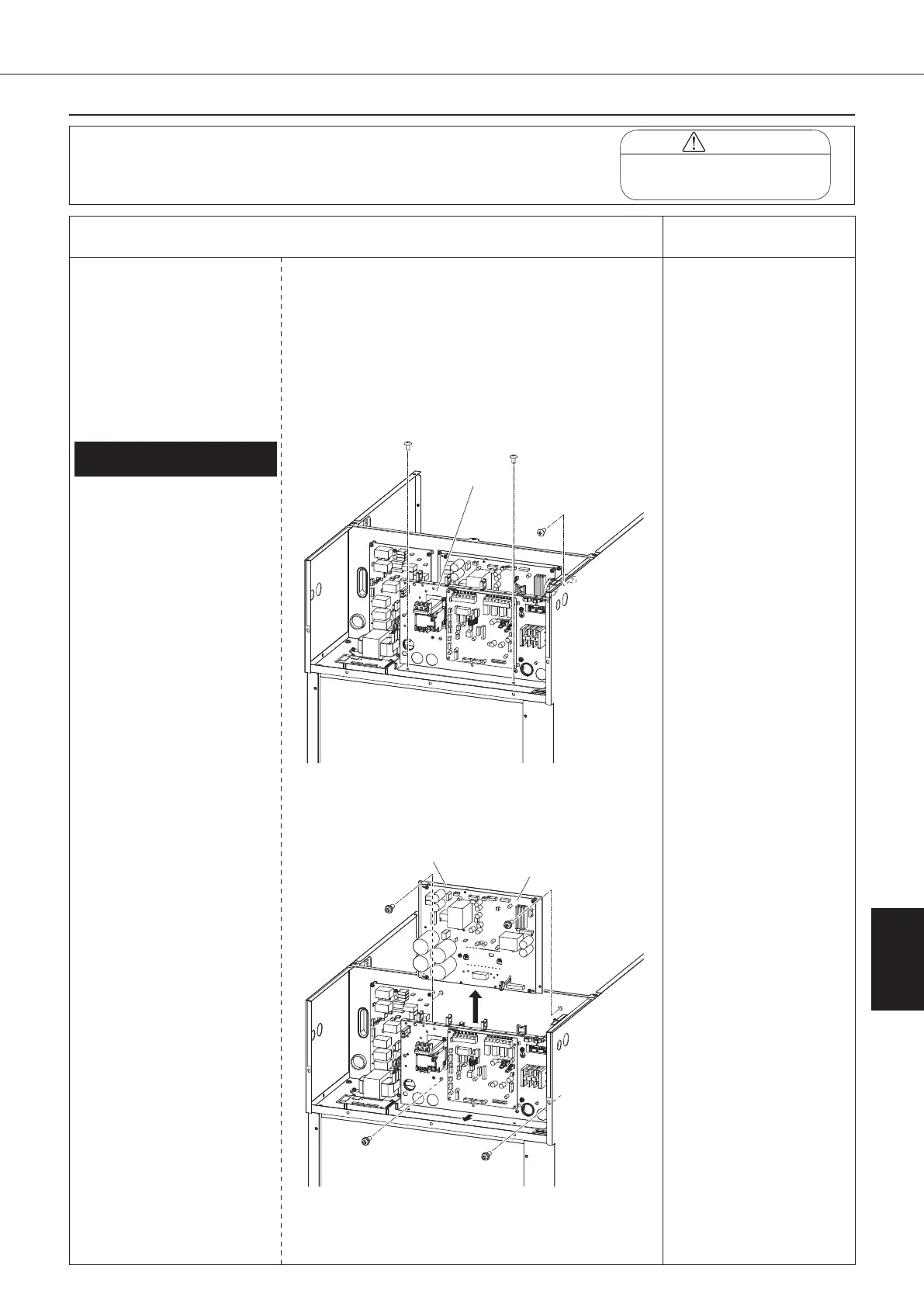
①
Unscrew the three screws
fixing the intermediate panel.
②
Disconnect all the wiring
connected to the inverter
board (A2P).
1)
Compressor (relay
connector in switch box)
2) DC
fan motor (CN15)
3)
Control board signal wire
1 (CN6)
4)
Control board signal wire
2 (CN110)
5)
Noise filter board signal
wire 1 (CN650)
6)
Noise filter board signal
wire 2 (CN103)
7)
Main circuit power supply
wire (R1: F504, S1: F505,
T1: F506)*
8)
Reactor (DCL1, DCL2)
*
Connector is located
on the noise filter board
(A3P) side.
③
Slide the intermediate panel
forward.
④
When removing the inverter
board (A2P), unscrew the
four screws on the inverter
board mounting plate, and
remove the inverter board
with heat sink attached to
the inverter board mounting
plate. (*1)
1.
Removing inverter board (A2P)
*1
When replacing the inverter
board, handle it as the
“inverter board assembly”,
i.e., inverter board integrated
with heat sink.
Never replace the inverter
board only. Replacement of
the inverter board only may
cause degradation of the
radiation performance of the
heat sink, leading to smoke
or ignition.
Intermediate
panel
mounting plate
Inverter board
(A2P)
00_PB00540A_M10.indb 141 2023/08/09 12:59:22


 To Next Page