SYSTEM OPERATION
13
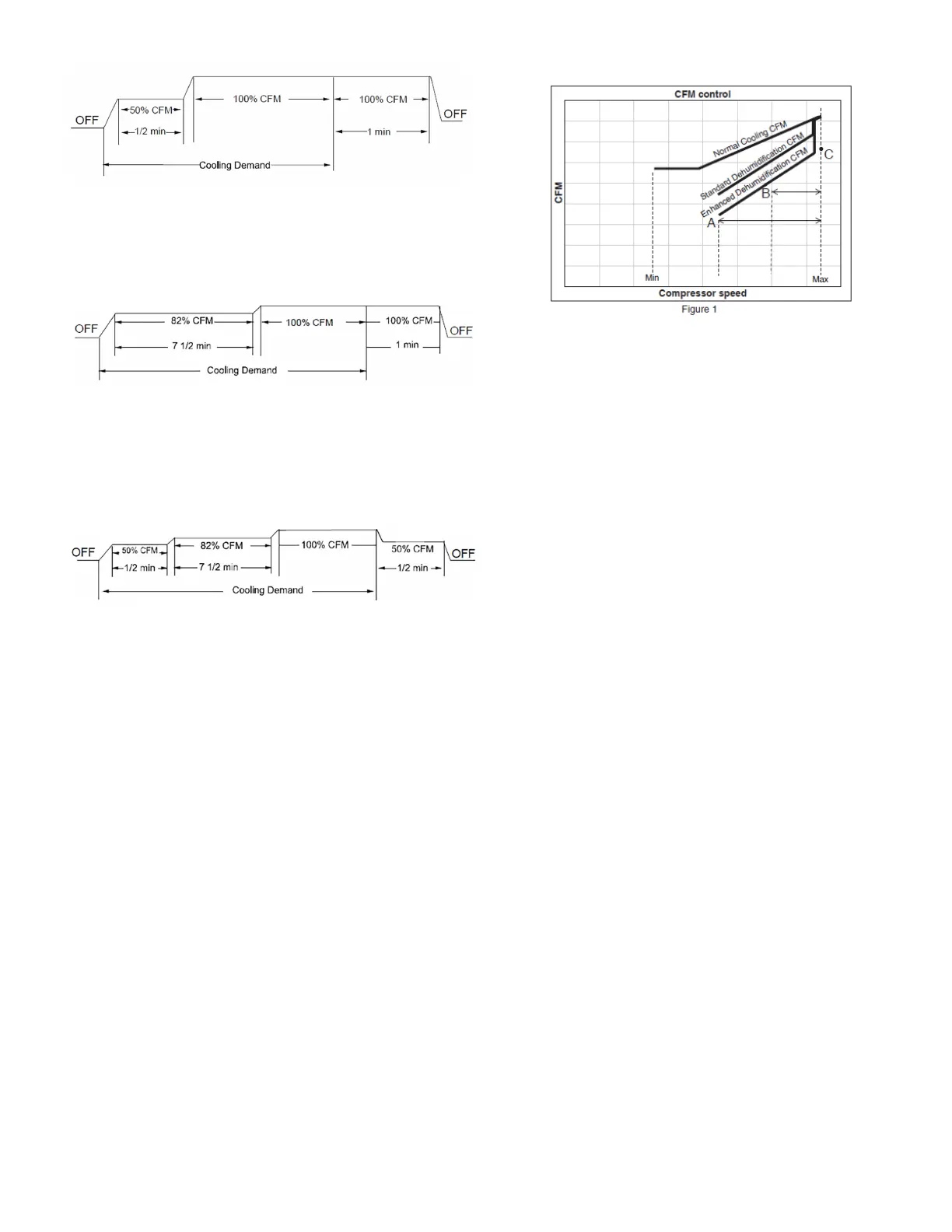
• Profile C ramps up to 82% of the full cooling demand airflow
and operates there for approximately 7 1/2 minutes. The
motor then steps up to the full demand airflow. Profile C
also has a one (1) minute 100% OFF delay.
• Profile D (default) ramps up to 50% of the demand for
1/2 minute, then ramps to 82% of the full cooling demand
airflow and operates there for approximately 7 1/2 minutes.
The motor then steps up to the full demand airflow. Profile D
has a 1/2 minute at 50% airflow OFF delay.
DEHUMIDIFICATION SELECT*
When Dehumidification mode exists, the circulating fan output
is reduced, increasing system run time, over cooling the
evaporator coil and ultimately removing more humidity from
the structure than if only in cooling mode.
The system can have Dehumidification operation in setting
“Standard”, “A”, “B” or “C” of “dehumidificatoin” menu
based on dehumidification demand.
Setting “Standard” allows for the widest compressor operation
range with lower CFM than Cooling mode.
In the Enhanced Dehumidification (setting A, B and C) the
indoor airflow is lower than Standard Dehumidification
(Standard).
Setting “A” allows for the same compressor operation range as
standard Dehumidification with lower CFM than standard
dehumidification (Standard).
Setting “B” limits compressor operation range and keeps high
dehumidification capacity.
In setting “C” the system runs fixed at 100% compressor and
airflow. See Figure 1.
NOTE: In high humidity environments, sweating on supply
ducts, cased coils or air handler cabinets can become an issue
in Enhanced Dehumidification operation. It is strongly
recommended covering then with 2" fiberglass insulation for
these installations.
* The specification of DZ20VC0241BD, 0361BC, 0481BC and
0601BC or earlier models are different from this specification.
For details, see the Installation Manual or Service Manual that
matches the Major and Minor revision of model name.
MAX COMPRESSOR RPS / MAX RPS OFFSET
Max compressor speed at which the outdoor unit will operate
can be changed using thermostat. Max compressor speed can
be changed to get the required capacity or efficiency.
Once the maximum speed is set, the system operates between
the set maximum speed and default low speed.
Based on the compressor speed displayed in “MAX COMPRES-
SOR RPS” the maximum compressor speed can be Increased or
decreased in the “MAX RPS OFFSET” menu.
HEAT SETTING
This menu allows for the adjustment of several heating
performance variables. Heat Airflwo trim (*1), Heat Airflow ON
Delay, Heat Aifflow OFF Delay and timed Defrost interval can be
adjusted in this menu. Time interval of 30, 60, 90, and 120
minutes between two defrost cycles can be set to suit the
weather conditions and performance of the unit.
SET THERMOSTAT TO ADJUST INDOOR AIR CFM TRIM *1
User can change the airflow trim at high, intermediate and low
for cooling and heat pump mode.
Select:
Cool/Heat Airflow Trim (High): high speed cooling/heating
Cool/Heat Airflow Trim (int): intermediate speed cooling/
heating
Cool/Heat Airflow Trim(Low): low speed cooling/heating Under
each trim setting, the airflow can be increased or decreased by
a certain percentage.
*1
1) At Cool and Heat Hi speed trim, DZ20VC0601* with
D*96VC0804C, D*97MC0804C and DM80VC0804C combination
trim more than 5% settings are invalid. Trimmed up CFM makes
miss matching error.
2) At Cool Hi speed trim, Other than the above, depending on
the connected indoor unit, there are restrictions on the positive
side Trim setting.
If you want to change the Cool Airflow Trim to positive side, be
sure to confirm the Airflow Trim restrictions in the latest
indoor unit installation manual. The latest manual can be
obtained from the website “DAIKIN CITY
(Installation Manual/Unitary Split System)” or
“PartnerLink(InfoFinderPlus/ \Literature)”.


 To Next Page