Installation Manual 3P291714-2B
DCM601A71 intelligent Touch Manager
39English
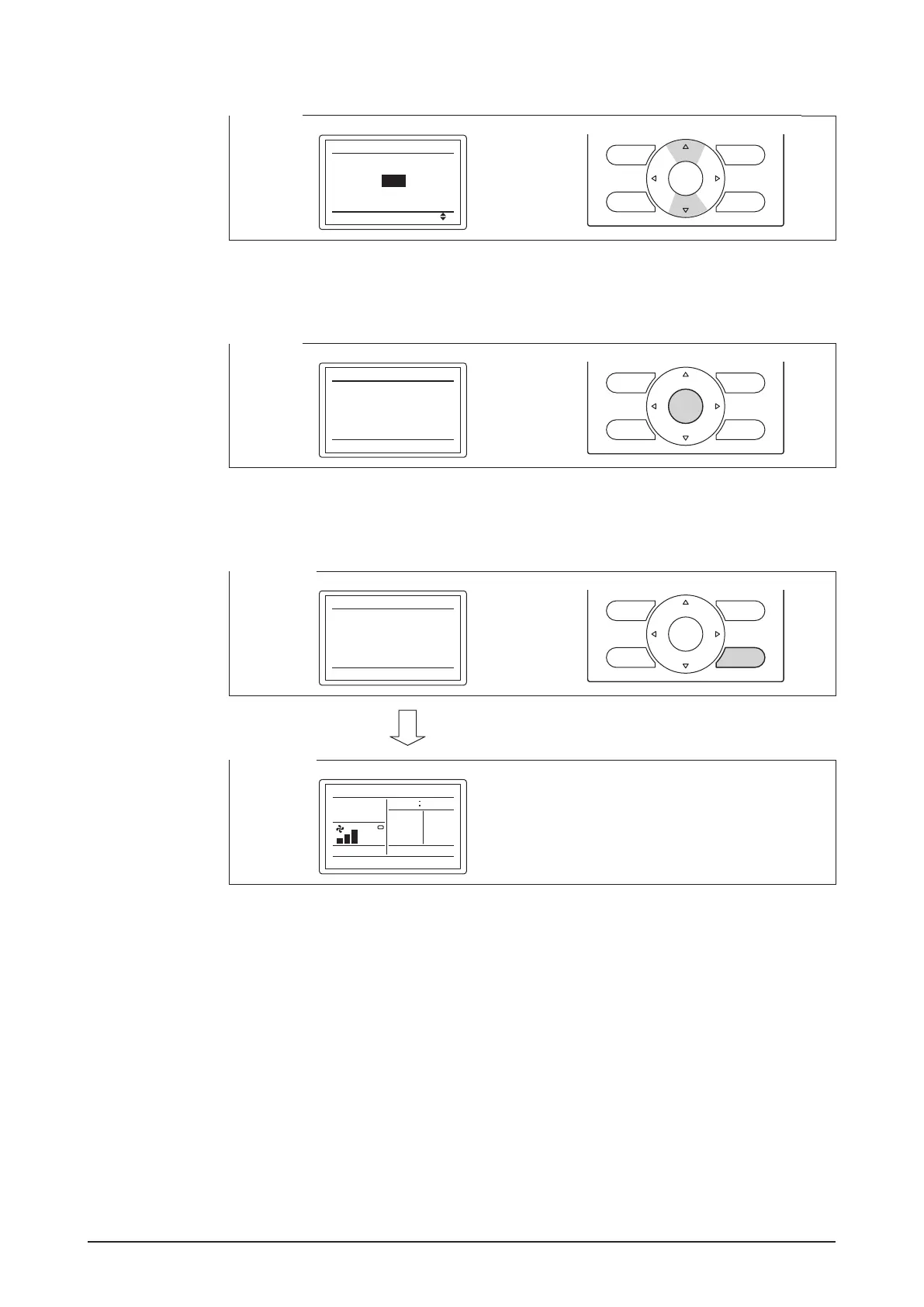
5. Using the Up/Down buttons, select the address you want to set.
<Step 5>
Gr Addr.
Release
1-00
Change
Group Address (Group)
6. Press the Menu/OK button.
The indication changes from “Release” to “Set” and the DIII-NET address is set.
<Step 6>
Gr Addr.
Set
1-03
Release
Group Address (Group)
7. Press the Cancel button three times. You are now brought back to the screen shown in
Step 7-2.
<Step 7-1>
Gr Addr.
Set
1-03
Release
Group Address (Group)
<Step 7-2>
Cool
Room
Thu
82
86
F
Set to
35
P
5
F
4.7.4 Setting an unique address to each unit (when Power Proportional Dis-
tribution (option) is used)
When power distribution is enabled, you need to set a unique address for each unit. For
how to set an address, refer to the “Commissioning Manual Supplementary Volume (Power
Proportional Distribution (EM11A027))”.










 To Next Page