AP20 Installation and Operating Guide Page 104
AP20 Installation & Operating Guide Document # 9301H39200 Ver. 1.25
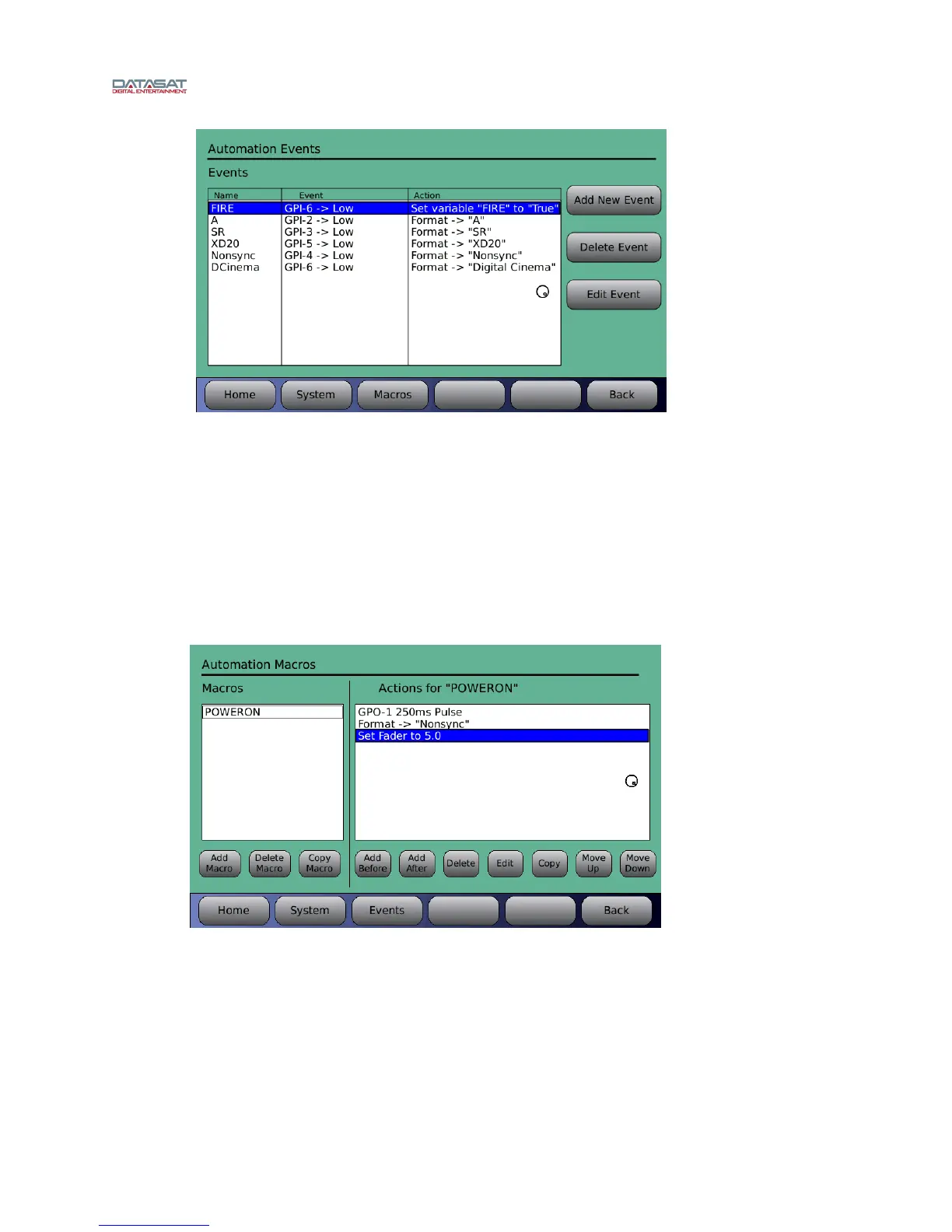
Once a Fire Alert event is programmed it will be sene in the Events screen. From here you
can edit or delete the event.
Once the Fire Alert Mode is activated, the AP20 must be restarted from the rear panel power
switch to reactivate normal operation. If the Fire Alert Mode pop up reappears after the
restart, then GPI-6 must still be low. When GPI-6 goes high and the AP20 is restarted from
the rear power switch, the AP20 should reactivate to normal operation.
Power On macro
When the AP20 is powered on, it will automatically run actions in a POWERON macro.
To set this up, go to Menu -> Automation -> Macros
Example: AP20 to pulse GPO-1 (start CD player), switch to NONSYNC format and adjust
fader level to 5.0.
To start, choose “Add Macro” and name it POWERON (as shown above). Be sure to match
case and spelling.
Next, add the actions required in the right “Actions for POWERON” column. Note: to add the
first action, choose “Add After” and then the action desired. Continue adding actions until all
are listed. More information on macros can be found in Section 4.5.2.



 To Next Page