AP20 Installation and Operating Guide Version 1.25
Appendix F. H338 Optical Film Card Option F-1 Document #: 9301H39200 Ver. 1.25
Appendix F: Optical Film Card Option
F1. Introduction
The Optional Optical Film card (H338) will enable the playback of standard optical film soundtracks
including Mono, A, and SR type. After the H338 card is installed, optical formats must be programmed
before playing optical sound.
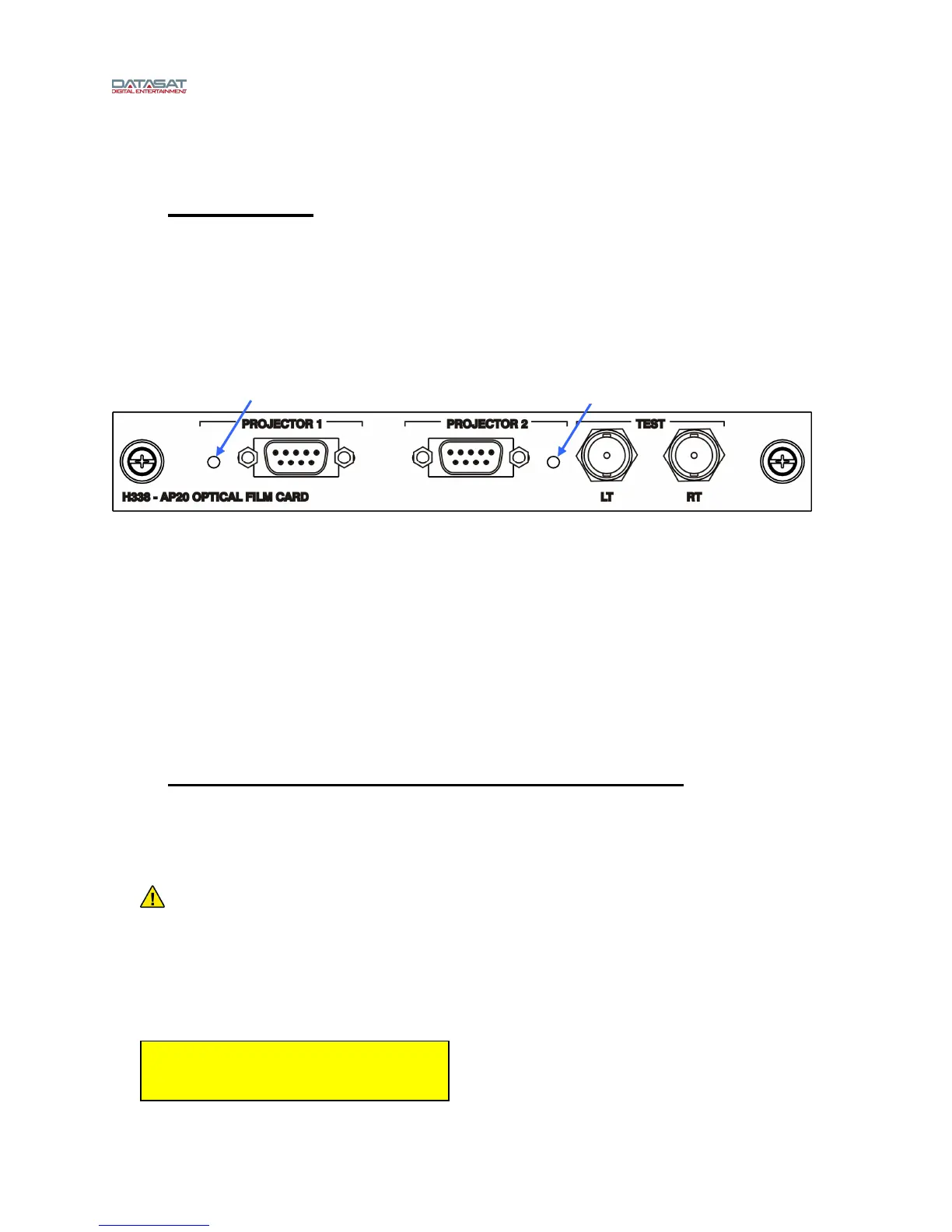
This card offers two inputs (Projector 1 & 2), see Figure 1 below. Both in
puts have an LED to indicate
which input is active. The automation in the AP20 must be programmed to switch the inputs at the proper
time. In addition to these inputs, there are two Lt/Rt test points. These are BNC type connectors that are
used for alignment of the projectors optics.
Figure 1 – H338 Optical Film Card
The remainder of this document is organized in 3 sections:
• Section F2: H338 card installation and verification of AP20 software version (this section may be
skipped if the AP20 was purchased with the Optical Film Card option from the factory).
• Section F3: Setting up the AP20 menus for Optical formats. If the AP20 was purchased with the
Optical Film Card option from the factory, then optical formats have already been added to the
configuration and button assignments made. You may skip to Section F4 - Alignment. Note:
Factory settings for A-type and SR default to Matrix Bass Extension set “On”. See Section F3.4
for more information on Matrix Bass Extension.
• Section F4: Alignment.
F2. H338 Card Installation and Software Update
Note: Skip to section F3 if the AP20 was purchased with the Optical Film Card option installed in the
factory
F2.1. Software Update
Verify that theAP20 system software is at V1.02.00 or above. If an earlier version of software is
installed, it must be updated before installing the H338 card. Failure to update software before
installing the H338 card will cause the software to malfunction.
The current AP20 software version may be found by selecting Menu → System → System Info. The
current version is displayed in the yellow box on the upper left of the screen. The example below
shows the earliest acceptable software version.
The latest software version will be included with the H338 card (if provided as part of the H458 field
upgrade kit).
Version: 102.00
BuildDate: Nov 1 2010
Pro
2 LED Pro
1 LED



 To Next Page