AP20 Installation and Operating Guide Version 1.25
Appendix F. H338 Optical Film Card Option F-2 Document #: 9301H39200 Ver. 1.25
Check with Datasat Digital Entertainment Technical support at www.datasatdigital.com
for the latest
update that will include fixes for known issues and feature enhancements.
F2.2. H338 Card Installation
Tools required: Phillips head #2 screw driver
Caution: The H338 card contains parts that are static sensitive. Use caution when handling to
avoid damage. Keep the card in the anti-static bag until needed. Just before removing the card from
the bag, hold the bag and touch the chassis of the player. This will make your body the same
electrical potential as the player (and will prevent static discharge). It is a good idea to stand on a
linoleum or cement floor (not carpet) when handling the card.
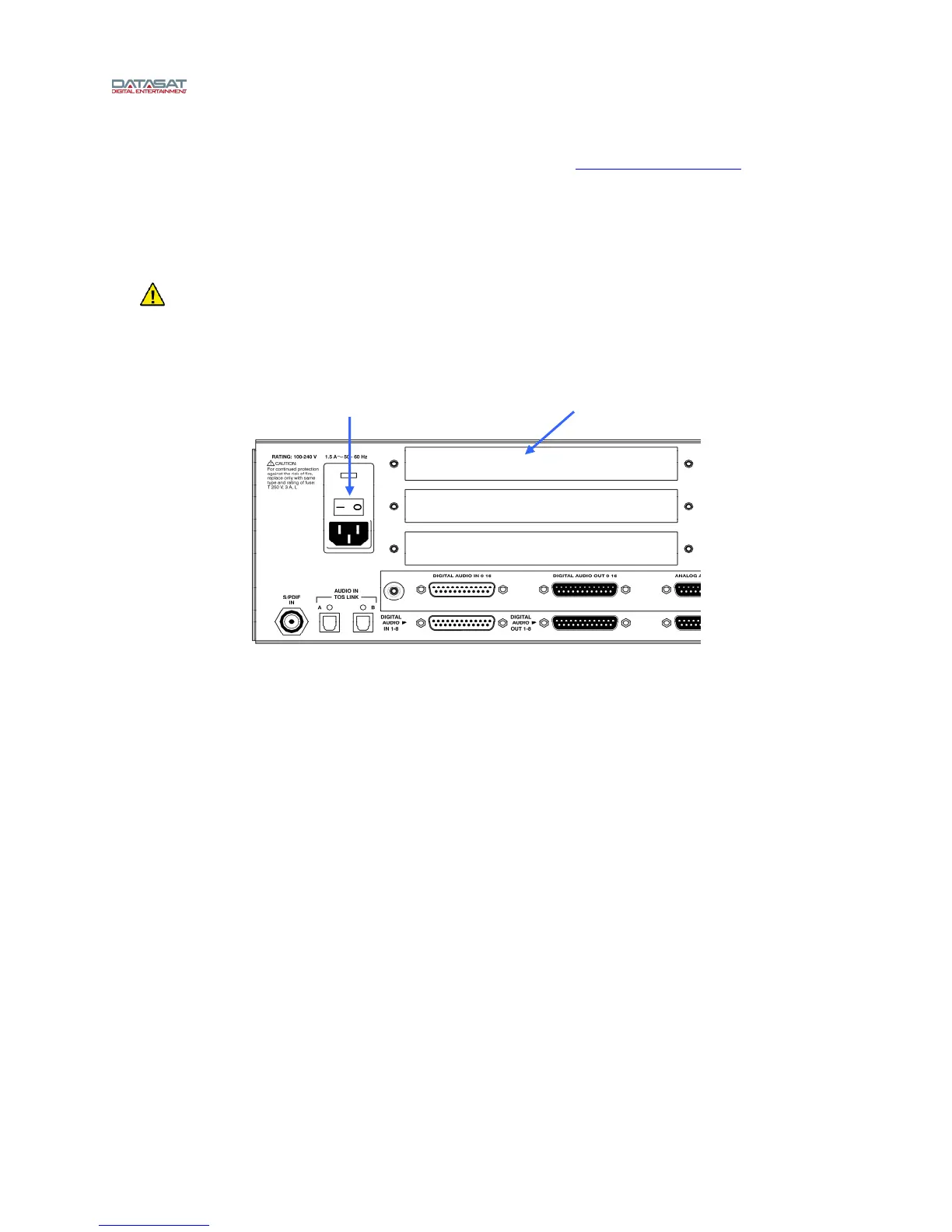
Figure 2 – AP20 Rear Panel
• Turn off the AP20’s rear panel power switch and unplug the power cord.
• Remove one of the three cover plates from the AP20 option slots. All slots are identical.
• Slide the H338 card into the card guides of the option slot and gently push the card into its
mating connector. Tighten the attached thumbscrews.
Power switch Option slot



 To Next Page