AP20 Installation and Operating Guide Version 1.25
Appendix F. H338 Optical Film Card Option F-12 Document #: 9301H39200 Ver. 1.25
F4.4.3. Cell Alignment
Items needed: Left/Right test film (CAT 97), oscilloscope and specific tools required to make
adjustments, such as Allen/Hex Wrenches, small screw driver etc.
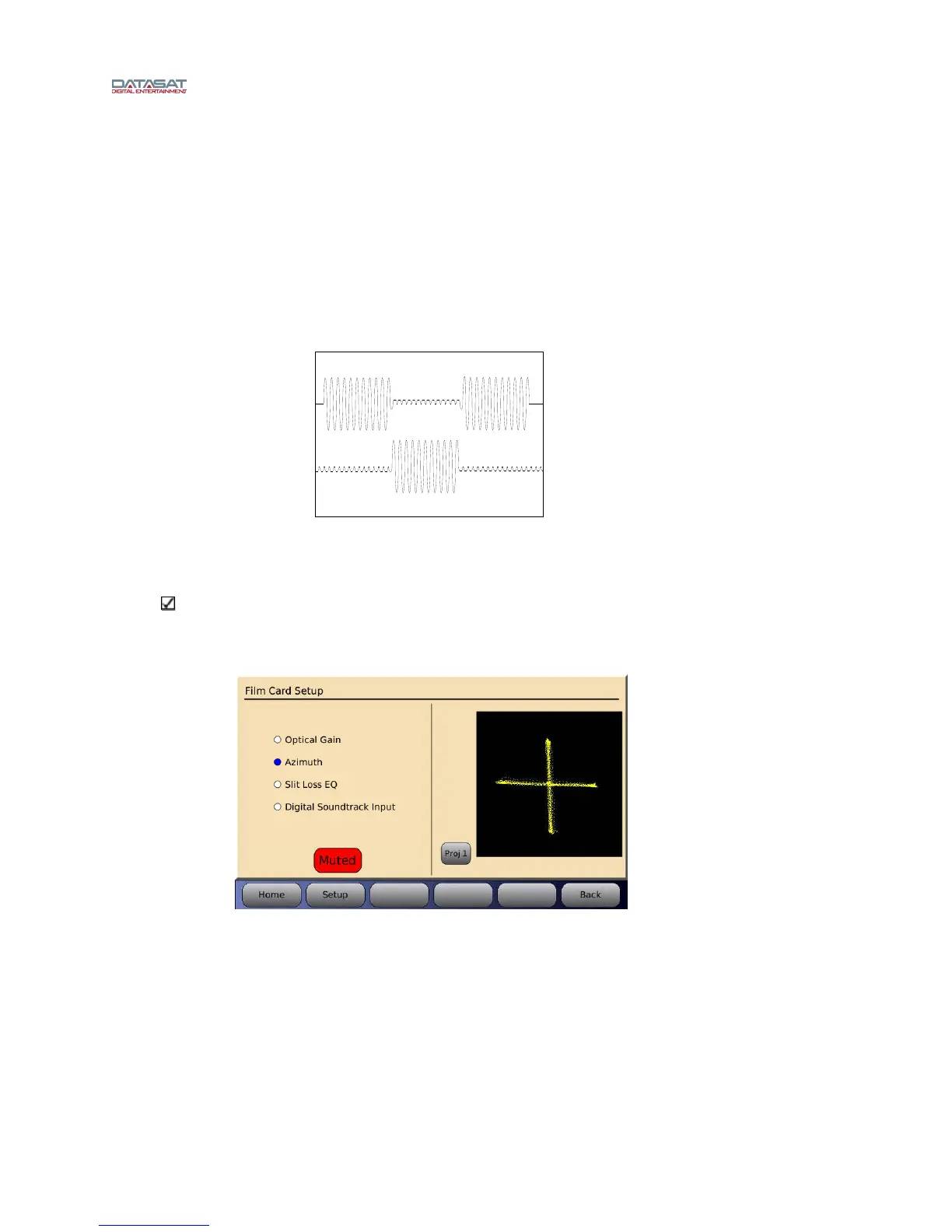
Thread up and play the Left/Right test film (CAT 97). This test checks for crosstalk between
the Left and Right channels. The goal is to have both channels at equal level. If necessary,
make adjustments to the solar cell by moving it left or right across the film path to achieve
results as seen in Figure 14. Refer to th
e projector manufacturer’s procedure for this
adjustment.
Figure 14 – Crosstalk using Cat 97 test film
Note: while running the CAT 97 test film you can also select Azimuth in the AP20’s optical
set up screen. If alignment is correct you should be able to observe a cross on the screen as
shown in Figure 15. The
same applies to viewing on the oscilloscope in X/Y mode.
Figure 15 – Optimum LED to lens alignment



 To Next Page