AP20 Installation and Operating Guide Version 1.25
Appendix F. H338 Optical Film Card Option F-14 Document #: 9301H39200 Ver. 1.25
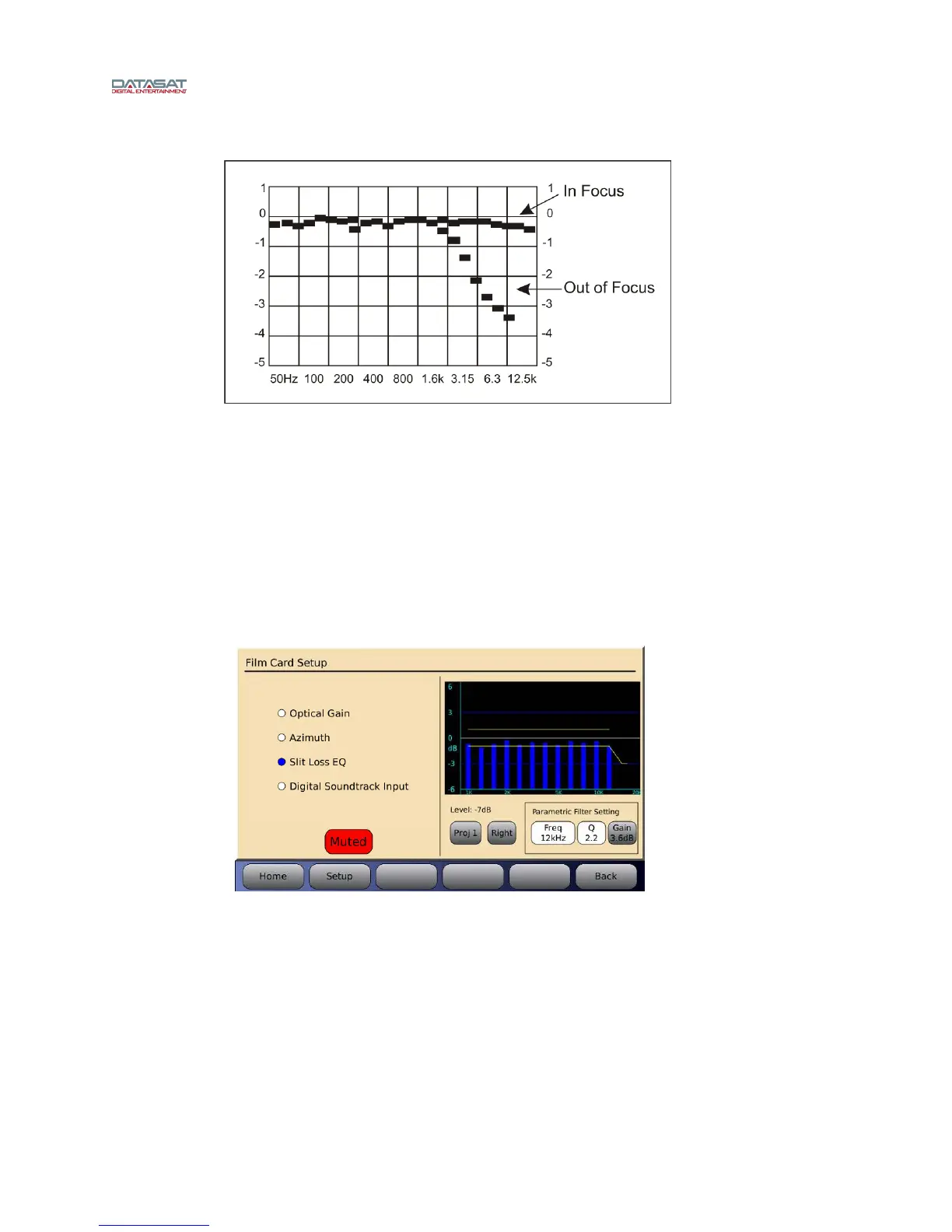
Figure 17 – Focus
After the flattest response is achieved by adjusting the projector optics, the final slit loss
correction is made using the Parametric Filter Settings, see Figure 18.
F4.4.5. Slit Loss EQ
When Slit Loss EQ is selected a graph of the slit loss adjustment is shown on the right of the
screen (see Figure 18 below). The goal
is to achieve a flat response. Each frequency level
should meet reference (“db” on the graph) as shown. Note the roll-off after 12.5 kHz.
Menu (System) → Formats → Format Options → Film Options → Film Setup →
Slit Loss EQ
Figure 18 – Slit Loss EQ
A projector select button is located below the graph: Projector 1 = Proj1 and projector 2 =
Proj2. Press the button to select.
The Level number above the Proj button is a general indicator of the input signal level that
can be used to confirm there is a valid signal. In Figure 18 the Level is -7dB, which is typical
when playing pink noise.
A button to allow switching between Right and Left channels is located to the right of the
Proj button. Press this button to select the channel.



 To Next Page