AP20 Installation and Operating Guide Version 1.25
Appendix F. H338 Optical Film Card Option F-16 Document #: 9301H39200 Ver. 1.25
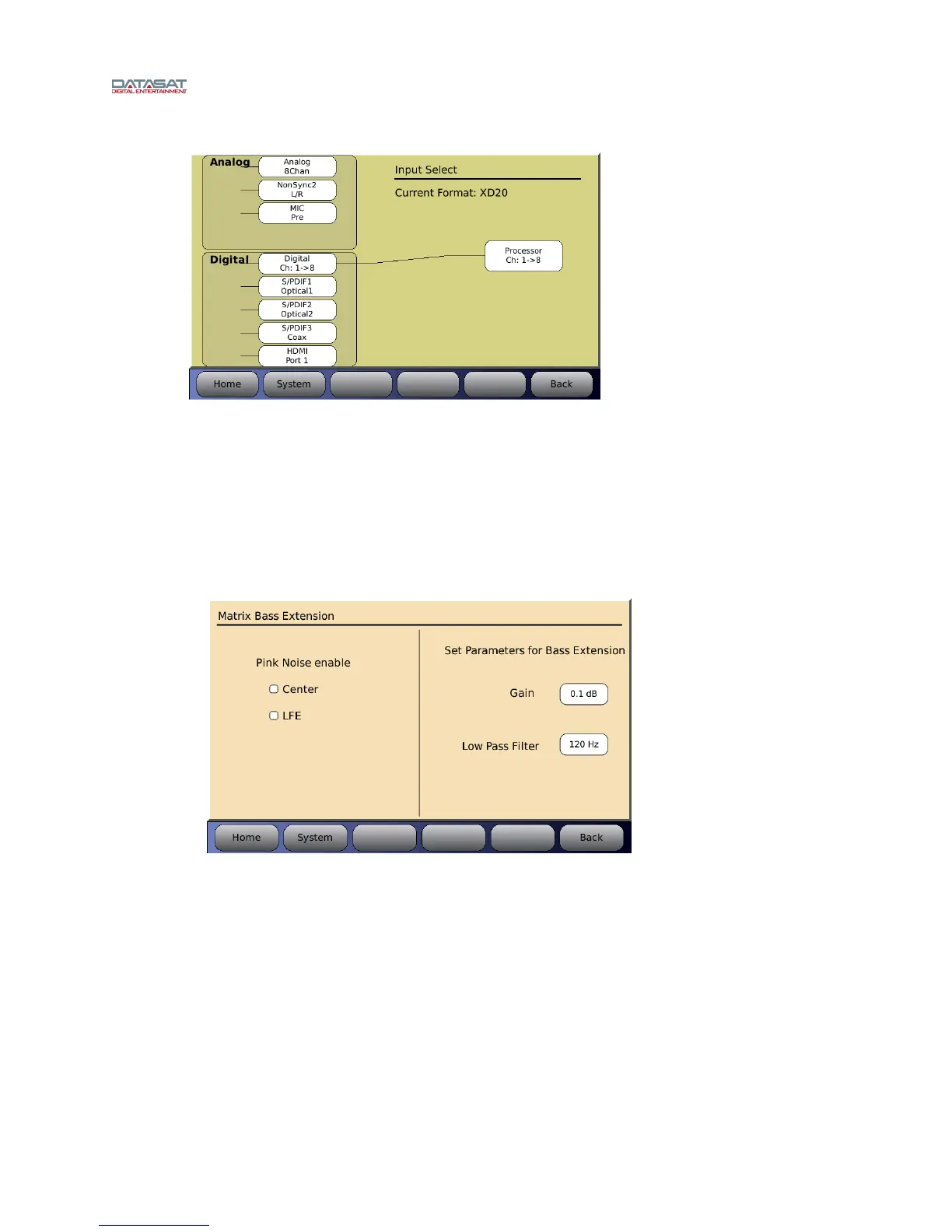
Menu (System) → Formats → Input Source
Figure 20 – Input Source Screen
F4.4.7. Matrix Bass Extension
Items needed: RTA with Microphone
When Matrix/Optical Bass Extension (OBE) is selected, the left half of the screen allows you
to enable pink noise on Center and/or LFE channels. The right half of the screen provides
settings for the parameters of optical bass gain and low pass filter frequency.
Menu (System) → Formats → Format Options → Film Options → Bass Enh
Figure 21 – Matrix Bass Extension
Gain allows you to set the gain for the optical bass. Press the button with the number
displayed and rotate the main fader to adjust for the desired level.
Low Pass Filter allows you to choose the frequency of the filter. Press the button with the
number displayed and rotate the main fader to adjust the desired frequency.
When adjusting the Bass Extension, set up a microphone in the auditorium. It is best to use a
single microphone, or if using a multiplexer select single microphone only, and connect it to
the RTA.
Select an optical format on the AP20, enable pink noise on the center channel, and note the
level and low frequency roll off displayed on the RTA. Select the appropriate Low Pass Filter
setting by pressing that button and using the fader knob to make any changes required to
match the low pass filter to the roll off measured.



 To Next Page