AP20 Installation and Operating Guide Version 1.25
Appendix G. Connecting Two AP20 Units G-1 Document #: 9301H39200 Ver. 1.25
Appendix G: Connecting Two AP20 units
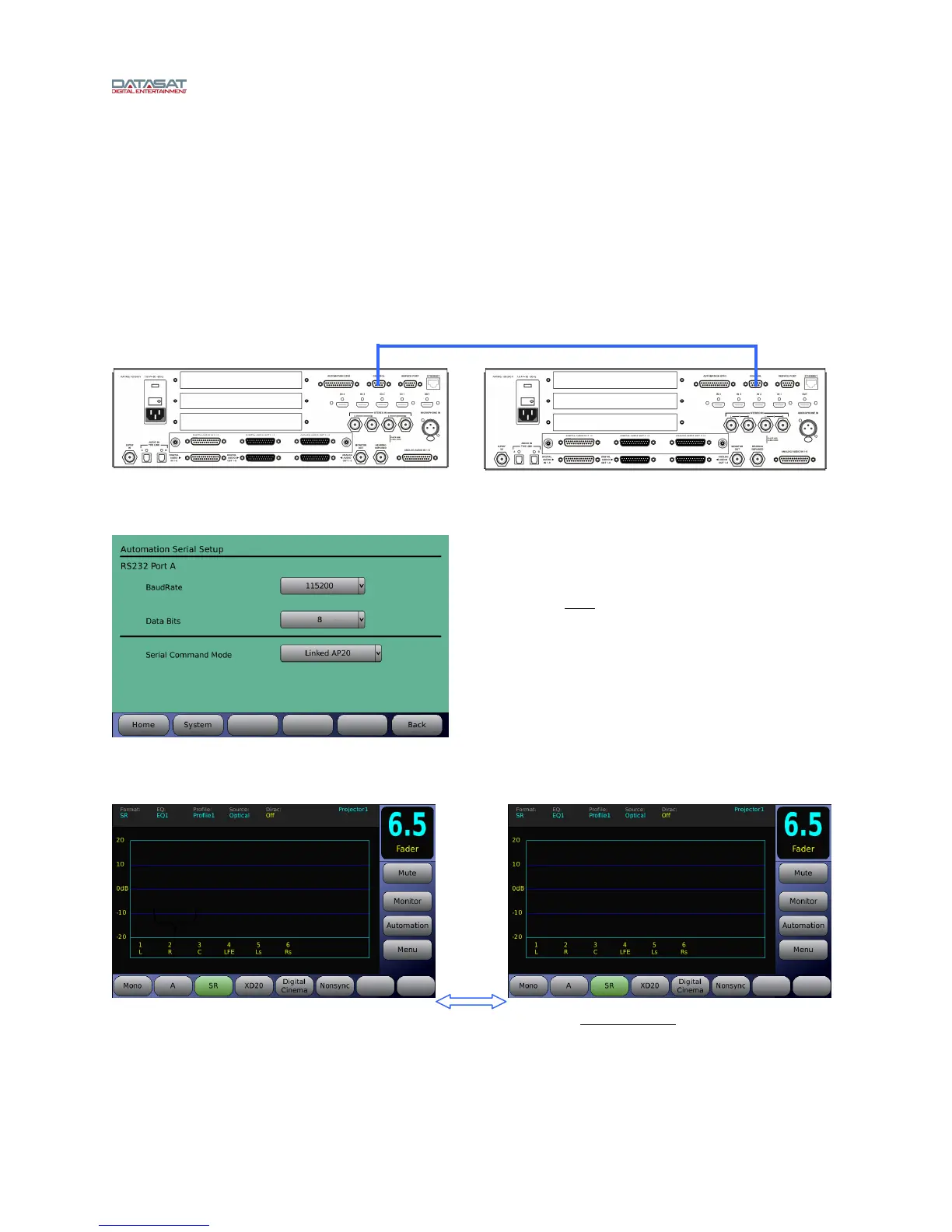
Two AP20 units can be linked together serially. When this is done the two units work in unison locking
their format, fader level, and mute selection.
Both AP20 units must have matching format names. The names must match exactly although their
format profiles may be different.
A null modem cable is needed.
Connect a null modem cable to the Control connector of each AP20 unit.
AP20 #1 AP20 #2
When programming format names on each AP20, the format names match exactly
, as shown in the
example above. When selecting any of the three available formats on either AP20, that format will be
chosen on both AP20 units. The above shows SR as selected.
Note: If one of the AP20’s Nonsync format was named “nonsync” or “Non sync” it would not work.
Both must be named exactly as in the above example, AP20 #1 Nonsync, AP20 #2 Nonsync.
Program both AP20s to lock onto the other by
selecting:
Automation > Serial > Serial Command Mode
Select “Linked AP20”
Null modem cable
Formats



 To Previous Page