6/ Repair Procedures
6-44 1503-0151-000 5/26/0
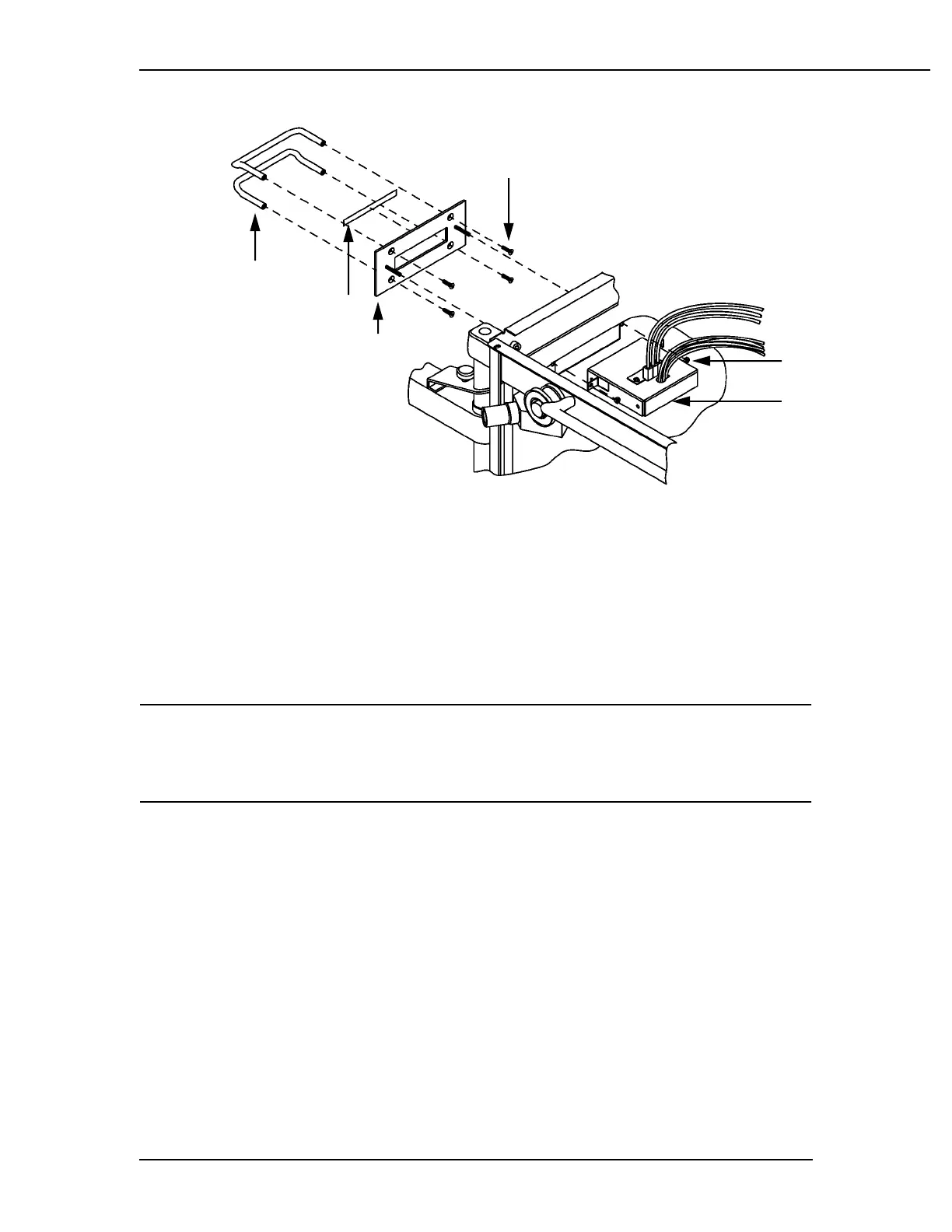
1. Handle, sensor interface, 1002-3952-000 (2)
2. Label, patient interface, 1001-3464-000
3. Panel, sensor interface 210, 1002-3970-000
4. Screw, # 10-32 x 3/8, 0140-6231-106 (4)
5. Nut, keps M4, 0144-3717-314 (2)
6. Harness, SA, SIB, 1503-3081-000
Figure 6-36
Patient interface/harness assembly (shown mounted on Excel 210 SE left side)
CAUTION: w Do not disconnect the hoses while the SIB is under pressure. This may
damage the SIB components. Ensure the flow transducers are not pres-
surized by removing the breathing circuit before disconnecting any of
the SIB interconnecting hoses.
6.11 Patient Interface Panel/Harness Assembly
Removal From Modulus SE
Note: The Patient Interface Panel/Harness is replaced as an assembly which in-
cludes the flow transducer connectors, oxygen sensor connector, interface har-
ness, transducer tubing with color coded connectors and housing.
1. Set the SE System Master Switch to OFF.
2. Unplug the system AC power cord from the AC source.
3. Disconnect the Inspiratory and Expiratory Flow Transducers from the Interface
Panel.
4. Disconnect the Oxygen Sensor Harness from the Interface Panel.
AA.72214
1
2
3
4
5
6



 To Next Page