4/Tests and Troubleshooting
1503-0151-000 5/26/0 4-3
4.2. Service Mode Menu
The service calibration mode tests and/or calibrates hardware necessary to pre-
pare a ventilator in the plant for factory shipment and to service a ventilator in the
field. Tests may be run manually with the rotary encoder (also called the adjust-
ment knob).
To enter this service mode, push and hold in the adjustment knob at power-up until
the "Service Confirmation" menu appears. Then select "Service Mode" from this
menu.
Another method to access the service mode is by a three key reboot. This method
can be used when the ventilator is in the normal operating mode. Ensure the Me-
chanical Ventilation switch is off, Apnea Detect Off and Volume Monitor Standby
modes are selected. Press the
V
T
/
Press., PEEP, and the menu switches at the
same time. Then push and hold the adjustment knob until the "Service Confirma-
tion" menu appears. The ventilator enters the service mode without having to pow-
er down and then back up.
All data displayed by the ventilator during and after a service mode test or mea-
surement is also output to the serial port.
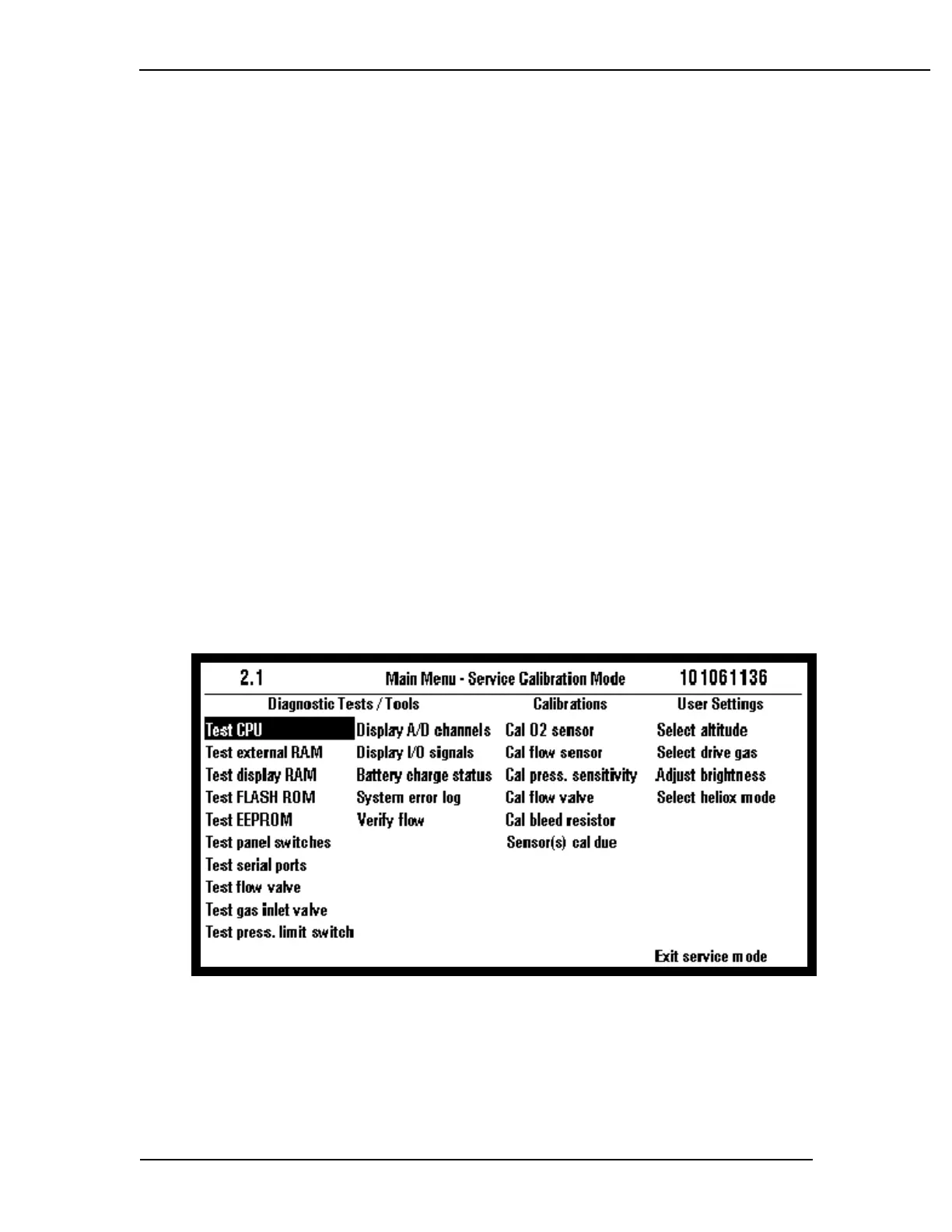
The service mode has a top level main menu screen which displays all the select-
able service tests in categorical order; Diagnostic Tests/ Tools, Calibrations and
User settings. Any service test can be selected from this menu with the adjustment
knob cursor. Software version and a date code are at the top of the screen.
Figure 4-1
Service mode main menu



 To Next Page