412 Clearing Jams
FILE LOCATION: C:\Users\fxstdpc-
admin\Desktop\0630_UG??\Mioga_SFP_UG_FM\Mioga_SFP_UG_FM\section27.fm
DELL CONFIDENTIAL – PRELIMINARY 9/13/10 - FOR PROOF ONLY
• Overtightening the guides may cause jams.
• Wipe the retard rollers in the tray or single sheet feeder with a cloth that is
slightly dampened with water if jams caused by misfeeding paper occur
frequently.
Identifying the Location of Paper Jams
CAUTION: Do not attempt to clear any jams using tools or instruments. This
may permanently damage the printer.
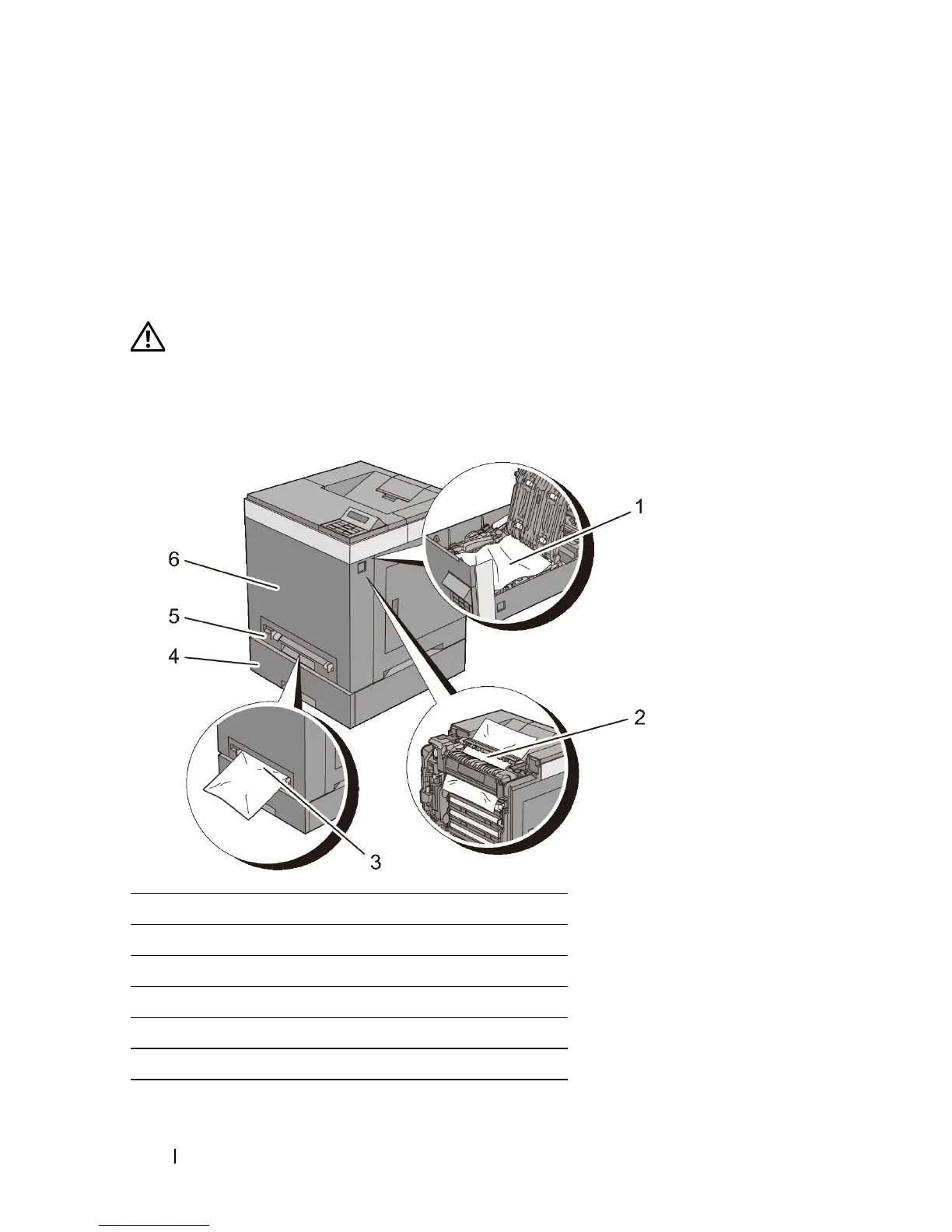
The following illustration shows where paper jams may occur along the print
media path.
1 Duplexer (2150cdn only)
2Fuser
3 Single Sheet Feeder (SSF)
4 Optional 250-Sheet Feeder
5 Standard 250-Sheet Tray
6 Front Cover











 To Next Page