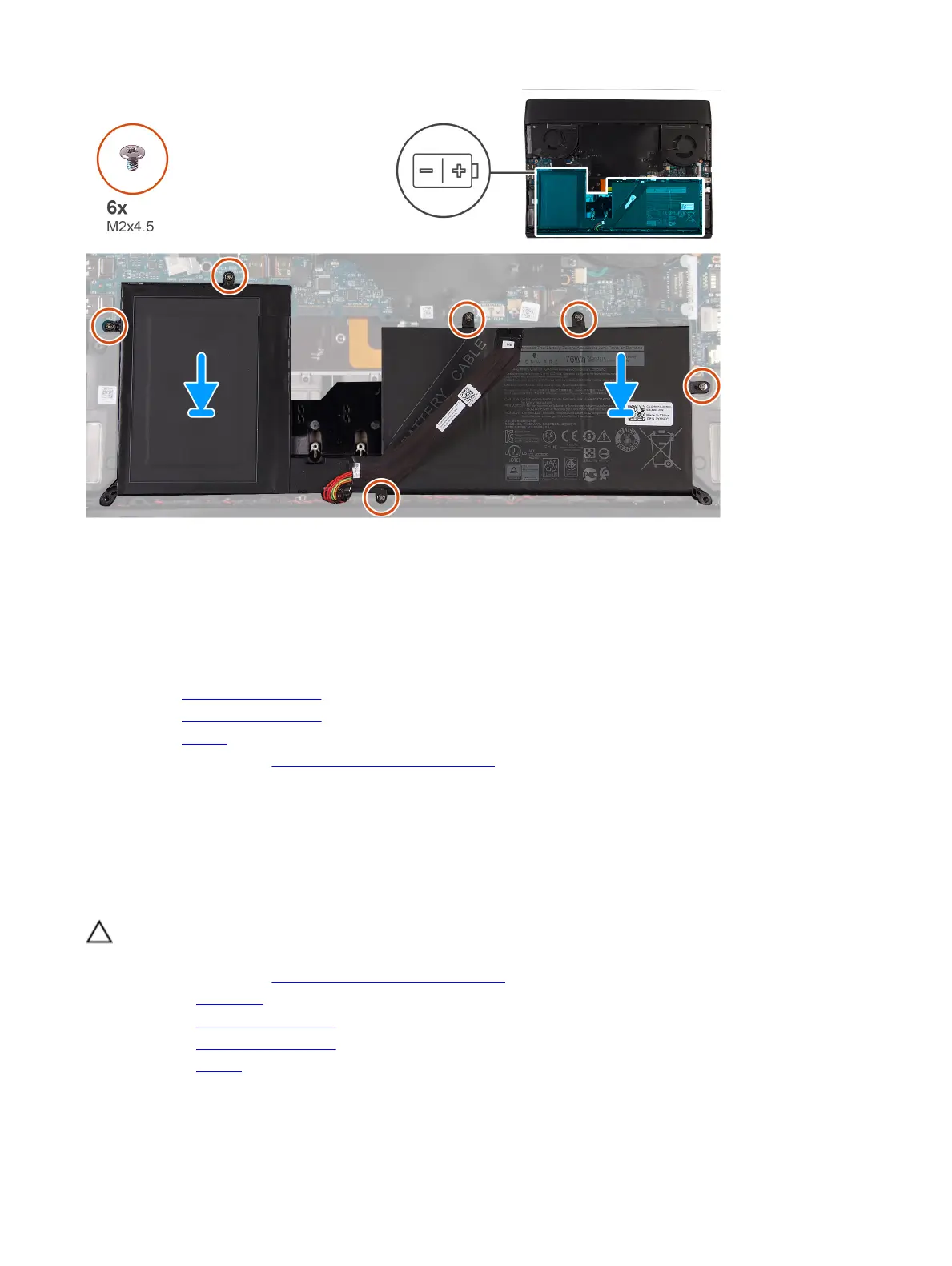
Steps
1 Place the battery on the palm-rest assembly.
2 Replace the six screws (M2x4.5) that secure the battery to the palm-rest assembly.
Next steps
1 Install the 2230 solid-state drive. (if applicable)
2 Install the 2280 solid-state drive. (if applicable)
3 Install the battery.
4 Follow the procedure in After working inside your computer.
Coin-cell battery
Removing the coin-cell battery
Prerequisites
CAUTION: Removing the coin-cell battery resets the BIOS setup program’s settings to default. It is recommended
that you note the BIOS setup program’s settings before removing the coin-cell battery.
1 Follow the procedure in Before working inside your computer.
2 Remove the base cover.
3 Remove the 2230 solid-state drive. (if applicable)
4 Remove the 2280 solid-state drive. (if applicable)
5 Remove the battery.
About this task
The following image indicates the location of the coin-cell battery and provides a visual representation of the removal
procedure.
27









 To Next Page