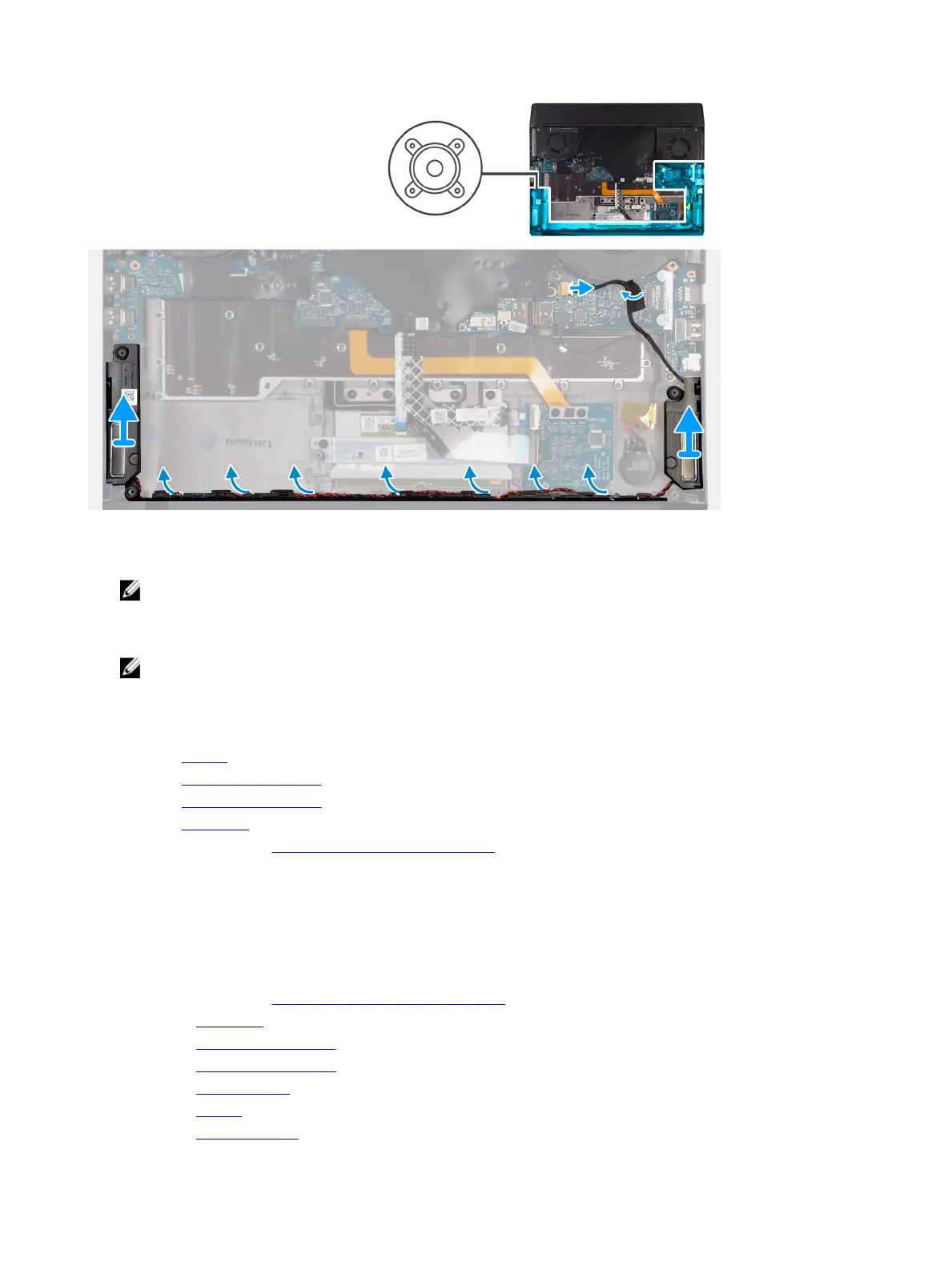
Steps
1 Using the alignment posts, place the left speaker on the palm-rest assembly.
NOTE: Ensure that the alignment posts are threaded through the rubber grommets on the speaker.
2 Route the speaker cable through the routing guides on the palm-rest assembly.
3 Using the alignment posts, place the right speaker on the palm-rest assembly.
NOTE: Ensure that the alignment posts are threaded through the rubber grommets on the speaker.
4 Connect the speaker cable to the right I/O-board.
Next step
1 Install the battery.
2 Install the 2230 solid-state drive. (if applicable)
3 Install the 2280 solid-state drive. (if applicable)
4 Install the base cover.
5 Follow the procedure in After working inside your computer.
System board
Removing the system board
Prerequisites
1 Follow the procedure in Before working inside your computer.
2 Remove the base cover.
3 Remove the 2230 solid-state drive. (if applicable)
4 Remove the 2280 solid-state drive. (if applicable)
5 Remove the rear I/O-cover.
6 Remove the battery.
7 Remove the right I/O-board.
38









 To Next Page