17
BHT-1600 Handy Terminal User Manual
1.2.2. WIRED DATA TRANSMISSION
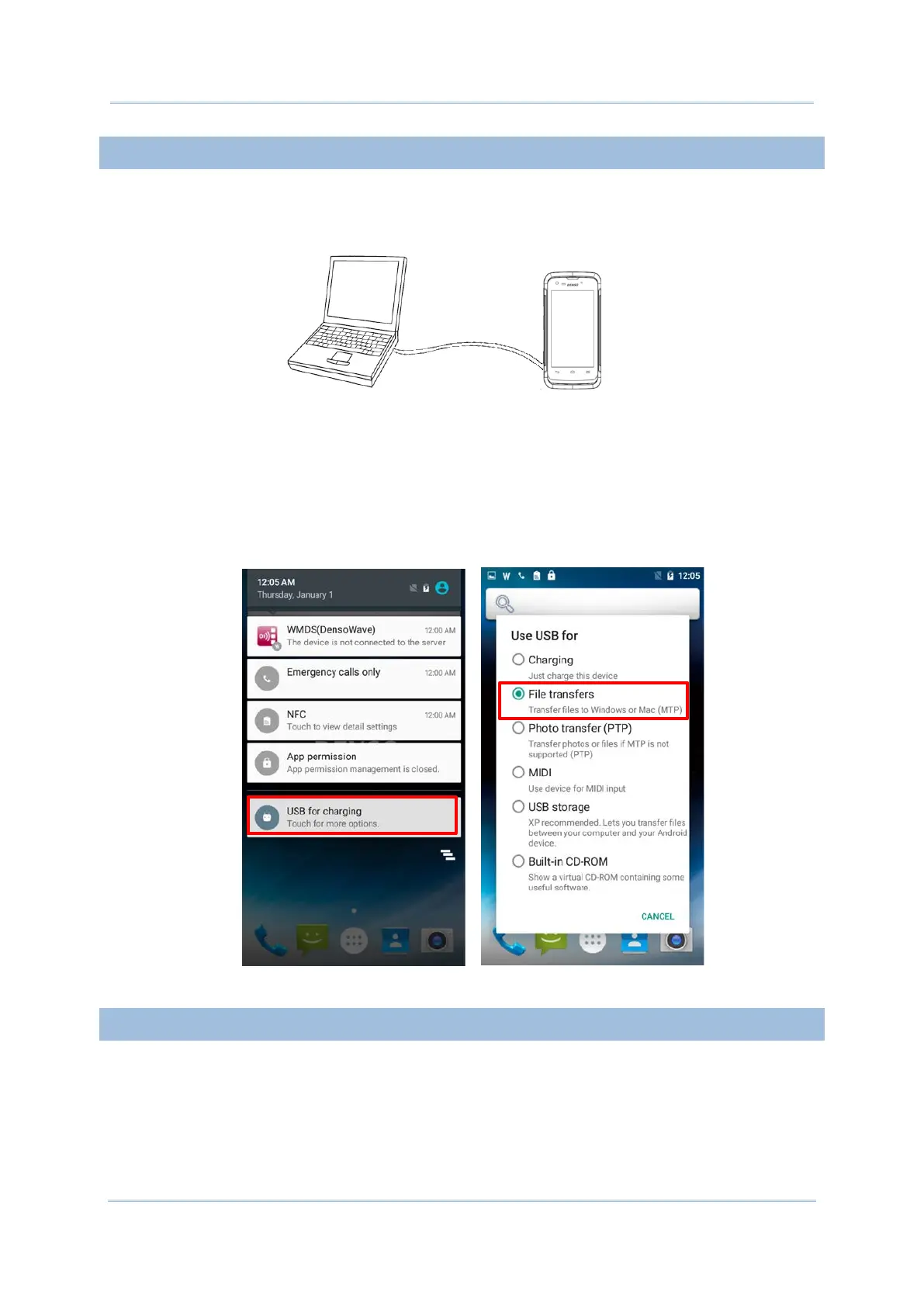
Use the micro USB cable to connect the handy terminal to your PC for data transmission.
1) Connect your device to the computer with supplied USB cable.
2) Swipe down from the status bar to reveal Notifications Drawer.
3) Tap “USB for Charging” to enter USB options. By default, the device will be in charging
mode, in which you are unable to access the files on this device from the PC client. To
transfer all types of files between your device and PC, choose “File transfers”. To
transfer videos and photos, you can select “Photo transfer (PTP)”, in which your
device will share only videos and photos in DCIM and Pictures folders.
1.2.3. USING WIRELESS NETWORKS
The handy terminal supports widely applied wireless technologies including Bluetooth v4.1
& v2.1+EDR, 802.11 a/b/g/n and NFC, and is able to send/receive data in real time in an
efficient way. Select GSM/GPRS/EDGE/WCDMA/UMTS/HSDPA/HSUPA/HSPA+/LTE modules
embedded (4G model only) for a total wireless solution for data and voice communication.



 To Next Page