Dexcom G5 Mobile System User Guide
87Starting a Sensor Session: Inserting Sensor, Transmitter, and Starting Your Session
(Continued from previous page)
Step Picture What you do
Inserting Sensor Wire
8
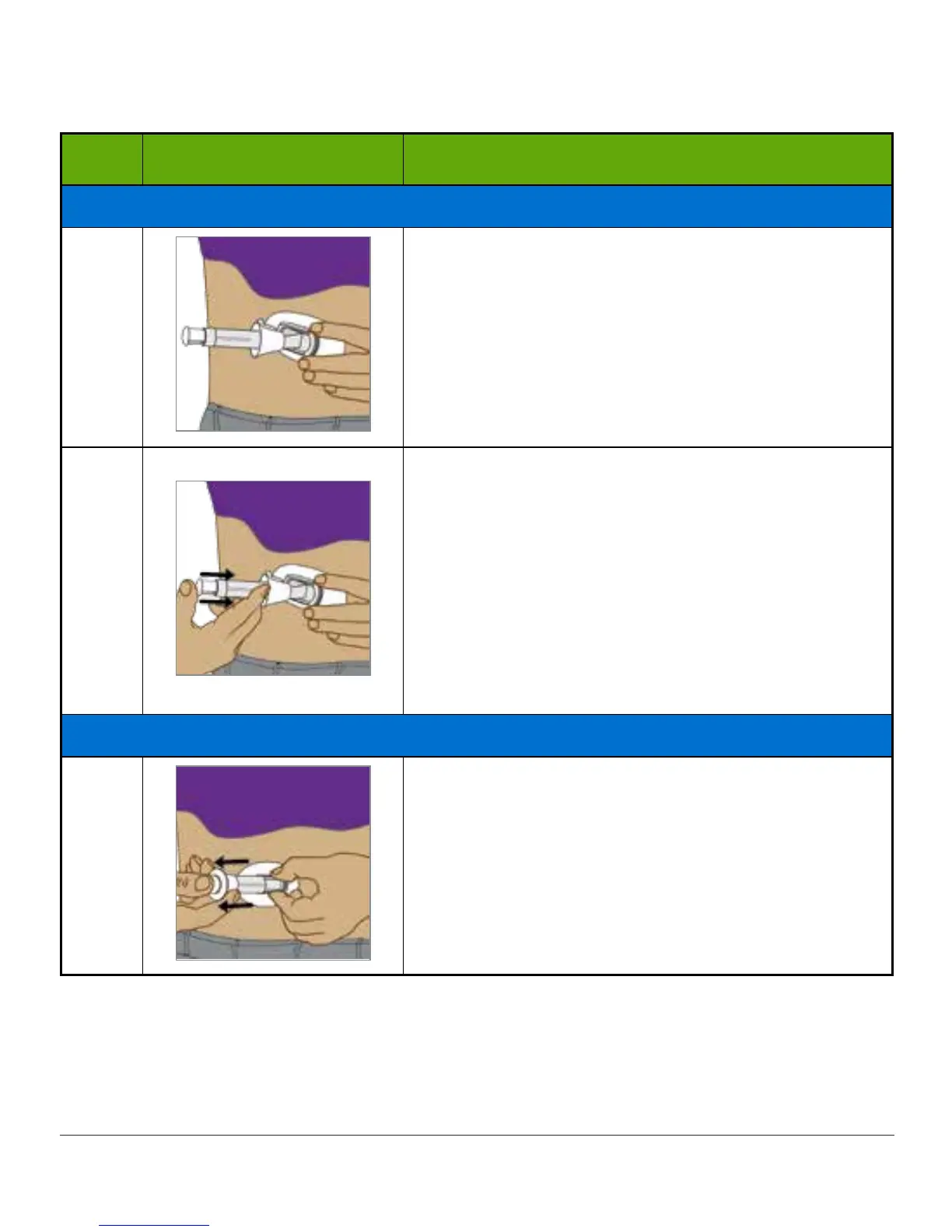
Place fingers of one hand on edges of adhesive
patch.
Pinch up your skin at the tips of the white adhesive.
9
Place two fingers directly above collar to steady
applicator barrel.
Place thumb on the white plunger.
Push plunger completely down the applicator
barrel.
• You should hear 2 clicks.
NOTE: Finger placement is important for correct
insertion.
Removing Applicator Barrel and Collar
10
Move two fingers from above collar to below collar.
Keep your thumb as a base on the white plunger.
Pull back collar all the way towards your thumb.
You should hear 2 clicks.
NOTE: Finger placement is important for correct
removal.
(Continued on next page)



 To Next Page