UTM-00339 | Rev 19
Page 151 of 253
DetNet South Africa Copyright © 2021
After the start-up sequence the identification number (1-10) will be displayed.
Remote control of the DigiShot
®
Plus 4G Commander is now possible from a CE4 Tagger within range (or a tablet
loaded with the required software).
Press and hold the button and press from the Main Menu on the CE4 Tagger to start the pairing function.
Select the appropriate DigiShot
®
Plus 4G Commander ID (1-10). The CE4 Tagger will establish a communication
link with one DigiShot
®
Plus 4G Commander at a time.
Commanders will clearly indicate their pairing status on the E-paper display.
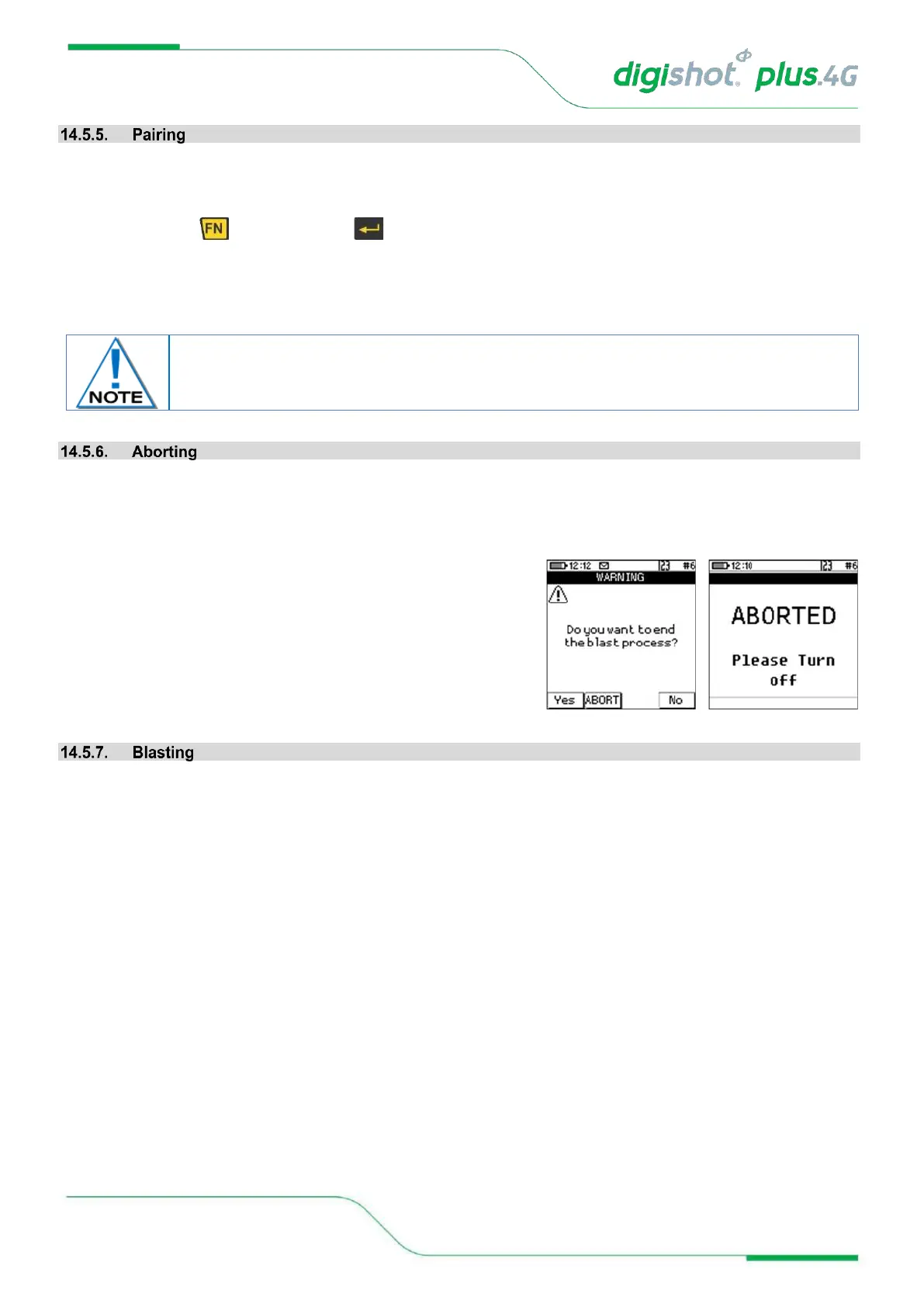
Choosing the ABORT option will return all devices in the setup to a safe state. No further activities can be initiated
remotely before cycling the power ON, on all said devices. Aborting is typically accomplished by pressing escape
and confirming the abort action when in an active blasting screen.
• Pressing the ESC button after arming will display a warning
with three options:
• Yes – this option will return to the main menu
• Abort – the blast will be aborted, and the user then
prompted to turn off Commander
• No – this option will return to the blast menu
Refer to the Blasting Overview contained in Chapter 19 of this document.



 To Next Page