13
© 2015 Directed. All rights reserved.
Adjusting the Doubleguard Shock Sensor
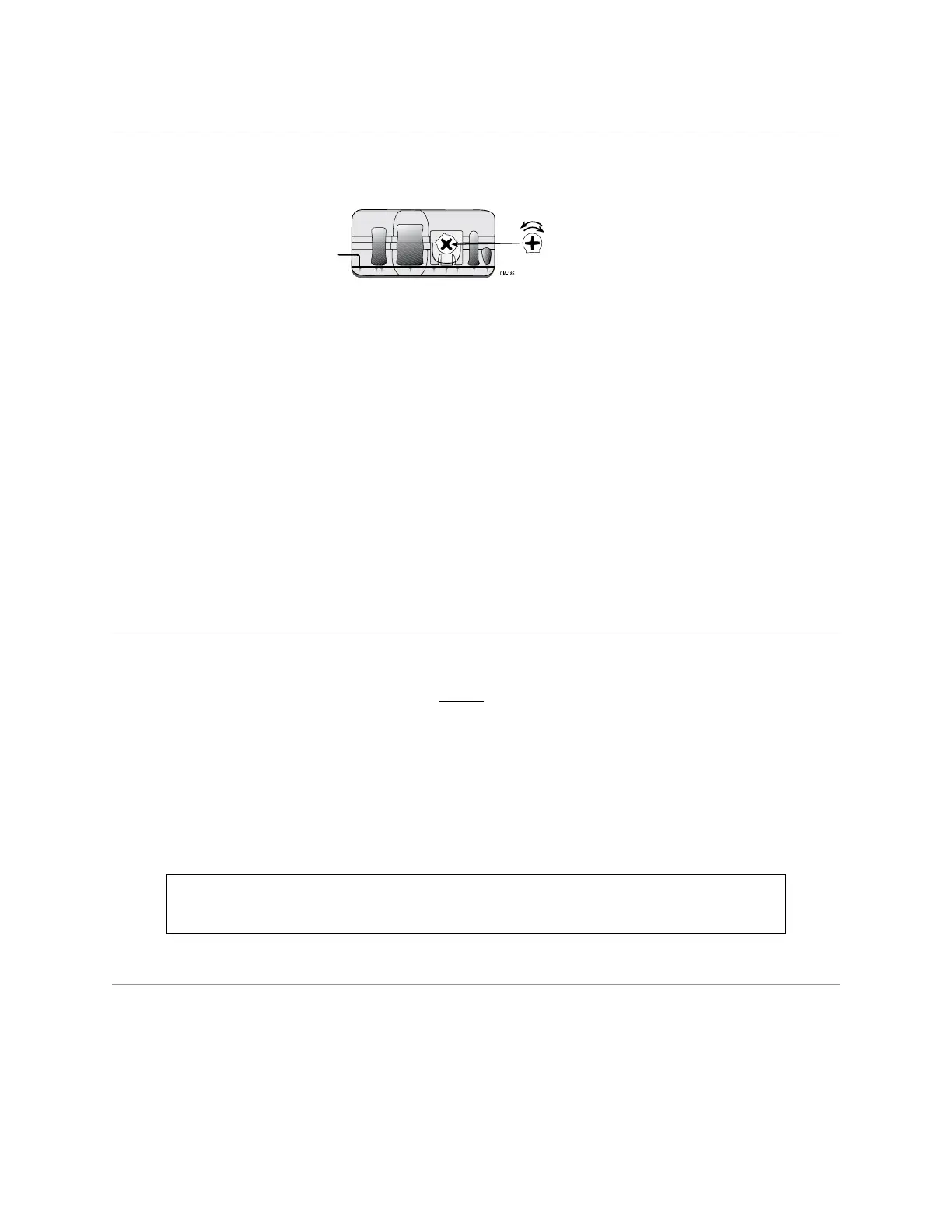
Important! Make sure the vehicle is disarmed. The Shock Sensor sensitivity can be adjusted by using a trim-
mer tool/screwdriver to turn the trimpot (trimmer potentiometer).
Trimpot
504D Doubleguard Shock Sensor
Adjusting the sensor:
1. Make sure the ignition is OFF and the system is disarmed.
2. With the sensor mounted in its permanent location, locate the trimpot on the shock sensor module and
using a trimmer tool/screwdriver:
• Turn the potentiometer clockwise for increased sensitivity or
• Turn it counterclockwise for decreased sensitivity
Note: You can test the new setting by cautiously impacting the vehicle with increasing intensity while not-
ing the LED status on the shock sensor. The LED turns on for a short duration for small impacts before turn-
ing off (indicating a Warn-Away trigger). The impact level required to fully trigger the alarm is indicated
when the LED remains on for a longer duration before turning off.
Note: The Shock Sensor adjustment cannot be performed using the remote control or the Bitwriter.
Initializing Virtual Tach (not needed w/analog or data tach
inputs)
To program Virtual Tach:
1. After the install is complete, remote start the engine. The programming operation may require 3 cranks of
the starter before the engine starts and runs. Do not turn off the remote start if this happens, it is a normal
programming operation.
2. Once the engine begins running, let it run for at least 30 seconds.
3. Using the remote control, send the remote start command to turn remote start off. Virtual Tach is pro-
grammed. To reset Virtual Tach, (see the Reset and Deletion section of this guide). Virtual Tach cannot be
reset with the Bitwriter.
Note: Virtual Tach is not recommended for diesel vehicles.
Virtual Tach handles disengaging the starter motor during remote starting – it does not address over-rev. If
the customer wants to have the over-rev protection capability, the Violet/White tach wire must be connected.
Important: After successfully learning Virtual Tach, a small minority of vehicle starters
may over or under crank during remote start. The Bitwriter can be used fine tune the
starter output time in 50 millisecond increments to compensate for such an occurrence.
Learning Analog or Data Tach (not needed with Virtual Tach)
To learn the tach signal:
1. Start the vehicle with the key. Within 5 seconds, press and hold the Control Center button.
2. After three seconds the status LED on the Control Center lights solid when a successful tach signal is
learned.
3. Release the Control Center button.
Note: When the analog or data tachometer is programmed, the main unit automatically enters the Tachom-








 To Next Page