Connections and Setup
75
Connecting the Phone Line
1
2
3
4
5
6
7
8
9
10
11
R
1
2
3
4
5
6
7
8
9
10
R
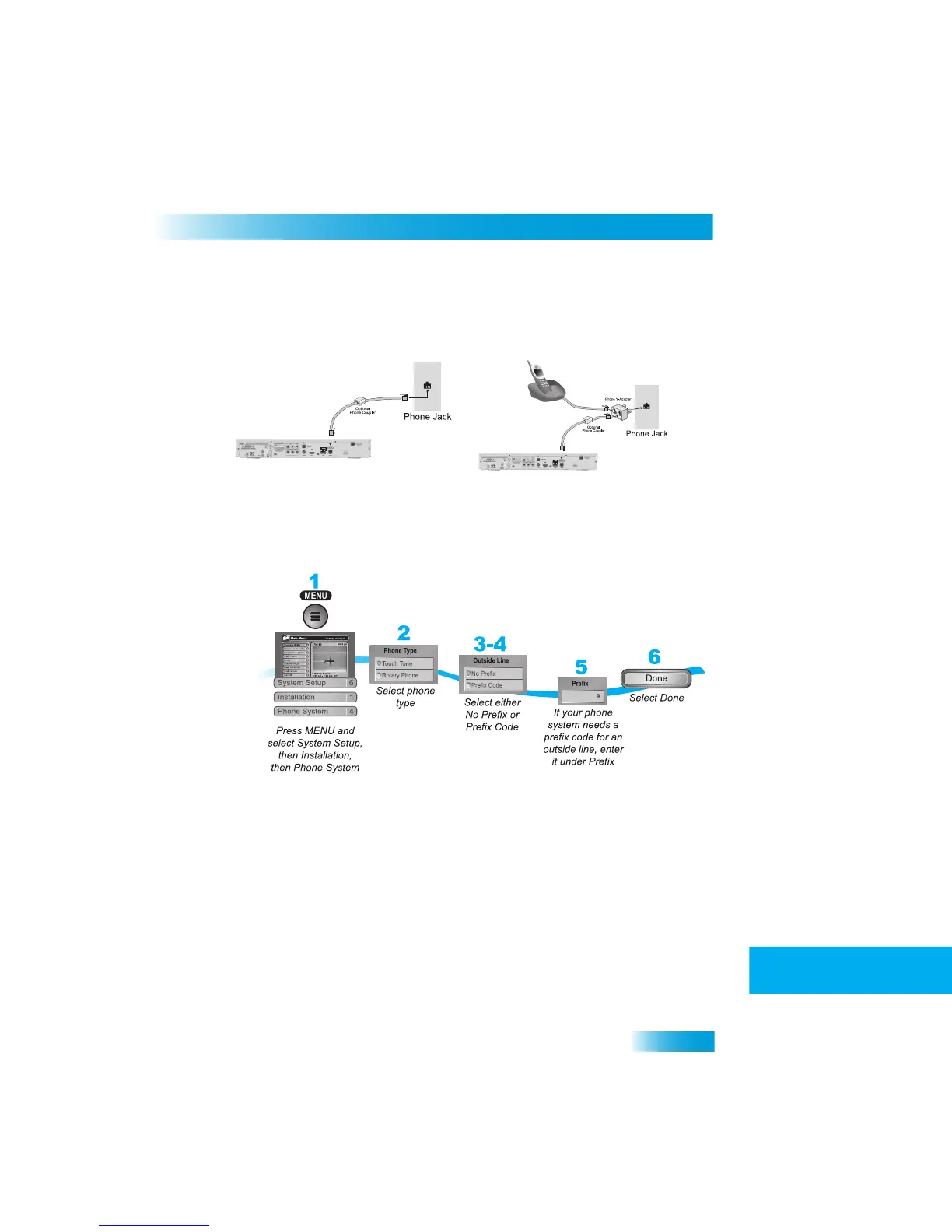
Phone Line Connection
Run a telephone cable with a standard RJ-11 connector from the re
ceiver’s back panel
Phone Jack to an active telephone connection.
Phone System Setup
You must also set up the receiver for your telephone system (touch ton
e or rotary), and set
a telephone number prefix, if you need a prefix to make an outside call.
1
Pressing MENU, then select System Setup (6), Installation (1), and then
Phone System (4).
2
Select the Touch Tone or the Rotary Phone option in the Phone Ty
pe list.
3
Select either the No Prefix or the Prefix
Code option in the Outside Line Prefix list.
Note
: Usually, you need a telephone number prefix only for business installa
tions. For
most residential installations,
all you need to do is set the telephone system type. The
default setting of No Pref
ix will allow correct dialing.
4
If you selected No Prefix, select Done.
5
If you selected Prefix Code, the receiver high
lights the box where you must enter the exact
sequence you dial the phone to obtain an outside line.
6
Select Done.



 To Next Page