Chapter 11
72
Connecting to a TV
Setting Up to Display in HD
Once the receiver has been
activated with qualifying DI
SH Network programming, you will
be able to receive HD programs to watch. Us
e the following steps to select the desired
HDTV format.
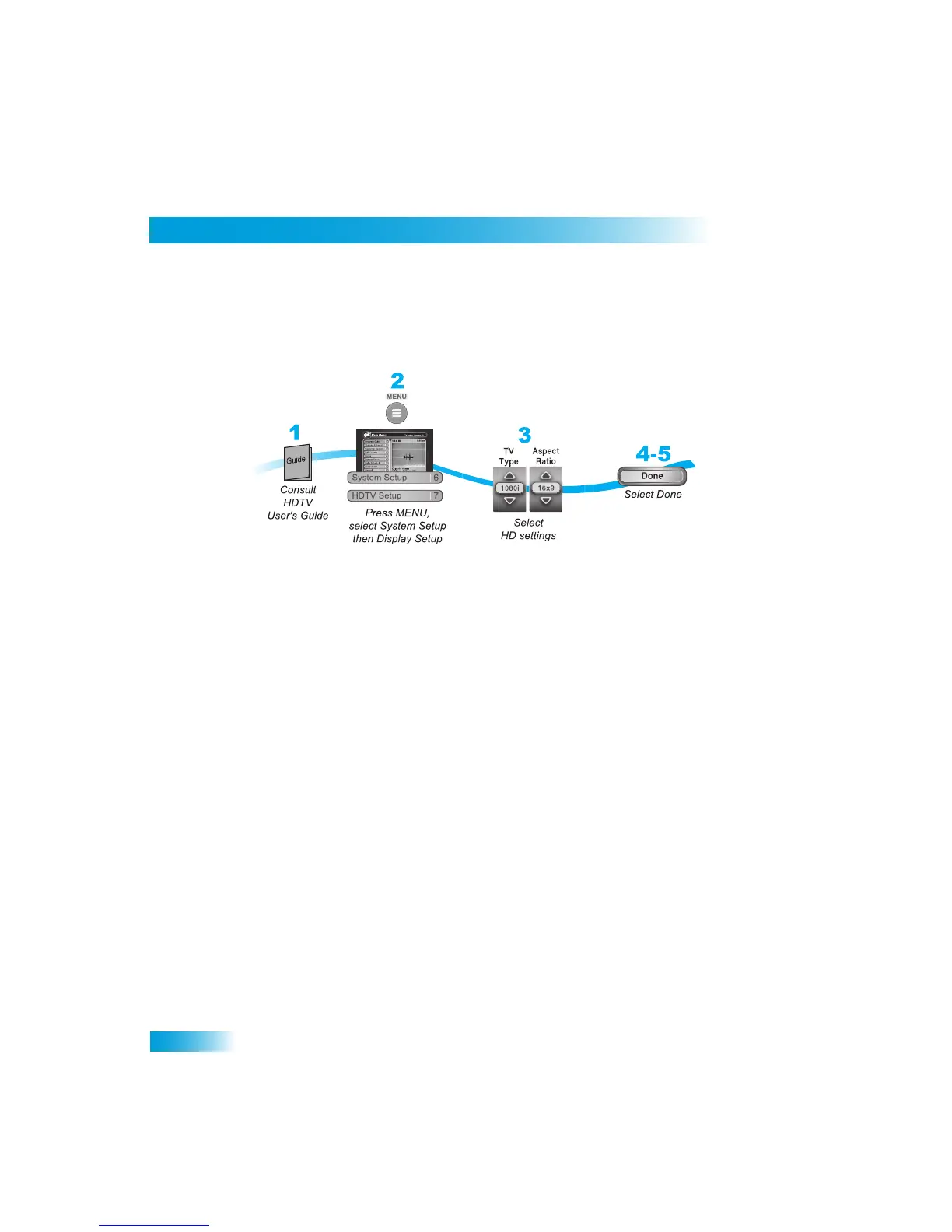
1
Consult your HDTV user’s guide for the HD format resolution that th
e TV supports (1080i
or 720p).
2
Press MENU, select System Setup (6), and
then HDTV Setup (7) to open the receiver
HDTV Setup screen.
3
While in this menu, select the Aspect
Ratio option that matches your TV:
•
16x9 is the setting for wide screen HDTV display.
• 4x3 #1 is the setting to use on a 4x3 TV
which uses vertical compression. When fed
with a 16x9 program, a compatible TV au
tomatically makes the picture letterbox
format (black bars top and bottom), to preserve the correct hor
izontal and vertical
proportions.
• 4x3 #2 is the setting to use on a 4x3 TV
which does NOT have internal vertical
compression. When fed with
a 16x9 program, such a TV will not show black bars at
the top and bott
om, and the picture will appear tall and skinny.
4
Press Done.
5
If required, set up the HDTV to display
in the format you desire. Some HDTVs will
automatically adjust to the reso
lution setting of the receiver.



 To Next Page