Connections and Setup
79
Connecting Off-Air Antenna/Cable TV
1
2
3
4
5
6
7
8
9
10
11
R
1
2
3
4
5
6
7
8
9
10
R
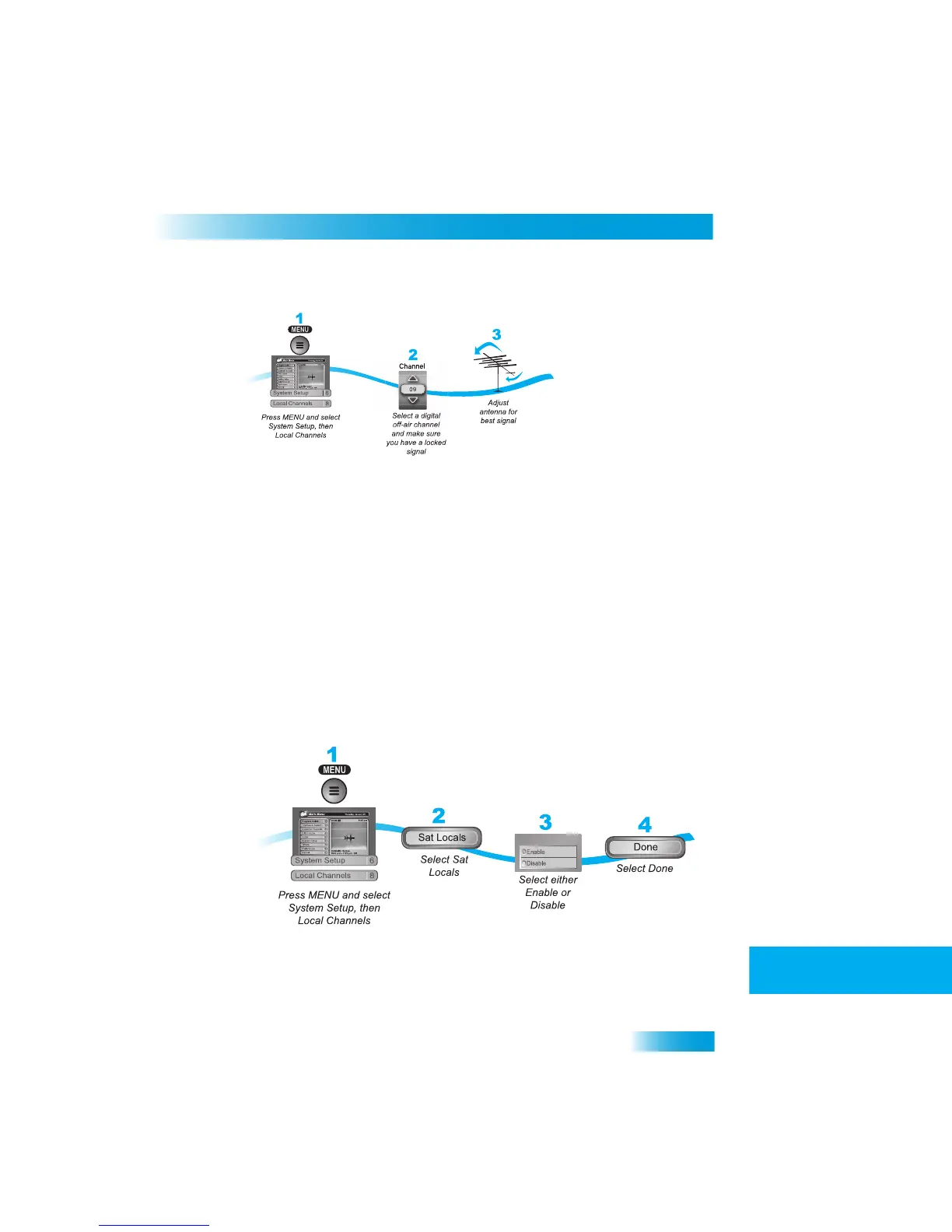
Peaking Your Off-Air Antenna
1
Press MENU, select System Setup (6), and t
hen Local Channels (8) to open the Local
Channels screen.
2
Select Add Locals. Highlight the Transmit
Number and use the UP
and DOWN ARROWS
to select a digital off-air channel. Make su
re you see a green signal strength bar and a
Locked indication on the meter.
3
Adjust the orientation of your antenna to ma
ximize the signal strength. If you cannot get a
Locked indication, you may need to upgrade your antenna or relocate
it to a better
position.
Using Local Satellite Channels
If you subscribe to the local satellite (Sat Locals) channels and want to
see the them in the
Program Guide by broadcast number, enable t
he Sat Locals feature. Otherwise, the local
satellite channels will display in
the four-digit channel range.
Note: Digital off-air channels display in the guide at the broadcast channel re
gardless of
the setting you choose here.



 To Next Page